Office Supplies Request Template

Free Excel download β€’ Edit online β€’ Save & share with Drive β€’ Export to PDF

1 pageβ€’15–20 min to fillβ€’Difficulty: Standard
Learn more ↓
FreeXLSOffice Supplies Request Template

At a glance

What it is
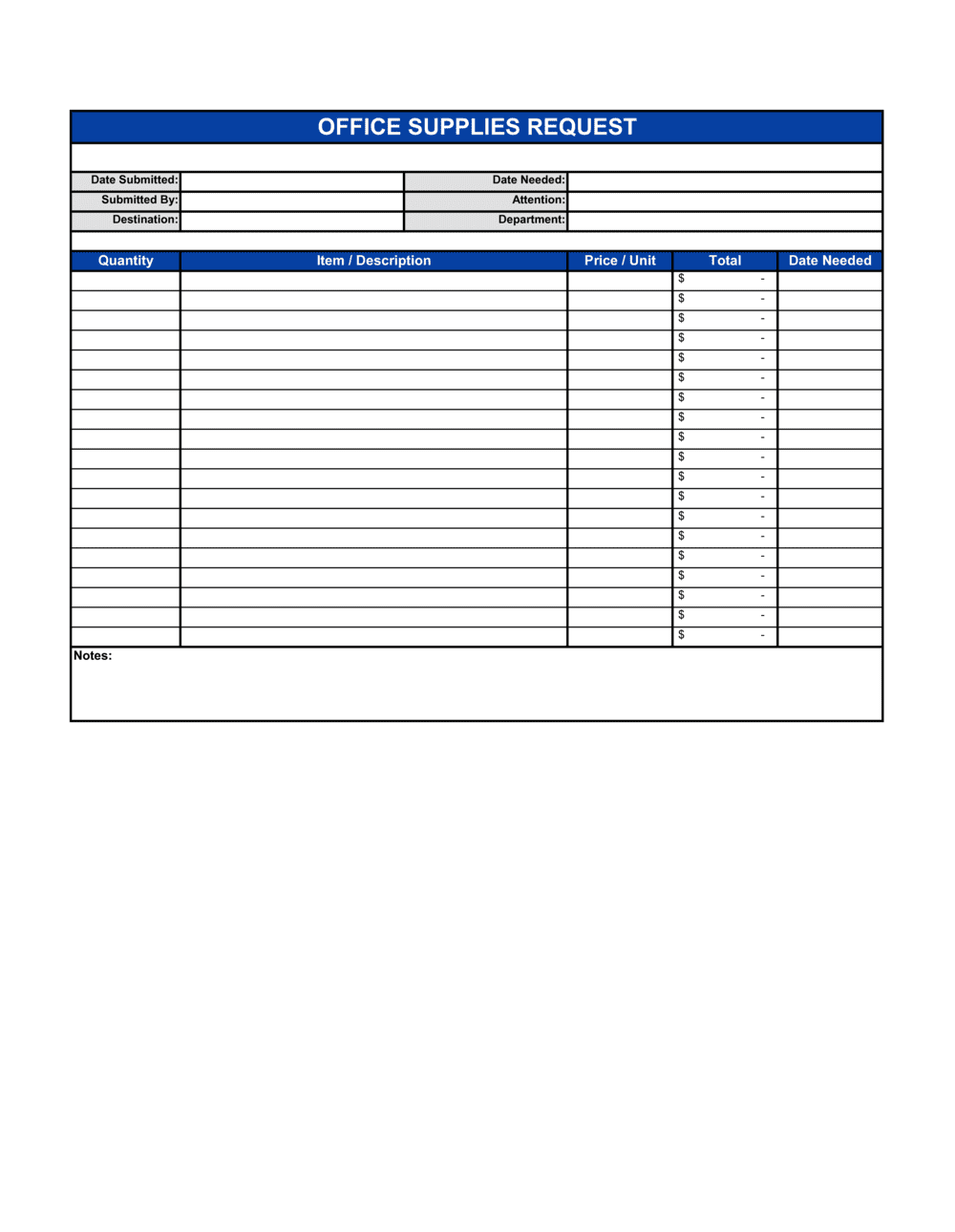
An Office Supplies Request is an internal form employees complete when they need to order or replenish office supplies. This free Word download captures the requestor's details, item descriptions, quantities, cost center, and approver sign-off in a single structured document you can edit online and export as PDF.
When you need it
Use it whenever an employee or department needs to procure office materials β€” from stationery and printer cartridges to breakroom supplies β€” and the purchase requires managerial approval or budget-code allocation before ordering.
What's inside
Requestor information, department and cost center, date of request, an itemized supply list with quantities and estimated unit costs, a business justification field, and an approver signature block with decision date.

What is an Office Supplies Request?

An Office Supplies Request is an internal form that employees submit when they need to procure office materials β€” from pens and printer paper to toner cartridges and breakroom supplies β€” before any purchase is made. It records who is asking, exactly what items are needed, in what quantities and at what estimated cost, which department budget the expense should be charged to, and who has authorized the purchase. By routing every supply need through a structured form, organizations create an auditable record of spending and ensure no purchase bypasses budget controls.

Why You Need This Document

Without a standard request form, supply purchases happen informally β€” employees order directly, expense receipts pile up with missing cost codes, and finance teams spend hours reconstructing who bought what and why. The result is budget overruns that are only discovered at month-end, duplicate orders across departments, and no data to support smarter procurement decisions. A completed, approved office supplies request ties every purchase to a named budget holder, a cost center, and a business reason before a single dollar is spent. This template gives you a ready-to-use form in minutes β€” covering every field your approvers and finance team need β€” so routine supply management stays organized without adding administrative burden.

Which variant fits your situation?

If your situation is…Use this template
Requesting a single high-value item such as a monitor or chairPurchase Request Form
Ordering goods from an external vendor with formal procurement termsPurchase Order
Tracking and reordering inventory at reorder-point thresholdsInventory Reorder Form
Submitting an expense for supplies already purchased out of pocketExpense Report
Requisitioning IT equipment such as laptops or peripheralsIT Equipment Request Form
Managing recurring monthly supply orders for a whole officeOffice Supply Inventory Template

Common mistakes to avoid

❌ Ordering before approval is received

Why it matters: Purchasing without an authorized sign-off bypasses budget controls and can result in the expense being denied for reimbursement or charged to the wrong cost center.

Fix: Wait for the approver's signed decision before contacting any vendor. If timing is critical, escalate verbally and note the verbal approval on the form pending written confirmation.
❌ Bundling unrelated items into a single request

Why it matters: Mixing items from different cost centers or projects on one form prevents accurate budget allocation and forces the finance team to split or re-code the purchase manually.

Fix: Submit a separate form for each cost center or project. Group only items that share the same budget code and business purpose.

❌ Using vague item descriptions

Why it matters: Descriptions like 'printer supplies' or 'stationery' leave the purchaser guessing, often resulting in the wrong product being ordered and a repeat request cycle.

Fix: Include the brand, model, color, size, or SKU for every item that has a meaningful specification. One precise line saves at least one back-and-forth email.

❌ Skipping the required-by date

Why it matters: Without a deadline, urgent requests sit in the same queue as routine ones, and items needed for a specific event or project deadline arrive too late.

Fix: Always complete the required-by field. If the need is ongoing, enter the date by which initial stock should arrive and note a reorder schedule in the justification.

The 8 key fields, explained

Requestor information

Date of request and date required

Cost center or budget code

Itemized supply list

Preferred vendor or product reference

Business justification

Estimated total cost

Approver sign-off block

How to fill it out

  1. 1

    Complete your requestor details

    Enter your full name, job title, department, and email address at the top of the form. Confirm your cost center code with your manager or finance team before proceeding.

    πŸ’‘ Save a partially pre-filled version with your own details so you only need to update the item list for each new request.

  2. 2

    Set the request date and required-by date

    Enter today's date as the request date. Calculate the required-by date by working backward from when you need the items, accounting for typical delivery lead times of 2–5 business days for standard orders.

    πŸ’‘ Flag requests with a required-by date fewer than 3 business days out as urgent in the justification field so the approver can prioritize.

  3. 3

    List each item on its own row

    Enter one item per row in the supply list table. Include a specific description, quantity, unit cost, and line total. Reference the catalog number or SKU where available.

    πŸ’‘ Check your organization's preferred vendor list before entering prices β€” contracted rates are often 10–20% lower than retail.

  4. 4

    Write a specific business justification

    In one to three sentences, explain what the supplies will be used for and why they are needed now. Reference a project, event, or depleted stock level where relevant.

    πŸ’‘ Justifications that reference a specific project or deadline are approved faster than generic descriptions of routine need.

  5. 5

    Total the estimated cost

    Sum all line totals and enter the grand total in the estimated total field. Verify the figure matches your departmental budget availability.

    πŸ’‘ If the total exceeds your department's discretionary spend threshold, note the budget code for a capital or project expenditure line instead.

  6. 6

    Submit to your approver before ordering

    Route the completed form to your designated approver β€” typically your direct manager or the office manager β€” and wait for a signed decision before placing any order.

    πŸ’‘ Follow up by email the same day if the required-by date is within the week; a brief reminder cuts average approval time significantly.

Frequently asked questions

What is an office supplies request form?

An office supplies request form is an internal document an employee completes to formally ask for office materials before a purchase is made. It captures who is asking, what items are needed, in what quantities, which budget the cost should be charged to, and who has authorized the purchase. It creates an auditable record of every supply expense.

Why do companies use a supplies request form instead of just buying items directly?

A formal request form ensures purchases are authorized before money is spent, routes costs to the correct budget code, prevents duplicate orders across departments, and creates a paper trail for audits. Without it, ad-hoc purchasing leads to budget overruns, unreconciled expenses, and no visibility into total supply spend across the organization.

Who should approve an office supplies request?

Typically the requestor's direct manager or the office manager, depending on company structure. For requests above a set dollar threshold β€” commonly $100–$500 β€” a second approval from a finance manager or department head is standard. Define these thresholds in your internal procurement policy and note the correct approver in the form template.

What is the difference between a supply request form and a purchase order?

A supply request form is an internal document that triggers authorization to buy. A purchase order is an external document issued to a vendor that creates a formal commitment to pay. The supply request precedes the purchase order β€” once the request is approved, a purchase order is issued to the supplier to complete the transaction.

How should I handle urgent supply requests?

Flag the required-by date clearly and note the urgency in the justification field. Alert your approver by email or in person immediately after submitting the form rather than waiting for them to find it in their queue. For same-day emergencies, obtain verbal approval first and complete the form retroactively within 24 hours.

Can this form be used for remote or home-office supply requests?

Yes. Add a delivery address field to capture the employee's home address when the company ships supplies directly. Note any policy limits on what categories of home-office supplies the company covers so the approver can apply them consistently across a distributed team.

How do I track supply requests over time?

Maintain a log of all submitted forms β€” a shared spreadsheet listing request date, requestor, items, total cost, cost center, and approval status works well for small teams. Larger organizations route completed forms to a procurement or office-management inbox and record each request in an ERP or facilities management system for budget-versus-actual reporting.

Should completed request forms be retained after the order is fulfilled?

Yes. Retain approved forms together with the corresponding purchase order and delivery confirmation for at least the duration of your standard record-retention period β€” typically three to seven years depending on jurisdiction. These records support expense audits, budget reviews, and disputes with vendors about quantities ordered versus delivered.

How this compares to alternatives

vs Purchase Request Form

A purchase request form is used for higher-value or one-time asset acquisitions β€” equipment, software licenses, or furniture β€” that go through a formal procurement process. An office supplies request handles routine, low-cost consumables with a simpler approval path. Use the purchase request form when the item will appear on a fixed-asset register or requires vendor negotiation.

vs Purchase Order

A purchase order is an external commercial document sent to a vendor that creates a binding commitment to pay. An office supplies request is an internal authorization form that precedes the purchase order. The request must be approved internally before a purchase order is issued to a supplier.

vs Expense Report

An expense report is completed after money has already been spent β€” typically by an employee using personal funds β€” to request reimbursement. An office supplies request is completed before any purchase to obtain authorization. Using an expense report for routine supplies signals a breakdown in the pre-approval process.

vs Inventory Reorder Form

An inventory reorder form is triggered by a stock level reaching a predefined reorder point and is often managed by a dedicated inventory controller. An office supplies request is initiated by any employee who identifies a need, regardless of stock levels. The reorder form suits high-volume, systematically tracked consumables; the request form suits ad-hoc or department-specific needs.

Industry-specific considerations

Professional Services

Client-matter billing codes are added to the cost center field so supply costs can be passed through to specific engagements or written off as overhead.

Education

Classroom supply requests are tied to per-pupil budget allocations, and requests often require principal or department chair approval before submission to a central purchasing office.

Healthcare

Administrative supply requests are kept separate from clinical or medical supply requisitions, each routed through different approval chains to satisfy regulatory and compliance requirements.

Manufacturing

Office supply requests are tracked against non-production overhead budgets to prevent misclassification with raw material or MRO (maintenance, repair, and operations) purchases.

Template vs pro β€” what fits your needs?

PathBest forCostTime
Use the templateAny team or business that needs a consistent, audit-ready way to manage supply requestsFree5 minutes to complete per request
Template + professional reviewOrganizations adding procurement-policy thresholds, multi-level approval workflows, or cost-center validation rules$0–$100 (office manager or finance team configuration)1–2 hours
Custom draftedEnterprises integrating supply requests into an ERP, procurement platform, or automated approval system$500–$5,000+ (IT or system configuration)1–4 weeks

Glossary

Cost Center
An internal accounting code identifying the department or budget line that will bear the expense of the requested supplies.
Requisition
A formal internal request to procure goods or services, submitted before a purchase is made to obtain authorization.
Approver
The manager or budget holder authorized to approve or reject a supply request before an order is placed.
Unit Cost
The price of a single item, used to calculate the total estimated cost of a line item on the request form.
Lead Time
The number of days between placing a supply order and receiving the items β€” used to time requests before stock runs out.
Reorder Point
The inventory level at which a new supply order should be triggered to avoid running out before the next delivery arrives.
Budget Variance
The difference between the amount budgeted for supplies and the amount actually spent, tracked per cost center per period.
Justification
A brief written explanation on the request form of why the supplies are needed, used by the approver to assess necessity.
Preferred Vendor
A pre-approved supplier the organization has negotiated pricing or terms with, often referenced on a supply request to guide purchasing.

Part of your Business Operating System

This document is one of 3,000+ business & legal templates included in Business in a Box.

  • Fill-in-the-blanks β€” ready in minutes
  • 100% customizable Word document
  • Compatible with all office suites
  • Export to PDF and share electronically

Create your document in 3 simple steps.

From template to signed document β€” all inside one Business Operating System.
1
Download or open template

Access over 3,000+ business and legal templates for any business task, project or initiative.

2
Edit and fill in the blanks with AI

Customize your ready-made business document template and save it in the cloud.

3
Save, Share, Send, Sign

Share your files and folders with your team. Create a space of seamless collaboration.

Save time, save money, and create top-quality documents.

β˜…β˜…β˜…β˜…β˜…

"Fantastic value! I'm not sure how I'd do without it. It's worth its weight in gold and paid back for itself many times."

Managing Director Β· Mall Farm
Robert Whalley
Managing Director, Mall Farm Proprietary Limited
β˜…β˜…β˜…β˜…β˜…

"I have been using Business in a Box for years. It has been the most useful source of templates I have encountered. I recommend it to anyone."

Business Owner Β· 4+ years
Dr Michael John Freestone
Business Owner
β˜…β˜…β˜…β˜…β˜…

"It has been a life saver so many times I have lost count. Business in a Box has saved me so much time and as you know, time is money."

Owner Β· Upstate Web
David G. Moore Jr.
Owner, Upstate Web

Run your business with a system β€” not scattered tools

Stop downloading documents. Start operating with clarity. Business in a Box gives you the Business Operating System used by over 250,000 companies worldwide to structure, run, and grow their business.

Start freeΒ Β·Β No credit card required