How To Improve Your Website Seo

Free to read β€’ Save or share with one click

FreeHow To Improve Your Website Seo Template

At a glance

What it is
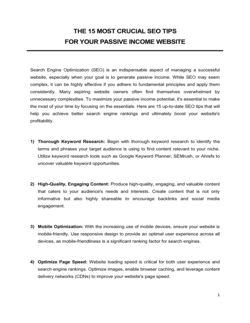
A How To Improve Your Website SEO plan is a structured operational document that guides a business through the key steps needed to increase organic search visibility β€” covering keyword research, on-page optimization, technical health, content strategy, and link building. This free Word download gives you a ready-to-edit framework you can tailor to your site and export as PDF to share with your team, agency, or stakeholders.
When you need it
Use it when organic traffic has plateaued or declined, when launching a new website or major content initiative, or when you need to give a marketing team or contractor a clear, repeatable process for improving search rankings.
What's inside
A site audit checklist, keyword research framework, on-page and technical optimization guidelines, content strategy section, internal and external link-building tactics, and a progress-tracking scorecard with KPIs.

What is a How To Improve Your Website SEO Plan?

A How To Improve Your Website SEO plan is a structured operational document that walks a business through every layer of organic search optimization β€” from a technical site audit and keyword research through on-page content improvements, internal linking, and backlink acquisition β€” all tied to measurable KPIs and a tracking scorecard. Rather than a generic checklist, it provides a sequenced, prioritized framework that reflects how search engine ranking signals actually interact: technical health first, on-page signals second, authority signals third. This free Word download gives you a ready-to-edit starting point you can customize to your site's current state and export as PDF for agency handoffs, stakeholder reviews, or internal team briefings.

Why You Need This Document

Without a written SEO improvement plan, optimization efforts become reactive and uncoordinated β€” one team member fixes meta descriptions while another publishes content targeting the same keywords as existing pages, and no one tracks whether rankings or revenue are actually improving. The cost of operating without a plan is concrete: keyword cannibalization quietly suppresses your best pages, technical crawl errors prevent new content from being indexed, and months of content investment produce no ranking movement because domain authority was never systematically built. A structured SEO plan eliminates these failure modes by establishing a baseline, setting prioritized actions in sequence, and defining the metrics that tell you whether the work is producing results. This template gives you that structure in under an hour, so your team spends its time executing rather than debating where to start.

Which variant fits your situation?

If your situation is…Use this template
Conducting a one-time full site audit before a redesignSEO Audit Report
Planning content production aligned to keyword clustersContent Marketing Plan
Tracking monthly SEO KPIs for a client or stakeholder reportSEO Monthly Report
Planning a link-building outreach campaignDigital Marketing Plan
Improving local search visibility for a brick-and-mortar businessLocal SEO Checklist
Optimizing a newly launched website from scratchWebsite Launch Plan
Aligning SEO strategy with a broader marketing planMarketing Plan

Common mistakes to avoid

❌ Skipping the technical audit entirely

Why it matters: On-page and content improvements deliver minimal ranking impact if Googlebot cannot crawl and index your pages correctly. Crawl errors, noindex tags left on accidentally, and slow page speed can negate months of content work.

Fix: Run a full crawl with Screaming Frog or a similar tool before touching any content. Fix all Priority 1 technical issues β€” 404s, redirect chains, accidental noindex β€” before any other optimization work begins.

❌ Targeting high-difficulty keywords before building domain authority

Why it matters: Competing for keywords with a difficulty score of 70+ when your domain authority is below 25 means your content will not appear on page one regardless of quality β€” the effort produces no return for 6–12 months.

Fix: Filter your keyword targets to difficulty scores below 40 for the first 6 months. Build topical authority through a cluster of easier-to-rank supporting articles before pursuing head terms.

❌ Publishing new content without checking for keyword cannibalization

Why it matters: Two pages targeting the same keyword split the ranking signals between them. Google ranks whichever it considers more authoritative, often neither, pushing both below where a single consolidated page would rank.

Fix: Search your target keyword on your own site using site:[domain] [keyword] before publishing. If an existing page already targets it, update that page rather than creating a new one.

❌ Reporting on rankings only and ignoring conversion metrics

Why it matters: A jump from position 8 to position 3 increases traffic but delivers no revenue if the landing page has a poor headline, no clear CTA, or slow load time. Optimizing for rankings without tracking conversions misses half the value.

Fix: Add organic conversion rate and organic-attributed revenue (or leads) to your KPI scorecard from day one. Filter Google Analytics by organic channel and set up goal tracking before the first monthly report.

The 8 key sections, explained

Site Audit and Baseline Assessment

Keyword Research and Targeting

On-Page Optimization Guidelines

Technical SEO Checklist

Content Strategy and Editorial Calendar

Internal Linking Architecture

Link Building and Authority Development

Performance Tracking and KPI Scorecard

How to fill it out

  1. 1

    Run a full site audit to establish your baseline

    Use Google Search Console and a crawler such as Screaming Frog or Ahrefs to document current indexed pages, crawl errors, average position, and Core Web Vitals scores before making any changes.

    πŸ’‘ Export your GSC performance data for the trailing 90 days and sort by impressions descending β€” your highest-impression, low-CTR pages are your fastest wins.

  2. 2

    Conduct keyword research and map terms to pages

    Identify 10–30 primary keywords aligned to your products or services. For each, record monthly search volume, keyword difficulty, and search intent. Assign one primary keyword per existing or planned page.

    πŸ’‘ Filter your keyword list to difficulty scores below 40 first if your domain authority is under 30 β€” competing for harder terms before building authority wastes months.

  3. 3

    Prioritize and fix technical issues

    Sort technical issues from your audit into three tiers: blocking crawl/indexation (fix within 7 days), harming page experience (fix within 30 days), and lower-priority cleanup (fix within 90 days).

    πŸ’‘ Submit an updated sitemap to Google Search Console immediately after fixing crawl errors to trigger faster re-indexation.

  4. 4

    Optimize on-page elements for each target keyword

    Update title tags, meta descriptions, H1s, and body copy for your top 10 priority pages. Ensure each page has one clear primary keyword in the title tag and H1, with semantic variants used naturally throughout the body.

    πŸ’‘ Check the top five ranking pages for your target keyword before writing β€” match their content format (list, how-to, comparison) to align with proven search intent.

  5. 5

    Build your content calendar around keyword clusters

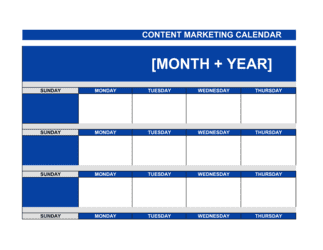
    Group related keywords into topic clusters. Plan one pillar page per cluster and two to four supporting articles that link back to it. Assign target publish dates and owners for each piece.

    πŸ’‘ Audit existing content before commissioning new articles β€” updating and consolidating thin existing pages almost always outperforms publishing brand-new content on a similar topic.

  6. 6

    Implement and document your internal linking plan

    Add internal links from high-authority pages to priority target pages using descriptive anchor text. Document each new link added so you can track which pages have been updated and which are still missing links.

    πŸ’‘ Sort your site's pages by organic traffic and prioritize adding internal links from your top 20 highest-traffic pages β€” those pass the most authority.

  7. 7

    Launch your link-building outreach

    Identify three to five repeatable link-building tactics appropriate for your industry and domain authority level. Set a monthly target for new referring domains and assign ownership to a team member or agency contact.

    πŸ’‘ Create a shareable data asset or original study relevant to your industry β€” original statistics are cited far more frequently than generic how-to content.

  8. 8

    Set up your KPI scorecard and reporting cadence

    Configure a weekly automated dashboard (Google Looker Studio is free) pulling organic sessions, average position, and CTR from Google Search Console. Schedule a monthly stakeholder report comparing actuals to your targets.

    πŸ’‘ Set a 90-day checkpoint to review whether your keyword targets are realistic β€” if a priority keyword has not moved within 90 days, investigate whether the page has indexation issues or a backlink deficit.

Frequently asked questions

How long does it take to see results from SEO improvements?

Most sites see measurable ranking improvements within 3–6 months of implementing on-page and technical fixes, assuming the site is properly indexed and the target keywords are realistic for the domain's authority level. Technical fixes β€” resolving crawl errors, improving page speed β€” can produce ranking changes within 4–8 weeks. Content targeting new keywords typically takes 3–6 months to rank on page one for competitive terms and 1–3 months for low-difficulty long-tail targets.

What is the most important SEO improvement a small business can make?

For most small business sites, fixing technical crawl and indexation issues delivers the highest return in the shortest time. After that, optimizing the title tags and meta descriptions of the top 10 highest-impression pages in Google Search Console β€” improving click-through rate without changing rankings β€” is the single highest-leverage content task. Most small business sites have significant on-page issues that are faster to fix than creating new content.

What is keyword cannibalization and how do I fix it?

Keyword cannibalization occurs when two or more pages on the same site target the same keyword, splitting ranking signals and causing both pages to rank lower than a single consolidated page would. Fix it by identifying competing pages using a site:[domain] search, then either consolidating the weaker page into the stronger one with a 301 redirect, or differentiating the two pages so they target clearly distinct search intents.

Do I need to hire an SEO agency or can I do it myself?

Small businesses with straightforward sites in low-competition niches can implement a solid SEO improvement plan using a structured template and free tools like Google Search Console, Google Analytics, and Screaming Frog. Hire an agency or specialist when you are in a highly competitive industry, when the site has significant technical complexity, or when you need content production at scale. For most businesses, starting with a self-implemented plan and adding professional support for link building is the most cost-effective approach.

What are Core Web Vitals and why do they matter for SEO?

Core Web Vitals are three page-experience metrics Google uses as ranking signals: Largest Contentful Paint (loading speed), Interaction to Next Paint (responsiveness), and Cumulative Layout Shift (visual stability). Pages that fail these thresholds receive a ranking penalty relative to competitors with similar content quality. Check your scores in Google Search Console under the Experience section and prioritize fixes for pages with the highest organic traffic.

How many keywords should a single page target?

Each page should have one clearly defined primary keyword and three to five semantically related secondary keywords. Attempting to rank a single page for ten unrelated keywords results in unfocused content that ranks well for nothing. Build additional pages or supporting articles for additional keyword clusters rather than expanding the scope of a single page beyond its core topic.

How do I know if my SEO improvements are working?

Track four metrics monthly: organic sessions (Google Analytics), average position and click-through rate (Google Search Console), referring domain count (Ahrefs or Semrush free tier), and organic conversion rate. Compare these against your baselines from the initial audit. If average position is improving but CTR is flat, your title tags need work. If rankings and CTR are improving but conversions are flat, the landing page experience is the constraint.

What is the difference between on-page SEO and technical SEO?

On-page SEO refers to optimizations within the visible content and HTML of a page β€” title tags, headings, body copy, image alt text, and internal links. Technical SEO refers to the infrastructure layer β€” crawlability, site speed, mobile usability, HTTPS, canonical tags, and structured data. Both are required for strong rankings; fixing technical issues first ensures that your on-page improvements are actually discoverable by search engines.

How this compares to alternatives

vs Content Marketing Plan

A content marketing plan focuses on what content to create, for which audience, and through which channels β€” it may or may not be built around search intent. An SEO improvement plan is specifically structured around keyword research and search engine ranking signals. The two are complementary: the content plan governs editorial direction, while the SEO plan ensures that content is optimized to rank.

vs Digital Marketing Plan

A digital marketing plan covers the full mix of online channels β€” paid search, social media, email, SEO, and display. An SEO improvement plan goes deeper on organic search specifically, covering technical audits, keyword mapping, and link building in detail that a broader marketing plan does not. Use the digital marketing plan for channel prioritization and budget allocation, then use the SEO plan to execute the organic channel.

vs Marketing Plan

A marketing plan operates at a strategic level β€” target market, positioning, messaging, and budget across all marketing activities. An SEO improvement plan is a tactical execution document focused on a single acquisition channel. Most businesses need both: the marketing plan sets the strategy, and the SEO plan is one of several channel-specific execution documents that flows from it.

vs Website Launch Plan

A website launch plan covers the full project of building and launching a new site β€” design, development, content migration, and go-live checklist. An SEO improvement plan assumes the site already exists and focuses on ongoing optimization to increase organic visibility. For a new site, complete the launch plan first, then implement the SEO improvement plan in the weeks following launch.

Industry-specific considerations

E-commerce and Retail

Product and category page optimization, faceted navigation crawl budget management, and schema markup for product rich results including ratings and pricing.

Professional Services

Location-specific landing pages for service areas, expertise-based content clusters targeting informational queries, and Google Business Profile optimization for local pack rankings.

SaaS / Technology

Bottom-of-funnel comparison and alternative pages, documentation SEO for developer audiences, and programmatic landing pages for use-case and integration keyword clusters.

Healthcare and Medical

YMYL content quality standards requiring author credentials and medical review disclosures, patient-intent keyword mapping, and Google's E-E-A-T signals applied to clinical content.

Hospitality and Food Service

Local SEO and Google Business Profile management, menu schema markup, and review acquisition strategies that feed both rankings and conversion.

Media and Publishing

Topical authority building through content cluster depth, news sitemap configuration, Google Discover optimization, and crawl budget management for high-volume article archives.

Template vs pro β€” what fits your needs?

PathBest forCostTime
Use the templateSmall businesses, solopreneurs, and in-house marketers managing SEO without an agencyFree4–8 hours to complete the plan; ongoing 2–4 hours per week to execute
Template + professional reviewBusinesses in competitive industries or those needing a professional audit of their existing SEO approach$500–$2,000 for a freelance SEO consultant review or one-time audit1–2 weeks
Custom draftedEnterprise sites, highly competitive niches, or companies needing full-service SEO agency management$1,500–$10,000+ per month for agency retainerOngoing

Glossary

Organic Traffic
Visitors who arrive at a website through unpaid search engine results rather than paid ads or direct navigation.
Keyword Research
The process of identifying the specific words and phrases your target audience types into search engines when looking for your products or services.
Search Intent
The underlying goal a user has when entering a search query β€” informational, navigational, commercial, or transactional.
On-Page SEO
Optimization applied directly to the content and HTML of a webpage β€” title tags, meta descriptions, headings, body copy, and internal links.
Technical SEO
Improvements to a site's infrastructure β€” crawlability, page speed, mobile-friendliness, structured data, and HTTPS β€” that help search engines index it correctly.
Domain Authority
A third-party metric (Moz, Ahrefs, Semrush) estimating how likely a domain is to rank in search results, based primarily on the quality and quantity of inbound links.
Core Web Vitals
Google's set of three page-experience metrics β€” Largest Contentful Paint, Interaction to Next Paint, and Cumulative Layout Shift β€” used as ranking signals.
Backlink
A hyperlink from an external website pointing to your site, treated by search engines as a vote of authority and relevance.
Crawl Budget
The number of pages Googlebot will crawl on your site within a given timeframe β€” critical for large sites with thousands of URLs.
Schema Markup
Structured data code added to a webpage's HTML that helps search engines understand and display content in rich results such as FAQ snippets or product ratings.

Part of your Business Operating System

This document is one of 3,000+ business & legal templates included in Business in a Box.

  • Fill-in-the-blanks β€” ready in minutes
  • Compatible with all office suites
  • Export to PDF and share electronically

Create your document in 3 simple steps.

From template to signed document β€” all inside one Business Operating System.
1
Download or open template

Access over 3,000+ business and legal templates for any business task, project or initiative.

2
Edit and fill in the blanks with AI

Customize your ready-made business document template and save it in the cloud.

3
Save, Share, Send, Sign

Share your files and folders with your team. Create a space of seamless collaboration.

Save time, save money, and create top-quality documents.

β˜…β˜…β˜…β˜…β˜…

"Fantastic value! I'm not sure how I'd do without it. It's worth its weight in gold and paid back for itself many times."

Managing Director Β· Mall Farm
Robert Whalley
Managing Director, Mall Farm Proprietary Limited
β˜…β˜…β˜…β˜…β˜…

"I have been using Business in a Box for years. It has been the most useful source of templates I have encountered. I recommend it to anyone."

Business Owner Β· 4+ years
Dr Michael John Freestone
Business Owner
β˜…β˜…β˜…β˜…β˜…

"It has been a life saver so many times I have lost count. Business in a Box has saved me so much time and as you know, time is money."

Owner Β· Upstate Web
David G. Moore Jr.
Owner, Upstate Web

Run your business with a system β€” not scattered tools

Stop downloading documents. Start operating with clarity. Business in a Box gives you the Business Operating System used by over 250,000 companies worldwide to structure, run, and grow their business.

Start freeΒ Β·Β No credit card required