Checklist Site Selection

Free download β€’ Use as a template β€’ Print or share

3 pagesβ€’20–25 min to useβ€’Difficulty: Standard
Learn more ↓
FreeChecklist Site Selection Template

At a glance

What it is
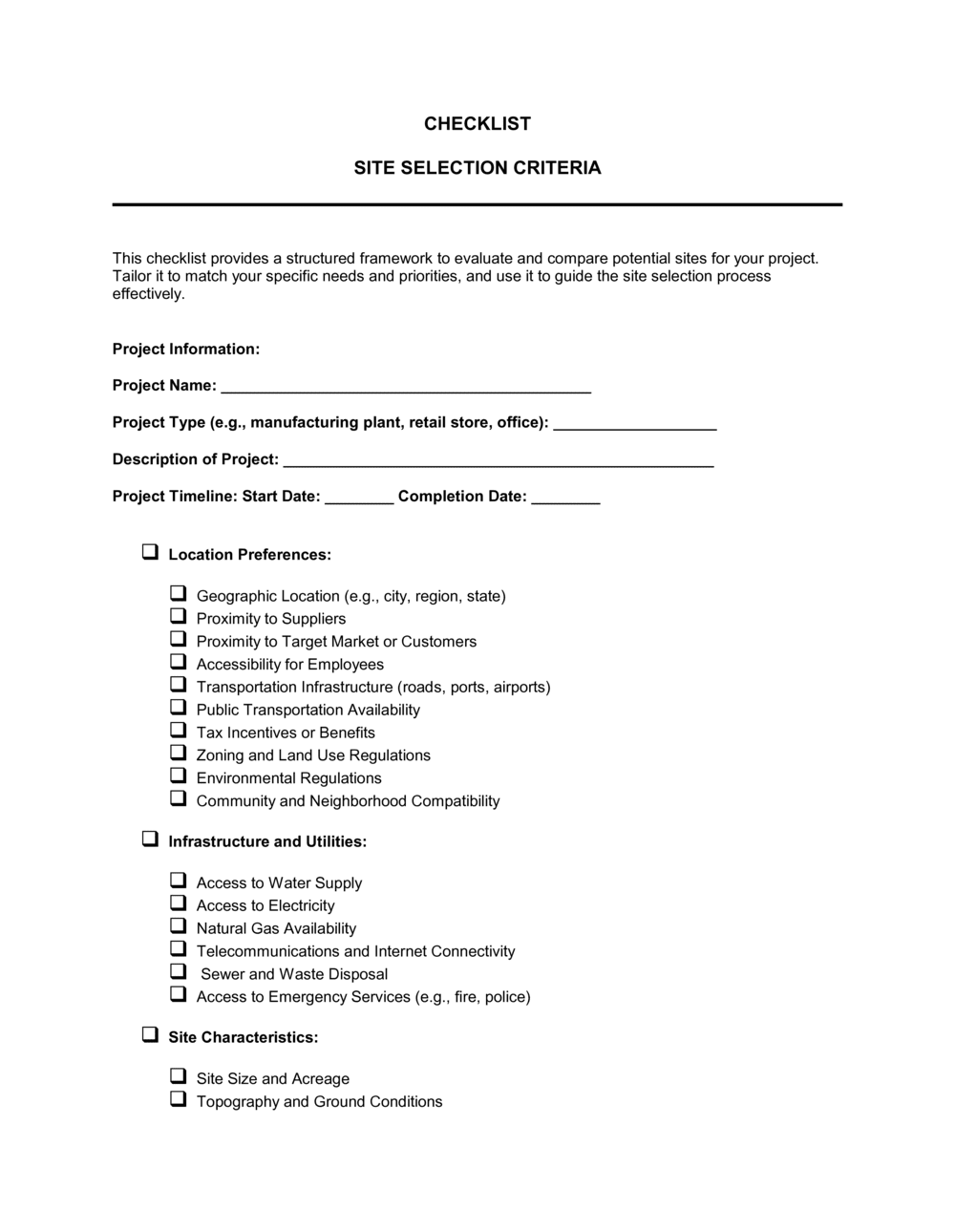
A Checklist Site Selection is a structured evaluation form used to assess and compare candidate locations for a business operation β€” whether a retail store, office, warehouse, restaurant, or franchise unit. This free Word download gives you a consistent scoring framework you can complete for each shortlisted site and share with stakeholders before committing to a lease or purchase.
When you need it
Use it whenever you are evaluating two or more physical locations for a new or relocated business operation and need a documented, side-by-side comparison to support a final decision.
What's inside
Demographic and trade-area data, zoning and permitted use confirmation, site access and visibility scoring, lease or purchase cost fields, competitor proximity, infrastructure and utilities assessment, and a summary scoring section for final comparison across candidate sites.

What is a Checklist Site Selection?

A Checklist Site Selection is a structured evaluation form used to assess and compare candidate locations for a business operation against a consistent set of criteria β€” zoning compliance, trade-area demographics, visibility, access, lease economics, infrastructure, and competitive proximity. Rather than relying on gut feel or a single site tour, it gives decision-makers a scored, side-by-side record of every location under consideration. The completed checklist becomes a documented rationale for the final choice, useful for internal approvals, franchisor sign-offs, investor reviews, or simply confirming that no critical factor was overlooked before signing a lease.

Why You Need This Document

Choosing the wrong location is one of the most expensive and difficult-to-reverse mistakes a business can make. A lease commitment of five to ten years locks you into a site's foot traffic, parking constraints, and total occupancy cost long after the initial enthusiasm fades. Without a structured evaluation, critical factors β€” an electrical service too small for your equipment, a zoning classification that prohibits your intended use, or NNN charges that push monthly costs 30% above the quoted base rent β€” are discovered after signing rather than before. This template ensures every candidate site is evaluated on the same criteria, in the same order, with the same scoring logic, so the decision is made on evidence rather than whichever landlord pitched most convincingly. For franchise applicants and multi-unit operators, a completed checklist also satisfies the documentation requirements most franchisors and lenders require before approving a new location.

Which variant fits your situation?

If your situation is…Use this template
Evaluating a retail storefront in a shopping centerRetail Site Selection Checklist
Assessing a warehouse or distribution facilityWarehouse Site Selection Checklist
Selecting a restaurant or food-service locationRestaurant Site Selection Checklist
Comparing office locations for a professional services firmOffice Location Checklist
Reviewing a site as part of a franchise territory approval processFranchise Site Approval Checklist
Documenting a completed site visit for internal recordsSite Visit Report
Formalizing the lease commitment after site approvalCommercial Lease Agreement

Common mistakes to avoid

❌ Evaluating all sites on the same visit day

Why it matters: Traffic patterns, parking availability, and foot traffic vary significantly by day and time. A single visit produces a snapshot, not an accurate picture of operating conditions.

Fix: Visit each site at least twice β€” once during peak hours for your business type and once at a slower period β€” and record conditions each time.

❌ Comparing base rent without calculating total occupancy cost

Why it matters: A $25/sq ft NNN site routinely costs $8–$12/sq ft more per year than the headline rent once taxes, insurance, and CAM are added, making it more expensive than a $32/sq ft gross lease.

Fix: Build a total monthly occupancy cost figure for every site that includes all fixed and variable costs before making any comparison.

❌ Skipping the infrastructure assessment

Why it matters: Discovering after signing that the site requires a $50,000 electrical upgrade or a grease-trap installation can eliminate the entire tenant improvement allowance and push the opening timeline back by months.

Fix: Complete the infrastructure field β€” including electrical capacity, HVAC condition, and any specialized requirements for your operation β€” before entering lease negotiations.

❌ Using a single unweighted checklist score to make the final decision

Why it matters: If zoning is unresolvable or parking is below your minimum, a high score in demographics or rent does not make a site viable. A flat score can mask a single deal-breaking deficiency.

Fix: Flag any field with a score below your non-negotiable threshold as an automatic disqualifier, regardless of the site's total weighted score.

The 9 key fields, explained

Site Identification

Zoning and Permitted Use

Demographic and Trade-Area Data

Visibility and Signage

Access and Parking

Lease or Purchase Economics

Infrastructure and Utilities

Competitive Proximity

Summary Score and Recommendation

How to fill it out

  1. 1

    Complete a separate checklist for each candidate site

    Print or duplicate the template once per location under consideration. Fill in the site identification block with the address, property type, landlord contact, and assessment date before visiting the site.

    πŸ’‘ Assign each site a code (Site A, Site B, Site C) at the top so you can reference them consistently in stakeholder discussions without revealing addresses prematurely.

  2. 2

    Verify zoning and permitted use before visiting

    Call or email the local planning or zoning department to confirm the current classification and that your intended business activity is permitted as of right. Note whether a variance or conditional use permit is required and the typical timeline.

    πŸ’‘ Zoning lookups on municipal GIS portals are a quick starting point, but always confirm verbally β€” online data can lag rezoning decisions by 6–12 months.

  3. 3

    Pull trade-area demographic data

    Use a source such as the US Census Bureau, Esri Business Analyst, or a free tool like SitesUSA to pull population, income, and daytime population data for the primary trade area radius relevant to your business type.

    πŸ’‘ For most retail businesses, a 1-mile, 3-mile, and 5-mile ring gives enough granularity. For destination businesses, extend to 10 miles.

  4. 4

    Conduct a drive-by and on-site inspection

    Visit the site at the time of day your business would peak β€” not just at a convenient time for the landlord's tour. Assess visibility at driving speed, count parking spaces, walk the ingress and egress routes, and photograph anything that needs follow-up.

    πŸ’‘ Visit on both a weekday and a weekend if your target customer mix differs across those days.

  5. 5

    Calculate total occupancy cost, not just base rent

    Add base rent, NNN charges (estimated property tax, insurance, and CAM), estimated utilities, and any required buildout amortized over the lease term. Enter the monthly total in the lease economics field.

    πŸ’‘ Ask the landlord for last year's actual NNN reconciliation statement β€” projected NNN estimates are routinely 15–25% below actual charges in the first year.

  6. 6

    Score each field and calculate the weighted total

    Assign numerical scores (e.g., 1–5) to each evaluation category. Multiply each score by the weight you assigned that category, then sum to get the site's total weighted score.

    πŸ’‘ Set your minimum acceptable score threshold before you start evaluating sites β€” deciding the cutoff in advance prevents the best available site from winning by default regardless of its absolute quality.

  7. 7

    Compare scores and document your recommendation

    Place all sites' summary scores side by side in the final recommendation field. Note any deal-breaker flags β€” zoning issues, insufficient parking, or unacceptable buildout costs β€” that override a high score.

    πŸ’‘ A written recommendation with a clear rationale protects you in partnership or franchisor approval processes where the decision will be reviewed by others.

Frequently asked questions

What is a site selection checklist?

A site selection checklist is a structured evaluation form used to assess and compare candidate locations for a business operation. It organizes the key factors β€” zoning, demographics, access, cost, competition, and infrastructure β€” into a consistent scoring framework so decision-makers can compare multiple sites on the same criteria and document the rationale for the final choice.

What criteria should a site selection checklist cover?

At minimum, a site selection checklist should cover zoning and permitted use, trade-area demographics, foot traffic and visibility, vehicle access and parking, lease or purchase economics (including total occupancy cost), infrastructure and utilities, competitor proximity, and a summary scoring section. Businesses with specific operational requirements β€” food service, healthcare, manufacturing β€” should add category-specific fields.

How many sites should I evaluate before choosing a location?

Evaluating at least three candidate sites gives you enough data for a meaningful comparison. Real estate brokers typically present five to ten options; narrowing to three finalists before conducting full checklist assessments is a practical approach. Evaluating only one site eliminates competitive leverage in lease negotiations and may cause you to overlook a superior option nearby.

Do I need a real estate broker to use a site selection checklist?

No. The checklist is designed to be completed by the business owner, operations manager, or franchise applicant without professional real estate support. A broker adds value in market access, landlord negotiations, and local knowledge β€” but the structured evaluation the checklist provides is equally useful whether you engage a broker or search independently.

How does a site selection checklist differ from a commercial lease agreement?

A site selection checklist is an internal evaluation tool used before committing to a location. A commercial lease agreement is the legally binding contract signed after a site is selected. The checklist informs and documents the selection decision; the lease formalizes the financial and legal obligations that follow it.

Can I use the same checklist for different types of business locations?

The core framework applies across most location types, but you should adapt specific fields to match the operation. A restaurant checklist needs grease-trap and hood-ventilation fields; a warehouse checklist needs dock height and clear-span ceiling fields; an office checklist prioritizes internet connectivity and conference room capacity. The template is designed to be edited to fit your business type.

How should I weight the scoring categories?

Assign higher weights to criteria that are non-negotiable or difficult to change after signing. Zoning, total occupancy cost, and minimum parking requirements are typically highest-weight because they cannot be improved by negotiation or investment. Visibility, co-tenancy, and signage are lower-weight because they can often be partially addressed through marketing or physical improvements.

What happens if two sites score the same?

A tied score usually signals that neither site is clearly superior and that the decision hinges on qualitative factors not fully captured by the checklist β€” landlord flexibility, lease commencement timing, or strategic neighborhood positioning. In a tie, return to the non-negotiable fields first; if those are equal, the site with the stronger lease terms or lower buildout cost typically offers the lower overall risk.

How this compares to alternatives

vs Site Visit Report

A site visit report is a narrative document capturing observations from a single property inspection. A site selection checklist is a scored evaluation framework applied consistently across multiple candidate sites to enable direct comparison. Use the checklist during the selection process; produce a site visit report for each finalist as a supporting record.

vs Commercial Lease Agreement

A commercial lease agreement is the legally binding contract signed after a site is chosen. The site selection checklist is the pre-decision evaluation tool that determines which site to lease. The checklist informs the decision; the lease formalizes the commitment. Both documents should be retained as part of the location file.

vs Real Estate Due Diligence Checklist

A real estate due diligence checklist covers legal, title, and structural inspection items needed to close a property transaction. A site selection checklist focuses on operational fit β€” demographics, access, zoning, and economics β€” for a business operator. Purchasers of commercial property typically need both.

vs Business Plan

A business plan defines the overall strategy, market opportunity, and financial model for a business. A site selection checklist is a tactical tool used at a specific decision point within that strategy β€” when physical location must be chosen and documented. The site economics captured in the checklist feed directly into the operations and financial sections of the business plan.

Industry-specific considerations

Retail

Foot traffic counts, anchor-tenant co-tenancy, storefront visibility score, and parking ratio per 1,000 sq ft of gross leasable area.

Food and Beverage

Kitchen infrastructure confirmation (grease trap, hood, 3-phase power), drive-through feasibility, and proximity to lunch-hour office or residential density.

Healthcare

ADA accessibility requirements, medical zoning classification, proximity to referring physicians or hospitals, and patient parking minimums.

Manufacturing

M-1 or M-2 zoning confirmation, dock-height loading access, electrical service capacity (3-phase, 400A+), and floor load rating.

Template vs pro β€” what fits your needs?

PathBest forCostTime
Use the templateSmall business owners, first-time retail operators, and franchise applicants evaluating up to five candidate sitesFree1–2 hours per site
Template + professional reviewMulti-unit operators or businesses with complex infrastructure or zoning requirements$500–$2,000 for a commercial real estate broker or site consultant review2–5 days
Custom draftedNational retailers, franchise systems, or developers evaluating dozens of sites with standardized scoring models$3,000–$15,000 for a custom GIS-integrated site evaluation system2–6 weeks

Glossary

Trade Area
The geographic zone from which a business location draws the majority of its customers, typically defined by drive time or radius distance.
Zoning Classification
A municipal designation that determines which business activities are legally permitted on a given parcel of land.
Foot Traffic
The number of pedestrians passing a site during a defined period, used as a proxy for walk-in customer potential.
Ingress / Egress
Entry and exit access points for vehicles and pedestrians at a site β€” assessed for safety, visibility, and ease of use.
Co-tenancy
The presence of complementary neighboring businesses (anchor tenants or compatible retailers) that generate shared customer flow.
NNN (Triple Net Lease)
A commercial lease structure in which the tenant pays base rent plus property taxes, building insurance, and maintenance costs.
Demographic Profile
Population data for a defined trade area β€” including age, income, household size, and spending habits β€” used to gauge customer fit.
Buildout Cost
The capital expenditure required to fit out a raw or existing space to the tenant's operational specifications.
Anchor Tenant
A large, high-traffic retailer or business that attracts customers to a center and benefits smaller co-located tenants.
Visibility Index
A qualitative or scored measure of how easily a location can be seen by passing vehicle and pedestrian traffic.

Part of your Business Operating System

This document is one of 3,000+ business & legal templates included in Business in a Box.

  • Fill-in-the-blanks β€” ready in minutes
  • 100% customizable Word document
  • Compatible with all office suites
  • Export to PDF and share electronically

Create your document in 3 simple steps.

From template to signed document β€” all inside one Business Operating System.
1
Download or open template

Access over 3,000+ business and legal templates for any business task, project or initiative.

2
Edit and fill in the blanks with AI

Customize your ready-made business document template and save it in the cloud.

3
Save, Share, Send, Sign

Share your files and folders with your team. Create a space of seamless collaboration.

Save time, save money, and create top-quality documents.

β˜…β˜…β˜…β˜…β˜…

"Fantastic value! I'm not sure how I'd do without it. It's worth its weight in gold and paid back for itself many times."

Managing Director Β· Mall Farm
Robert Whalley
Managing Director, Mall Farm Proprietary Limited
β˜…β˜…β˜…β˜…β˜…

"I have been using Business in a Box for years. It has been the most useful source of templates I have encountered. I recommend it to anyone."

Business Owner Β· 4+ years
Dr Michael John Freestone
Business Owner
β˜…β˜…β˜…β˜…β˜…

"It has been a life saver so many times I have lost count. Business in a Box has saved me so much time and as you know, time is money."

Owner Β· Upstate Web
David G. Moore Jr.
Owner, Upstate Web

Run your business with a system β€” not scattered tools

Stop downloading documents. Start operating with clarity. Business in a Box gives you the Business Operating System used by over 250,000 companies worldwide to structure, run, and grow their business.

Start freeΒ Β·Β No credit card required