Checklist Drafting Web Site Development Agreements

Free download β€’ Use as a template β€’ Print or share

3 pagesβ€’20–25 min to useβ€’Difficulty: Standard
Learn more ↓
FreeChecklist Drafting Web Site Development Agreements Template

At a glance

What it is
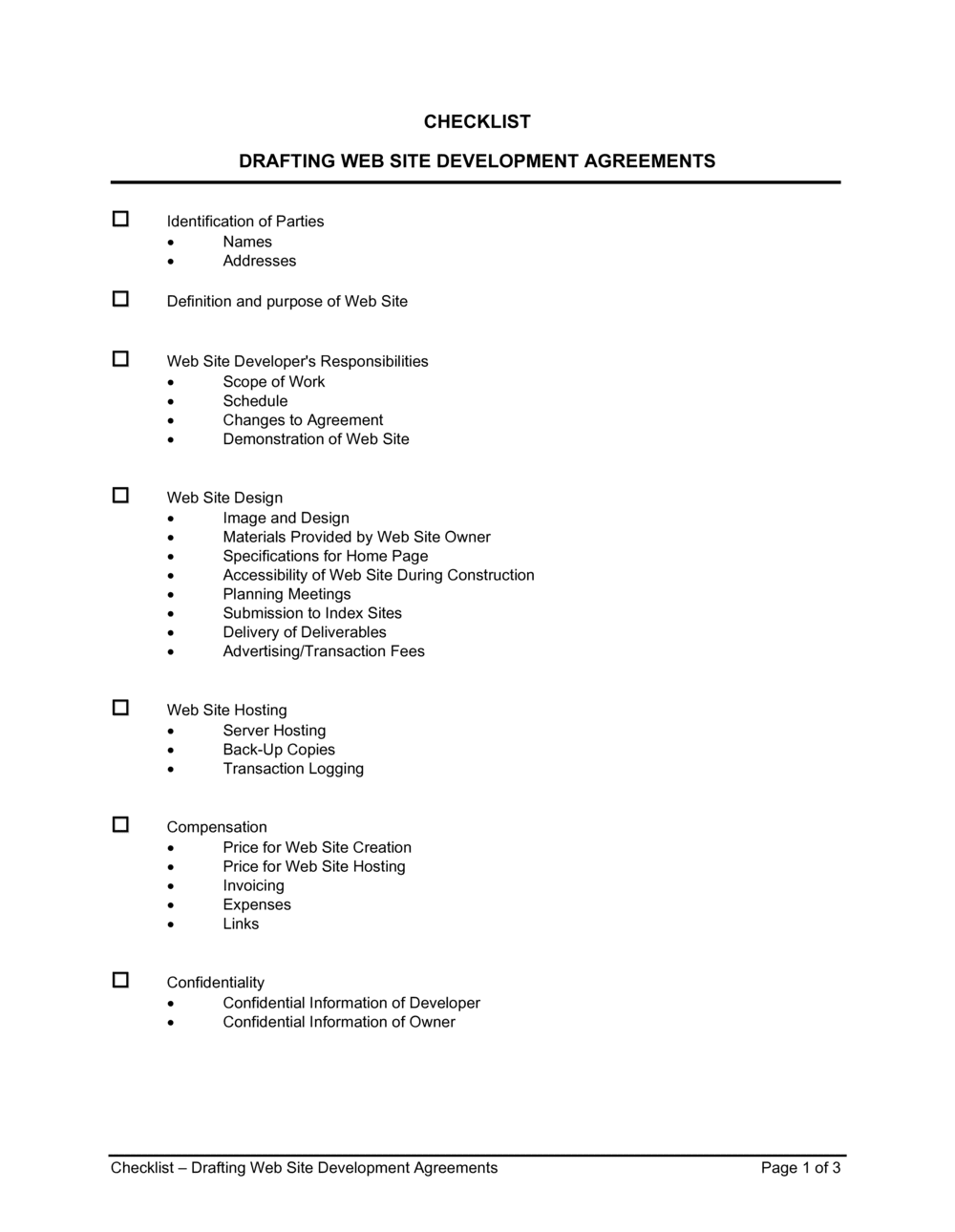
A Checklist for Drafting Web Site Development Agreements is a structured reference form that walks parties through every material provision to address before signing a website development contract. This free Word download organizes the key checkpoints β€” scope, deliverables, IP ownership, payment milestones, hosting, and acceptance β€” into a single scannable sheet you can complete before drafting or reviewing the full agreement.
When you need it
Use it whenever a business or individual is preparing, negotiating, or reviewing a website development contract β€” either as the client commissioning the site or the developer building it. It is especially useful when either party is working through the agreement without in-house legal counsel.
What's inside
The checklist covers scope of work and deliverables, ownership and IP assignment, payment structure and milestones, revision and change-order procedures, hosting and maintenance responsibilities, testing and acceptance criteria, confidentiality, and dispute resolution provisions.

What is a Checklist for Drafting Web Site Development Agreements?

A Checklist for Drafting Web Site Development Agreements is a structured reference form that guides both clients and developers through every material provision that should appear in a website development contract before it is signed. It organizes the critical checkpoints β€” scope of work, IP ownership, payment milestones, change order procedures, acceptance criteria, hosting responsibilities, confidentiality, and dispute resolution β€” into a single scannable document. Rather than a binding contract itself, it functions as a pre-signing audit tool that confirms the full agreement is complete, specific, and unambiguous.

Why You Need This Document

Website development disputes almost always trace back to a provision that was missing, vague, or never discussed before work began β€” not to anything that happened on the project itself. A client who discovers the developer owns the code after final payment has no practical remedy. A developer who launches a site with no acceptance clause has no way to compel final payment from a dissatisfied client. Working through this checklist before signing closes those gaps systematically, in 20 minutes, before they become expensive problems. For anyone commissioning or delivering a website build without in-house legal counsel, it is the fastest way to confirm the contract actually covers the project.

Which variant fits your situation?

If your situation is…Use this template
Full website build with a development firmWeb Site Development Agreement
Ongoing website maintenance after launchWebsite Maintenance Agreement
Hiring a freelance designer for UI/UX onlyGraphic Design Services Agreement
Commissioning custom software rather than a websiteSoftware Development Agreement
Protecting confidential project details during negotiationsNon-Disclosure Agreement
Engaging a contractor for a defined project phase onlyIndependent Contractor Agreement

Common mistakes to avoid

❌ Skipping the IP assignment field

Why it matters: Without a written assignment, copyright in the code and design belongs to the developer by default in most jurisdictions, regardless of who paid for it.

Fix: Verify the agreement contains explicit assignment language transferring all rights to the client upon final payment, and confirm which components β€” if any β€” are excepted.

❌ No objective acceptance criteria

Why it matters: Without defined acceptance criteria, the client can indefinitely withhold final payment by citing subjective dissatisfaction, leaving the developer with no recourse.

Fix: Confirm the checklist item for acceptance criteria is addressed with specific browser, device, and functionality tests, plus a defined review window.

❌ Domain and hosting accounts in the developer's name

Why it matters: If the developer retains control of the domain or hosting account and the relationship ends, the client may lose access to their own website with no immediate legal remedy.

Fix: Verify that all accounts are registered in the client's name before work begins, or that a written transfer obligation with a specific deadline is included in the agreement.

❌ No change order procedure defined

Why it matters: Without a written procedure, scope creep goes uncompensated β€” developers absorb extra hours, and clients receive no documentation of what was added and why costs increased.

Fix: Confirm the checklist item for change orders specifies a written approval requirement before any out-of-scope work begins, with an hourly rate or flat-fee structure stated.

The 9 key fields, explained

Project scope and deliverables

IP ownership and assignment

Payment schedule and milestone triggers

Change order and revision procedure

Project timeline and launch date

Hosting, domain, and maintenance responsibilities

Testing and acceptance criteria

Confidentiality

Dispute resolution and governing law

How to fill it out

  1. 1

    Identify all project deliverables before opening the checklist

    Write out every page, feature, and integration the project requires before working through the checklist. The checklist confirms coverage β€” it cannot generate scope you haven't defined yet.

    πŸ’‘ A simple wireframe or sitemap produced before drafting saves more contract disputes than any clause you can write.

  2. 2

    Work through each field in order and mark it complete or not applicable

    Check off each item as addressed in the draft agreement. Mark items N/A only when they genuinely do not apply β€” for example, no ongoing hosting if the client manages their own server.

    πŸ’‘ Any item you cannot check off or mark N/A is a gap in the agreement. Resolve it before signing, not after a dispute arises.

  3. 3

    Confirm IP assignment language is explicit

    Locate the IP section in the draft agreement and verify it contains an explicit written assignment β€” not just an implied transfer. Note whether the developer retains any license to reuse design elements or code libraries.

    πŸ’‘ Open-source or licensed third-party components cannot be assigned β€” confirm which parts of the codebase are proprietary versus licensed.

  4. 4

    Verify the payment schedule ties to measurable milestones

    Confirm that each payment trigger is tied to a specific, observable event β€” delivery of a staging site, client sign-off on designs, or site launch β€” not to calendar dates or developer self-certification.

    πŸ’‘ A three-milestone schedule (signing, staging, launch) covers most small-to-mid-size projects. Add a fourth milestone for complex builds with a distinct discovery or design phase.

  5. 5

    Check that acceptance criteria are objective and time-bound

    Confirm the agreement defines what the client is reviewing, what constitutes a defect, and how many days the client has to respond before acceptance is implied.

    πŸ’‘ Five to seven business days is a standard client review window. Shorter windows work for simple sites; longer ones invite indefinite delays.

  6. 6

    Confirm hosting and domain ownership details

    Verify the hosting account and domain are registered in the client's name, or that the agreement includes an explicit obligation to transfer them upon project completion.

    πŸ’‘ Request a screenshot or confirmation email from the registrar showing client ownership before the project launches.

Frequently asked questions

What is a web site development agreement checklist?

A web site development agreement checklist is a structured reference form that identifies every material provision β€” scope, IP, payment, acceptance, hosting, and dispute resolution β€” that should appear in a website development contract before it is signed. It helps both the client and developer confirm the agreement is complete before execution, reducing the risk of disputes caused by missing or ambiguous clauses.

Do I need a checklist if I already have a contract template?

Yes. A contract template gives you the structure; a checklist confirms you have filled in every variable correctly and that no provision has been left blank or vague. Even experienced developers and procurement managers use checklists to catch gaps they would otherwise overlook when reviewing a lengthy contract under deadline pressure.

Who should complete the checklist β€” the developer or the client?

Both parties benefit from working through it independently. The developer uses it to confirm the draft agreement they send to clients covers every standard provision. The client uses it to review a received agreement and identify anything missing before signing. In negotiated contracts, both parties reviewing the checklist together in a kickoff call is an efficient way to surface and resolve gaps early.

What is the most commonly missed item in website development agreements?

IP assignment is the most frequently overlooked provision. Many clients assume they own the code they paid for, but in most jurisdictions copyright belongs to the creator unless a written assignment is signed. A checklist flags this before signing, not after a dispute over who owns the finished site.

How is a checklist different from the web site development agreement itself?

The checklist is a planning and review tool β€” a one or two-page form you work through before drafting or signing the full contract. The web site development agreement is the binding legal document. Use the checklist to draft or audit the agreement; sign the agreement to create enforceable obligations.

Can this checklist be used for ongoing maintenance agreements too?

It is designed specifically for the development and launch phase. Ongoing maintenance arrangements β€” covering uptime, updates, security patches, and support response times β€” are better addressed with a dedicated website maintenance agreement that includes an SLA. The checklist does include a field for post-launch responsibilities, which can flag when a separate maintenance agreement is needed.

Should the checklist be attached to the signed agreement?

It can be, but it is not typically incorporated as a contract exhibit. Its value is as a pre-signing review tool. Keep a completed copy in your project file as a record that both parties reviewed the agreement systematically before signing. If any checklist item required a specific amendment to the agreement, reference that amendment in the agreement body.

What happens if a checklist item cannot be agreed upon before signing?

Do not sign the agreement until the issue is resolved. A checklist item that cannot be checked off represents a gap or disagreement in the contract β€” signing with that gap in place means courts or arbitrators will fill it with default rules that may not reflect either party's intent. Resolve every open item, even briefly, before execution.

How this compares to alternatives

vs Web Site Development Agreement

The web site development agreement is the binding contract both parties sign to create enforceable obligations. This checklist is the pre-signing review tool used to confirm the agreement addresses every material provision. Use the checklist first, then execute the agreement. The two documents work together β€” the checklist catches gaps; the agreement closes them.

vs Software Development Agreement

A software development agreement covers custom application or platform builds β€” desktop, mobile, or enterprise systems β€” with more complex IP, escrow, and acceptance testing requirements than a typical website. Use a website development agreement and this checklist for public-facing websites; use a software development agreement for applications with complex back-end logic, APIs, or proprietary algorithms.

vs Independent Contractor Agreement

An independent contractor agreement establishes the general working relationship and classification between a client and a freelance developer. A website development agreement β€” reviewed against this checklist β€” governs the specific deliverables, timeline, and IP for a defined project. Both may be needed when engaging a freelancer for a significant build.

vs Non-Disclosure Agreement

An NDA protects confidential information shared during negotiations or project work. A website development agreement includes its own confidentiality clause, which this checklist verifies. For projects where sensitive information is exchanged before a contract is signed, an NDA should be executed first β€” the development agreement's confidentiality clause then governs the project itself.

Industry-specific considerations

Professional services

Law firms, accountancies, and consultancies commissioning client-facing portals need explicit data confidentiality and IP terms given the sensitivity of client information handled through the site.

Retail and e-commerce

Online stores require payment gateway integration, PCI-DSS compliance confirmation, and clearly assigned responsibility for platform licensing β€” all checklist items that go unaddressed in generic contracts.

Healthcare

Patient-facing websites and portals must address HIPAA-compliant hosting, data handling responsibilities, and BAA obligations β€” provisions a standard web development contract rarely includes without a checklist prompting them.

SaaS and technology

SaaS companies building marketing or product sites need source code escrow provisions, open-source license disclosures, and clear ownership of custom integrations β€” areas the checklist specifically covers.

Template vs pro β€” what fits your needs?

PathBest forCostTime
Use the templateFreelancers, small agencies, and small business owners reviewing or drafting straightforward website contractsFree15–30 minutes per contract review
Template + professional reviewProjects over $10,000, e-commerce builds with payment processing, or sites handling sensitive personal data$150–$400 for a one-hour lawyer review1–2 days
Custom draftedEnterprise website builds, regulated industries, or multi-vendor projects with complex IP chains$800–$3,000+1–2 weeks

Glossary

Scope of Work
A detailed written description of the specific tasks, deliverables, and features the developer agrees to build.
IP Assignment
A contractual provision transferring ownership of the completed website and its code to the client upon final payment.
Acceptance Criteria
Specific, measurable conditions the deliverable must meet for the client to formally accept and approve it.
Change Order
A written amendment to the original scope of work that documents additional features or tasks and their associated cost and timeline impact.
Payment Milestone
A defined project stage at which an agreed portion of the total fee becomes due β€” for example, 30% on signing, 40% on staging delivery, 30% on launch.
Kill Fee
A contractual fee owed by the client if the project is cancelled after work has begun, compensating the developer for time already invested.
Work for Hire
A legal classification under copyright law where work created by a contractor is owned by the commissioning party, not the creator.
Warranty Period
A defined window β€” typically 30 to 90 days after launch β€” during which the developer must fix defects at no additional charge.
Escrow
An arrangement where source code is held by a neutral third party and released to the client if the developer fails to deliver or goes out of business.
SLA (Service Level Agreement)
A commitment specifying uptime targets, response times, and remedies applicable to hosting or maintenance services.

Part of your Business Operating System

This document is one of 3,000+ business & legal templates included in Business in a Box.

  • Fill-in-the-blanks β€” ready in minutes
  • 100% customizable Word document
  • Compatible with all office suites
  • Export to PDF and share electronically

Create your document in 3 simple steps.

From template to signed document β€” all inside one Business Operating System.
1
Download or open template

Access over 3,000+ business and legal templates for any business task, project or initiative.

2
Edit and fill in the blanks with AI

Customize your ready-made business document template and save it in the cloud.

3
Save, Share, Send, Sign

Share your files and folders with your team. Create a space of seamless collaboration.

Save time, save money, and create top-quality documents.

β˜…β˜…β˜…β˜…β˜…

"Fantastic value! I'm not sure how I'd do without it. It's worth its weight in gold and paid back for itself many times."

Managing Director Β· Mall Farm
Robert Whalley
Managing Director, Mall Farm Proprietary Limited
β˜…β˜…β˜…β˜…β˜…

"I have been using Business in a Box for years. It has been the most useful source of templates I have encountered. I recommend it to anyone."

Business Owner Β· 4+ years
Dr Michael John Freestone
Business Owner
β˜…β˜…β˜…β˜…β˜…

"It has been a life saver so many times I have lost count. Business in a Box has saved me so much time and as you know, time is money."

Owner Β· Upstate Web
David G. Moore Jr.
Owner, Upstate Web

Run your business with a system β€” not scattered tools

Stop downloading documents. Start operating with clarity. Business in a Box gives you the Business Operating System used by over 250,000 companies worldwide to structure, run, and grow their business.

Start freeΒ Β·Β No credit card required