Employee Request to Participate in Medical Plan Template

Free Word download β€’ Edit online β€’ Save & share with Drive β€’ Export to PDF

1 pageβ€’20–25 min to fillβ€’Difficulty: Standard
Learn more ↓
FreeEmployee Request to Participate in Medical Plan Template

At a glance

What it is
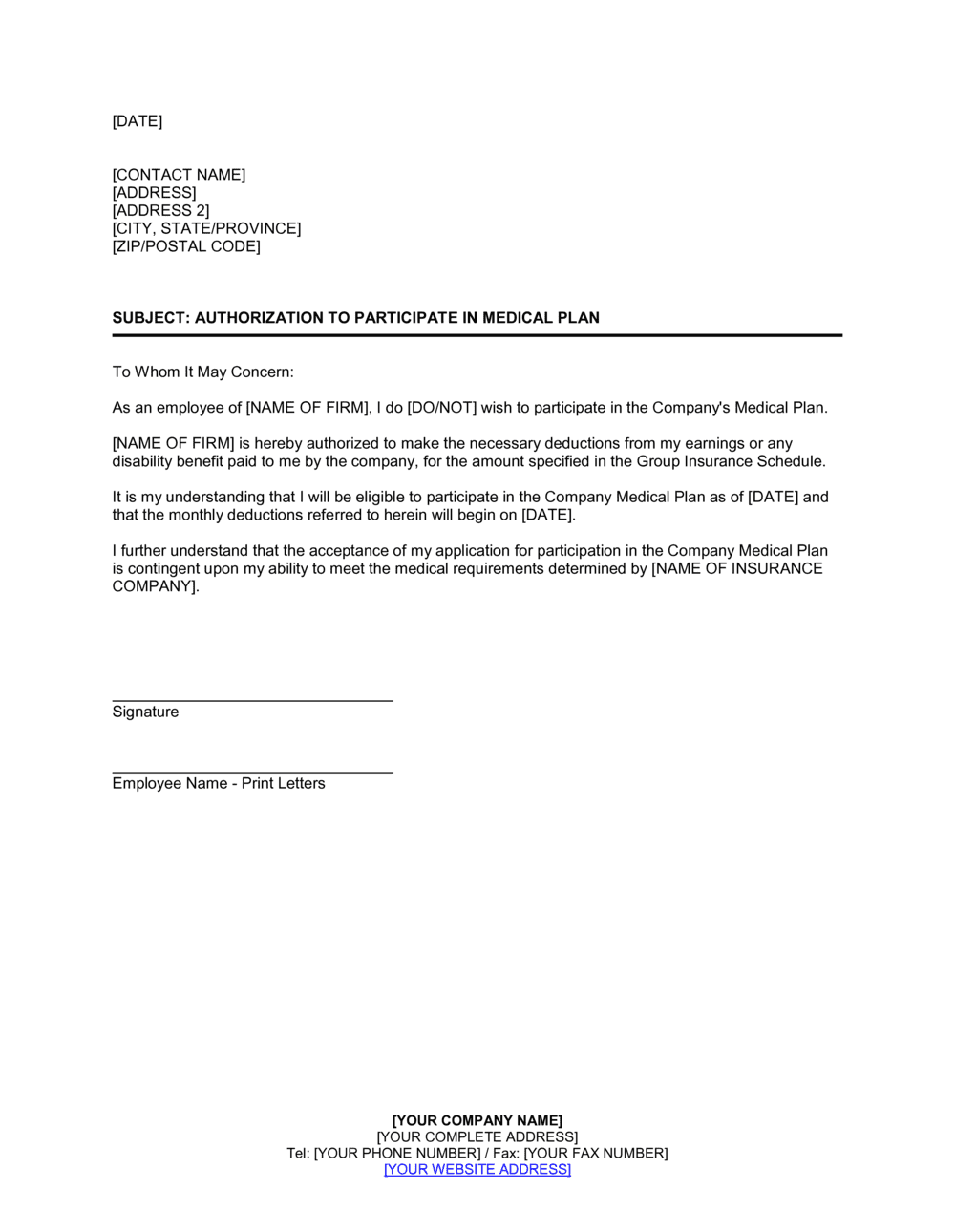
An Employee Request To Participate In Medical Plan is a standardized enrollment form an employee submits to their employer's HR or benefits department to formally elect coverage under a company-sponsored group health insurance plan. This free Word download captures all the information an HR team needs to process enrollment accurately β€” from plan tier selection to dependent details β€” and can be edited online and exported as PDF for filing or digital submission.
When you need it
Use it during new-hire onboarding, at the annual open enrollment period, or whenever a qualifying life event β€” marriage, birth of a child, or loss of other coverage β€” triggers a mid-year enrollment window. It ensures every enrollment request is documented in a consistent, auditable format.
What's inside
Employee identification and contact information, plan tier and coverage level selection, dependent enrollment details, prior coverage waiver or coordination of benefits declaration, and the employee's authorization signature confirming the accuracy of the information provided.

What is an Employee Request To Participate In Medical Plan?

An Employee Request To Participate In Medical Plan is a standardized enrollment form that an employee submits to their employer's HR or benefits department to formally elect coverage under a company-sponsored group health insurance plan. It captures the employee's personal and dependent information, plan selection, coverage tier, coordination of benefits disclosures, and payroll deduction authorization in a single document that creates an auditable record of the election. By formalizing the enrollment decision in writing, the form protects both the employer and the employee β€” ensuring that coverage elections are processed accurately, premiums are deducted correctly, and the submission date is documented in case an enrollment window is ever disputed.

Why You Need This Document

Without a completed enrollment form on file, HR teams have no documented evidence of what plan an employee elected, when they requested it, or whether dependents were intentionally added or inadvertently omitted. Verbal or email-based elections are difficult to enforce when a carrier questions eligibility, a claim is denied for a dependent not on file, or an employee disputes the premium deduction amount appearing in their paycheck. Under ERISA, employers operating group health plans are required to maintain adequate plan records β€” a signed enrollment form satisfies that obligation for each participant. This template gives HR teams a consistent, complete document to collect at every enrollment trigger event: new hire onboarding, annual open enrollment, and qualifying life event changes. Using it from day one eliminates the gaps that create compliance exposure and claims processing delays.

Which variant fits your situation?

If your situation is…Use this template
New hire enrolling in medical coverage during the first 30 daysEmployee Request To Participate In Medical Plan
Employee waiving medical coverage and documenting the decisionBenefits Waiver Form
Employee electing dental and vision coverage separatelyDental and Vision Enrollment Form
Employee adding or removing a dependent mid-year due to a qualifying life eventQualifying Life Event Change Form
Employee enrolling in a flexible spending account alongside medical coverageFSA Enrollment Form
Employee changing plan tier during annual open enrollmentOpen Enrollment Change Request
Employer documenting the full benefits package offered to employeesEmployee Benefits Summary

Common mistakes to avoid

❌ Missing or undated employee signature

Why it matters: An unsigned or undated form cannot prove the submission fell within the enrollment window, creating compliance exposure if a coverage dispute arises later.

Fix: Make the signature and date fields mandatory before accepting the form; add a submission-date stamp on receipt.

❌ Incorrect or missing dependent SSNs

Why it matters: Carriers match dependent eligibility on name plus date of birth plus SSN. Missing SSNs delay the dependent's coverage activation and generate error reports from the carrier.

Fix: Collect SSNs for all dependents at the time of enrollment and cross-reference them against the carrier's eligibility confirmation once the enrollment is processed.

❌ Selecting the wrong coverage tier

Why it matters: Choosing 'employee only' when dependents are being enrolled means the carrier will deny dependent claims until the tier is corrected β€” a correction that may require retroactive premium adjustments.

Fix: Design the form so the plan selection and dependent sections are adjacent, prompting the employee to confirm the tier matches the number of dependents listed.

❌ Skipping the coordination of benefits section

Why it matters: Undisclosed dual coverage results in the wrong carrier paying primary, triggering overpayment recovery demands months after claims are settled.

Fix: Require the employee to complete the COB section for both themselves and each dependent listed, even if the answer is 'no other coverage.'

The 9 key sections, explained

Employee identification

Contact and personal information

Enrollment type

Plan selection

Dependent information

Coordination of benefits declaration

Prior coverage waiver or termination confirmation

Payroll deduction authorization

Employee certification and signature

How to fill it out

  1. 1

    Complete employee identification and personal information

    Enter the employee's full legal name exactly as it appears on their government-issued ID, along with their employee ID, department, and date of hire. Add date of birth, SSN, and home address.

    πŸ’‘ Cross-reference the employee's onboarding paperwork to confirm the legal name and SSN before submitting β€” carrier eligibility files are matched on these two fields.

  2. 2

    Select the correct enrollment type and event date

    Check the appropriate enrollment type β€” new hire, qualifying life event, or open enrollment. For a qualifying life event, record the specific event and date, since most plans require submission within 30 days.

    πŸ’‘ Note the plan's deadline for each enrollment type in the form instructions β€” missing a 30-day new-hire window typically locks the employee out until the next open enrollment.

  3. 3

    Choose the plan and coverage tier

    Record the exact plan name as listed in the benefits summary, the plan type (HMO, PPO, HDHP), and the coverage tier. Confirm the employee-only premium versus the family premium before selecting.

    πŸ’‘ Provide a benefits comparison sheet alongside this form so employees can see premium differences between tiers before completing this section.

  4. 4

    List all dependents to be enrolled

    For each dependent, enter their full legal name, relationship, date of birth, and SSN. Indicate whether each dependent has other health coverage in force.

    πŸ’‘ Request dependent birth certificates or marriage certificates at the same time β€” most carriers require documentation within 31 days of enrollment for dependents added outside of new-hire periods.

  5. 5

    Complete the coordination of benefits section

    If the employee or any dependent is covered under another group plan, record the other carrier's name, policy number, and the policyholder's relationship to the employee.

    πŸ’‘ Even if the answer is 'no other coverage,' have the employee initial the section β€” a blank field creates ambiguity during claims processing.

  6. 6

    Document prior coverage termination

    If the employee is leaving another plan, record the prior carrier and the exact coverage termination date. Have the employee initial the confirmation that duplicate coverage is not being maintained.

    πŸ’‘ A prior coverage termination date that overlaps with the new effective date by more than a few days should be flagged to the carrier to avoid double-billing.

  7. 7

    Authorize payroll deductions

    Enter the per-paycheck deduction amount, payroll frequency, and effective date. Confirm whether the deduction will be processed pre-tax under the employer's Section 125 cafeteria plan.

    πŸ’‘ Verify the deduction amount against the carrier's current rate sheet before the employee signs β€” rate changes effective at renewal can differ from the prior year's amounts.

  8. 8

    Obtain the employee's dated signature and file the completed form

    Have the employee sign and date the certification block. Retain the original in the employee's benefits file and submit a copy to the insurance carrier or benefits broker within the applicable window.

    πŸ’‘ Scan and store the signed form in the employee's digital HR record on the same day β€” physical forms are easily lost, and the submission date is an auditable compliance record.

Frequently asked questions

What is an employee request to participate in a medical plan?

It is a standardized enrollment form an employee submits to their employer's HR or benefits department to formally elect coverage under a company-sponsored group health insurance plan. It captures plan selection, coverage tier, dependent details, coordination of benefits disclosures, and payroll deduction authorization in a single auditable document. Without it, the employer has no documented record of the employee's specific elections.

When does an employee need to submit this form?

The form is required in three situations: during the new-hire enrollment window (typically within 30 days of the start date), at the annual open enrollment period, or within 30 days of a qualifying life event such as marriage, birth of a child, adoption, or loss of other coverage. Missing any of these windows generally locks the employee out of coverage changes until the next open enrollment.

What is a qualifying life event and why does it matter?

A qualifying life event (QLE) is a change in personal circumstances recognized by the IRS and the health plan that permits benefit changes outside the annual open enrollment window. Common examples include marriage, divorce, birth or adoption of a child, and loss of coverage under a spouse's plan. Most plans require a completed enrollment form submitted within 30 days of the event date; submissions outside that window are typically rejected.

Does the employee need to submit this form every year?

In most group health plans, elections automatically renew at the same coverage level unless the employee actively changes them during open enrollment. However, employers should still collect a new form whenever plan options change, when an employee's dependent eligibility status changes, or when the carrier requests updated enrollment records. Retaining an annual form for every employee simplifies audits.

What happens if an employee misses the enrollment deadline?

The employee is generally locked out of coverage for the current plan year and must wait for the next open enrollment period. They may still qualify for a special enrollment period if a qualifying life event occurs later in the year. Some employers offer a retroactive enrollment exception for new hires who miss the window due to administrative error, but this requires carrier approval and is not guaranteed.

Are dependents automatically enrolled when an employee enrolls?

No. Each dependent must be explicitly listed on the enrollment form with their name, date of birth, SSN, and relationship. Selecting a family coverage tier without completing the dependent section does not automatically add dependents to the carrier's eligibility file. Most carriers also require supporting documentation β€” birth certificate or marriage certificate β€” within 31 days of enrollment.

Does this form need to be notarized or witnessed?

No notarization or independent witness is required for a standard group health plan enrollment form. The employee's dated signature certifying the accuracy of the information is sufficient. Some carriers require an HR representative's counter-signature to confirm eligibility, but this is an internal administrative step rather than a legal formality.

How long should employers retain completed enrollment forms?

Under ERISA, employers are generally required to retain plan records for a minimum of six years from the date of filing. Many HR teams retain enrollment forms for the duration of the employee's tenure plus six years after separation. Storing signed forms in a secure digital HR system rather than paper files reduces retrieval time and protects against physical document loss.

Can this form be submitted electronically?

Yes. Many employers process enrollment requests through an HRIS or benefits administration platform where employees complete the equivalent fields digitally. When using a Word-based template, the completed form can be exported as PDF, signed electronically, and submitted by email or uploaded to the HR system. The key requirement is retaining a time-stamped record of the submission.

How this compares to alternatives

vs Benefits Waiver Form

A benefits waiver form documents an employee's decision to decline medical coverage β€” typically because they are covered under a spouse's or parent's plan. An enrollment request documents the decision to accept coverage. Both are needed to maintain a complete benefits election record for every employee in the workforce.

vs Employee Benefits Summary

A benefits summary describes what the employer offers β€” plan options, premium contributions, and eligibility rules. An enrollment request is the employee's response β€” their formal election of a specific option. The summary informs the decision; the enrollment form documents it.

vs Open Enrollment Change Request

An open enrollment change request is used to modify existing coverage elections during the annual window β€” changing plan tier, adding or removing dependents, or switching plan types. An initial enrollment request is for first-time participation. Both use similar data fields but serve different administrative purposes and trigger different effective dates.

vs New Employee Onboarding Checklist

An onboarding checklist tracks all the administrative tasks required when a new hire joins β€” including completing benefit enrollment forms β€” but does not itself document the benefit election. The medical plan enrollment form is a specific deliverable within the broader onboarding process, and both documents should be retained in the employee's file.

Industry-specific considerations

Professional Services

High employee-to-HR ratio means standardized forms reduce the administrative burden of processing enrollment for multiple staff members simultaneously during annual open enrollment.

Retail and Hospitality

High turnover and part-time eligibility thresholds make it critical to document exactly when each employee met hours requirements and formally requested coverage.

Manufacturing

Union and non-union workforce splits require separate plan options and enrollment windows that must be tracked independently on a per-employee basis.

Healthcare

Regulatory scrutiny of employee benefit administration means complete, signed enrollment records are essential for ERISA compliance audits and accreditation reviews.

Template vs pro β€” what fits your needs?

PathBest forCostTime
Use the templateSMBs and HR generalists managing group enrollment without a dedicated benefits administration platformFree5–10 minutes per employee
Template + professional reviewEmployers adding custom plan options, multi-carrier elections, or FSA/HSA coordination fields$100–$300 (HR consultant or benefits broker review)1–2 days
Custom draftedLarge employers with self-funded plans, complex eligibility rules, or multi-state workforces requiring carrier-specific enrollment data formats$500–$2,000 (benefits administration specialist)1–2 weeks

Glossary

Open Enrollment
A fixed annual window during which employees may enroll in, change, or cancel benefit plan elections without a qualifying life event.
Qualifying Life Event (QLE)
A change in personal circumstances β€” such as marriage, divorce, birth of a child, or loss of other coverage β€” that allows an employee to modify benefits elections outside open enrollment.
Plan Tier
The coverage level selected by the employee, typically: employee only, employee plus spouse, employee plus children, or family.
Premium
The fixed monthly amount paid to maintain health insurance coverage, usually shared between the employer and employee through payroll deduction.
Dependent
A spouse, domestic partner, or child under a specified age (typically 26 in the US) who is eligible for coverage under the employee's group health plan.
Coordination of Benefits (COB)
The process of determining which health plan pays first when an individual is covered by more than one group plan, preventing duplicate payments.
ERISA
The Employee Retirement Income Security Act, a US federal law that sets minimum standards for employer-sponsored benefit plans including recordkeeping and disclosure requirements.
COBRA
A US federal law that allows employees and dependents to continue group health coverage for a limited period after employment ends or coverage is otherwise lost.
Evidence of Insurability (EOI)
Documentation an insurance carrier may require β€” such as a health questionnaire β€” before approving coverage above guaranteed-issue limits or outside a standard enrollment window.
Effective Date
The specific calendar date on which the elected coverage begins, which may differ from the form submission date depending on the plan's administrative rules.

Part of your Business Operating System

This document is one of 3,000+ business & legal templates included in Business in a Box.

  • Fill-in-the-blanks β€” ready in minutes
  • 100% customizable Word document
  • Compatible with all office suites
  • Export to PDF and share electronically

Create your document in 3 simple steps.

From template to signed document β€” all inside one Business Operating System.
1
Download or open template

Access over 3,000+ business and legal templates for any business task, project or initiative.

2
Edit and fill in the blanks with AI

Customize your ready-made business document template and save it in the cloud.

3
Save, Share, Send, Sign

Share your files and folders with your team. Create a space of seamless collaboration.

Save time, save money, and create top-quality documents.

β˜…β˜…β˜…β˜…β˜…

"Fantastic value! I'm not sure how I'd do without it. It's worth its weight in gold and paid back for itself many times."

Managing Director Β· Mall Farm
Robert Whalley
Managing Director, Mall Farm Proprietary Limited
β˜…β˜…β˜…β˜…β˜…

"I have been using Business in a Box for years. It has been the most useful source of templates I have encountered. I recommend it to anyone."

Business Owner Β· 4+ years
Dr Michael John Freestone
Business Owner
β˜…β˜…β˜…β˜…β˜…

"It has been a life saver so many times I have lost count. Business in a Box has saved me so much time and as you know, time is money."

Owner Β· Upstate Web
David G. Moore Jr.
Owner, Upstate Web

Run your business with a system β€” not scattered tools

Stop downloading documents. Start operating with clarity. Business in a Box gives you the Business Operating System used by over 250,000 companies worldwide to structure, run, and grow their business.

Start freeΒ Β·Β No credit card required