Customer Feedback Form Template

Free Word download β€’ Edit online β€’ Save & share with Drive β€’ Export to PDF

1 pageβ€’15–25 min to fillβ€’Difficulty: Standard
Learn more ↓
FreeCustomer Feedback Form Template

At a glance

What it is
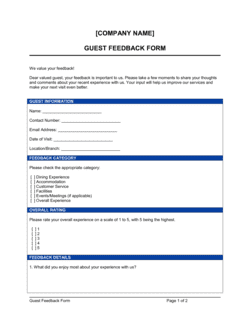
A Customer Feedback Form is a structured questionnaire that collects customer input on satisfaction, product quality, service experience, and improvement suggestions. This free Word download lets you customize questions, rating scales, and response fields, then distribute the form in print or as a PDF within minutes.
When you need it
Use it after a purchase, service interaction, or product delivery when you need structured input to improve your offering and understand how customers perceive your business. It is also useful when launching a new product line or following up after a support resolution.
What's inside
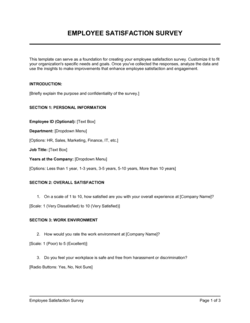
Respondent details, overall satisfaction rating, product or service quality scores, service experience questions, open-ended improvement suggestions, likelihood-to-recommend (NPS) question, and an optional follow-up consent field.

What is a Customer Feedback Form?

A Customer Feedback Form is a structured questionnaire that collects input from customers about their satisfaction, product quality, service experience, and suggestions for improvement. It combines rating scales β€” typically 1 to 5 or a 0–10 NPS question β€” with open-ended fields that capture the specific language and reasoning behind each score. This free Word download gives you a ready-to-customize template you can adapt to your business, distribute as a printed form or PDF, and start collecting actionable responses the same day.

Why You Need This Document

Without a structured feedback form, customer dissatisfaction surfaces only through refund requests, negative reviews, and churn β€” after the damage is done. A consistently distributed feedback form intercepts problems early, when service recovery is still possible and the customer is still reachable. Scores without open-ended questions tell you that something is wrong but not what to fix; this template captures both. Businesses that review feedback on a fixed cadence identify product and service issues an average of 4–6 weeks earlier than those relying on informal channels alone. This template gives you the structure to collect, compare, and act on customer input without building a survey from scratch every time.

Which variant fits your situation?

If your situation is…Use this template
Measuring overall customer loyalty with a single scoreNet Promoter Score (NPS) Survey
Evaluating a specific support interaction or help-desk ticketCustomer Service Evaluation Form
Collecting feedback immediately after an event or workshopEvent Feedback Form
Gathering input on a product prototype or beta featureProduct Evaluation Form
Assessing employee performance from a client's perspective360-Degree Feedback Form
Surveying satisfaction across an entire account relationshipClient Satisfaction Survey

Common mistakes to avoid

❌ Using mixed rating scales across questions

Why it matters: Switching between a 5-point scale for satisfaction and a 10-point scale for NPS makes aggregated scoring unreliable and confuses respondents mid-form.

Fix: Choose one scale β€” 1–5 for simplicity or 1–10 for NPS-style benchmarking β€” and apply it to every rated question without exception.
❌ Making respondent identity fields mandatory

Why it matters: Requiring a name and email before any other question causes a significant share of respondents to abandon the form before answering a single question.

Fix: Mark name and email as optional and position them at the end of the form, after the respondent has already invested time answering.

❌ Omitting open-ended improvement questions to keep the form short

Why it matters: Numeric scores tell you that something is wrong; open-ended responses tell you what and why. Without them, low scores produce no actionable direction.

Fix: Include at least one open-ended improvement question and one positive verbatim field, even on a short form.

❌ Collecting responses without an assigned owner or review cadence

Why it matters: Feedback stored in a folder and never reviewed does not improve products or service β€” and customers who see no change after providing detailed input stop responding.

Fix: Before distributing the form, assign one person to own the review log and set a fixed cadence β€” weekly or monthly β€” for triaging and acting on responses.

The 9 key fields, explained

Respondent information

Overall satisfaction rating

Product or service quality rating

Service experience rating

Value for money rating

Likelihood to recommend (NPS question)

What we did well (open-ended)

Improvement suggestions (open-ended)

Follow-up consent

How to fill it out

  1. 1

    Set your form header and branding

    Add your company name, logo, and a short one-sentence description of the form's purpose at the top. Include the date range or specific transaction the form relates to.

    πŸ’‘ A form that looks like it came from your brand gets a 15–20% higher completion rate than a generic unbranded questionnaire.

  2. 2

    Define the rating scale and apply it consistently

    Choose either a 1–5 or 1–10 scale and use it for every rated question in the form. Label both ends of every scale clearly β€” never leave the poles undefined.

    πŸ’‘ 1–5 scales are easier for respondents to complete on mobile or in print; 1–10 scales give more granularity for statistical benchmarking.

  3. 3

    Customize the questions to your product or service

    Replace placeholder text like [PRODUCT / SERVICE] with your specific offering. Add or remove sub-questions to match the customer touchpoints relevant to your business.

    πŸ’‘ Limit the form to 8–10 questions total. Each question beyond 10 drops your completion rate by roughly 5–10%.

  4. 4

    Order questions from specific to general

    Start with transaction-specific ratings (product quality, service experience), move to value-for-money, then place the NPS question near the end, and close with open-ended fields.

    πŸ’‘ Ending with open-ended questions lets the ratings put respondents in an evaluative mindset before they write β€” which produces more specific, actionable text.

  5. 5

    Add the follow-up consent field

    Include a clearly labeled, unchecked consent checkbox asking permission to follow up. Add a field for preferred contact method and time if you plan to act on responses within 48 hours.

    πŸ’‘ Promising a follow-up within 24 hours for dissatisfied customers (CSAT 1–2) and actually delivering it turns detractors into repeat buyers more reliably than any discount.

  6. 6

    Export as PDF or print, then distribute

    Save the completed template as PDF for digital distribution via email or QR code, or print copies for in-person collection at point of sale or service delivery.

    πŸ’‘ A QR code linking to the PDF form placed on receipts, packaging, or table cards generates 3–4Γ— more responses than a URL alone.

  7. 7

    Establish a review cadence before you launch

    Decide how often you will review responses β€” weekly for high-volume businesses, monthly for lower-volume β€” and assign one person to own the action log before you distribute the first form.

    πŸ’‘ Collecting feedback you never act on is worse than not collecting it. Customers who complete a form and receive no visible change lose trust faster than those never asked.

Frequently asked questions

What is a customer feedback form?

A customer feedback form is a structured questionnaire that collects input from customers about their satisfaction, product quality, service experience, and suggestions for improvement. It typically combines rating scales for quantifiable scores and open-ended fields for qualitative insight, giving businesses a repeatable way to measure and act on customer sentiment.

What questions should a customer feedback form include?

At minimum, include an overall satisfaction rating, a product or service quality rating, a value-for-money rating, a likelihood-to-recommend (NPS) question, one open-ended field for positives, and one for improvement suggestions. For service businesses, add a service experience rating. Limit the form to 8–10 questions total to maintain completion rates.

How long should a customer feedback form be?

8–10 questions is the practical upper limit for most customer feedback forms. Completion rates drop noticeably beyond that threshold, especially on mobile. A focused form with 5–7 well-chosen questions consistently outperforms a long survey with 15–20 questions in both response rate and data quality.

What is an NPS question and should I include it?

An NPS (Net Promoter Score) question asks customers to rate their likelihood to recommend your business on a 0–10 scale. Respondents scoring 0–6 are Detractors, 7–8 are Passives, and 9–10 are Promoters. Your NPS is Promoters minus Detractors as a percentage. Including it gives you a single benchmark score you can track over time and compare against industry averages.

Should the feedback form be anonymous?

Anonymous forms typically generate more candid responses, especially for complaints. However, they prevent follow-up for service recovery. A practical middle ground is making identity fields optional while including a clearly labeled, unchecked consent checkbox for customers who want to be contacted. This preserves honesty while enabling action on the most critical responses.

How do I increase response rates for my feedback form?

Keep the form under 10 questions, make identity fields optional, place the form at the natural end of a transaction (receipt, order confirmation, post-support email), and use a QR code for in-person distribution. Personalizing the request β€” using the customer's name and referencing the specific purchase β€” consistently lifts response rates compared to generic survey invitations.

How often should I review customer feedback responses?

High-volume businesses (100+ responses per week) should review weekly. Lower-volume businesses can review monthly. The cadence matters less than consistency β€” assign one person to own the review log and set a fixed schedule before distributing the first form. Feedback that sits unread in a folder produces no business value.

What is the difference between a customer feedback form and a customer satisfaction survey?

In practice, the terms are often used interchangeably. A feedback form typically refers to a shorter, transaction-level document distributed immediately after a purchase or interaction. A satisfaction survey tends to be longer, distributed periodically to a broader customer base, and designed to produce statistically comparable data over time. This template is designed for the transaction-level use case.

How this compares to alternatives

vs Customer Service Evaluation Form

A customer service evaluation form focuses specifically on a single support interaction β€” agent helpfulness, resolution speed, and issue outcome. A customer feedback form covers the entire customer experience including product quality, value, and overall satisfaction. Use the evaluation form after a support ticket; use the feedback form after any purchase or service delivery.

vs Event Feedback Form

An event feedback form rates a specific in-person or virtual event β€” content quality, speaker performance, venue, and logistics. A customer feedback form measures an ongoing product or service relationship. The questions, rating dimensions, and distribution timing differ significantly between the two.

vs 360-Degree Feedback Form

A 360-degree feedback form collects performance input about an individual employee from peers, managers, and reports β€” it is an internal HR tool. A customer feedback form collects external input from paying customers about their experience with a product or service. These serve entirely different audiences and purposes.

vs Client Satisfaction Survey

A client satisfaction survey is typically distributed periodically to an entire account base to benchmark relationship health over time. A customer feedback form is a transaction-level document distributed immediately after a specific purchase or interaction. The satisfaction survey is broader and longitudinal; the feedback form is focused and real-time.

Industry-specific considerations

Retail and E-commerce

Post-purchase feedback tied to a specific order number, with fields for packaging quality, delivery speed, and product-description accuracy.

Food and Beverage

Table-side or receipt-linked forms rating food quality, wait time, staff friendliness, and ambiance with a follow-up field for managers to address complaints same-day.

Professional Services

Project-end or quarterly relationship reviews rating deliverable quality, communication responsiveness, and whether outcomes met the original brief.

SaaS / Technology

Post-onboarding and post-support-ticket surveys measuring feature satisfaction, setup friction, and likelihood to recommend β€” feeding directly into product roadmap prioritization.

Template vs pro β€” what fits your needs?

PathBest forCostTime
Use the templateAny business collecting structured customer input at the transaction levelFree15–30 minutes to customize and distribute
Template + professional reviewBusinesses adding custom scoring formulas, GDPR consent language, or multi-language versions$100–$300 (CX consultant or copywriter review)1–2 days
Custom draftedEnterprise CX programs requiring integration with CRM, automated scoring, and statistical benchmarking$1,000–$5,000+ (CX platform setup or survey specialist)1–4 weeks

Glossary

Net Promoter Score (NPS)
A single-question metric asking customers how likely they are to recommend a business on a 0–10 scale, with scores grouped into Detractors (0–6), Passives (7–8), and Promoters (9–10).
CSAT (Customer Satisfaction Score)
A rating β€” typically 1–5 or 1–10 β€” that measures how satisfied a customer was with a specific interaction, product, or service.
Likert Scale
A response scale with ordered options β€” commonly 1 to 5 or 1 to 7 β€” that measures the degree of agreement, satisfaction, or frequency.
Closed-Ended Question
A question with a fixed set of answer options, such as a rating scale or multiple choice, that produces quantifiable data.
Open-Ended Question
A free-text question that invites respondents to answer in their own words, producing qualitative insight that scores alone cannot capture.
Response Rate
The percentage of people who complete a feedback form out of all those who received or were offered it.
Follow-Up Consent
A field asking the respondent whether the business may contact them to discuss their feedback, enabling personalized service recovery.
Verbatim Response
An unedited, word-for-word answer recorded from an open-ended question field, used to surface specific language and sentiment.
Benchmark Score
A satisfaction or NPS baseline established over time β€” or sourced from industry data β€” against which future survey results are compared.

Part of your Business Operating System

This document is one of 3,000+ business & legal templates included in Business in a Box.

  • Fill-in-the-blanks β€” ready in minutes
  • 100% customizable Word document
  • Compatible with all office suites
  • Export to PDF and share electronically

Create your document in 3 simple steps.

From template to signed document β€” all inside one Business Operating System.
1
Download or open template

Access over 3,000+ business and legal templates for any business task, project or initiative.

2
Edit and fill in the blanks with AI

Customize your ready-made business document template and save it in the cloud.

3
Save, Share, Send, Sign

Share your files and folders with your team. Create a space of seamless collaboration.

Save time, save money, and create top-quality documents.

β˜…β˜…β˜…β˜…β˜…

"Fantastic value! I'm not sure how I'd do without it. It's worth its weight in gold and paid back for itself many times."

Managing Director Β· Mall Farm
Robert Whalley
Managing Director, Mall Farm Proprietary Limited
β˜…β˜…β˜…β˜…β˜…

"I have been using Business in a Box for years. It has been the most useful source of templates I have encountered. I recommend it to anyone."

Business Owner Β· 4+ years
Dr Michael John Freestone
Business Owner
β˜…β˜…β˜…β˜…β˜…

"It has been a life saver so many times I have lost count. Business in a Box has saved me so much time and as you know, time is money."

Owner Β· Upstate Web
David G. Moore Jr.
Owner, Upstate Web

Run your business with a system β€” not scattered tools

Stop downloading documents. Start operating with clarity. Business in a Box gives you the Business Operating System used by over 250,000 companies worldwide to structure, run, and grow their business.

Free Forever PlanΒ Β·Β No credit card required