Checklist Standard Operating Procedure

Free download β€’ Use as a template β€’ Print or share

2 pagesβ€’20–30 min to useβ€’Difficulty: Standard
Learn more ↓
FreeChecklist Standard Operating Procedure Template

At a glance

What it is
A Checklist Standard Operating Procedure is a structured document that breaks a repeatable business process into a sequenced list of discrete, verifiable steps that an operator can check off as they work. This free Word download gives you a ready-to-edit format you can adapt to any department or workflow and export as PDF for deployment in the field, on the shop floor, or in a digital process tool.
When you need it
Use it whenever a recurring task must be performed consistently across multiple people, shifts, or locations β€” especially where a missed step creates safety, quality, compliance, or customer-experience risk.
What's inside
Purpose and scope, required personnel and materials, safety or compliance notes, a sequenced step-by-step checklist with sign-off fields, exception handling guidance, version control block, and a review and approval record.

What is a Checklist Standard Operating Procedure?

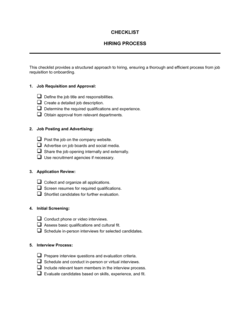
A Checklist Standard Operating Procedure (SOP) is a structured operational document that presents a repeatable business process as a sequenced list of discrete, verifiable steps β€” each accompanied by a checkbox an operator marks off as they complete it. Unlike narrative procedure documents, the checklist format is designed for real-time execution: the operator works through the document step by step rather than reading a paragraph, interpreting it, and relying on memory to carry it out. A complete checklist SOP includes a document control header, purpose and scope statements, a responsibilities block, required materials, safety notes, the numbered checklist itself with sign-off fields, exception handling guidance, and a change log.

Why You Need This Document

Without a documented checklist SOP, recurring procedures are executed from memory β€” and memory is inconsistent across people, shifts, and stress levels. The consequences are concrete: quality defects that trace back to a skipped verification step, compliance findings because a regulated task has no audit trail, and onboarding that takes weeks longer than it should because institutional knowledge lives in one person's head. When a procedure is documented in checklist form, a new hire can execute it correctly on their first attempt, a supervisor can verify completion in seconds, and an auditor has a signed record that every step was performed. This template gives you a ready-to-edit format that captures all of that structure without starting from a blank page.

Which variant fits your situation?

If your situation is…Use this template
Process involves branching logic or decision points between stepsFlowchart Standard Operating Procedure
Procedure requires narrative explanation and context alongside each stepStep-by-Step Standard Operating Procedure
Documenting a safety-critical or regulated manufacturing processManufacturing SOP
Onboarding a new employee through their first 30/60/90 daysEmployee Onboarding Checklist
Conducting a recurring internal compliance or quality auditInternal Audit Checklist
Capturing a full end-to-end process with roles, tools, and timingProcess Documentation Template
Tracking project task completion across a team with dependenciesProject Management Checklist

Common mistakes to avoid

❌ Combining two actions into one step

Why it matters: When a multi-action step fails, the root cause is ambiguous and corrective action targets the wrong problem. Audit evidence is also weaker when you cannot confirm which action was completed.

Fix: Rewrite each step so it contains exactly one action verb and one expected output. If a step says 'check and record,' split it into two numbered items.

❌ Assigning responsibilities to named individuals rather than roles

Why it matters: The SOP becomes inaccurate every time that person changes roles or leaves β€” and the team reverts to informal, inconsistent execution while waiting for an update.

Fix: Use job titles throughout the document. Include a separate, easily updated contact list outside the SOP body if personal names are needed for notification purposes.

❌ Skipping the pilot test before publishing

Why it matters: Authors are blind to their own knowledge gaps β€” steps that seem obvious to the writer are opaque to a first-time user. Undiscovered ambiguities get discovered at the worst possible moment.

Fix: Run the completed checklist once with an operator who did not write it, observing silently. Revise before issuing version 1.0.

❌ No scheduled review cycle

Why it matters: Procedures drift from reality as equipment, software, regulations, and personnel change. An unreviewed SOP from two years ago may describe a process that no longer exists β€” and operators quietly stop following it.

Fix: Set a review date in the document header (12 months is standard) and assign the document owner responsibility for triggering that review proactively.

❌ Omitting exception handling instructions

Why it matters: When a step cannot be completed as written, operators with no guidance improvise. Those improvisations become informal workarounds that spread, bypass controls, and are invisible to management.

Fix: Add a brief exception clause to every critical step and a standalone exception-handling section that names who to notify and which deviation form to complete.

❌ No record retention instruction on sign-off

Why it matters: Completed checklists without a clear filing location pile up on desks, get discarded, or are never saved β€” leaving no audit trail when a quality or compliance review requires one.

Fix: State the exact filing location (physical binder, shared drive path, or QMS record number) and the retention period (e.g., 3 years) directly above the sign-off block.

The 10 key sections, explained

Header and document control block

Purpose statement

Scope and applicability

Responsibilities

Required materials and equipment

Safety and compliance notes

Step-by-step checklist

Exception and deviation handling

Completion sign-off and record retention

Review history and change log

How to fill it out

  1. 1

    Complete the document control header

    Assign a unique SOP ID using your department code and a sequential number (e.g., OPS-0042). Enter the version number as 1.0 for a new document, and set the effective date to the date of first use.

    πŸ’‘ Store your master SOP register in a shared drive so every new ID is assigned centrally β€” this prevents duplicate IDs across departments.

  2. 2

    Write a specific purpose statement

    State in two to four sentences what outcome this procedure is designed to achieve and what risk or inconsistency it prevents. Reference the specific standard or regulation it supports if applicable.

    πŸ’‘ Test the purpose statement by asking: would a new employee reading only this section understand why this procedure matters? If not, rewrite it.

  3. 3

    Define scope and responsibilities

    Name every role involved by job title, not personal name. State explicitly what the procedure does not cover, and cross-reference the SOP that covers excluded activities if one exists.

    πŸ’‘ A one-sentence exclusion clause ('This SOP does not cover X, which is governed by SOP [ID]') prevents scope creep and role confusion.

  4. 4

    List all required materials before writing steps

    Walk through the procedure mentally from start to finish and list every tool, system, form, and piece of PPE needed. Operators should be able to gather everything before step one.

    πŸ’‘ If an item requires a login or access credential, note who provisions it and the lead time β€” missing access is the most common cause of procedure delays.

  5. 5

    Write each checklist step as a single, verifiable action

    Begin every step with an action verb (check, verify, enter, press, record, notify). Each step should describe exactly one action with a clear expected output or pass/fail criterion.

    πŸ’‘ If a step takes more than 15 seconds to read aloud, it probably contains two actions β€” split it.

  6. 6

    Flag critical control points and safety notes

    Review your step list and identify any step where a failure causes a disproportionate safety, quality, or compliance impact. Mark these with a WARNING or CRITICAL label and add the safety notes section before the checklist.

    πŸ’‘ Color-coding critical steps (bold or highlighted) in the Word document catches the eye during fast-paced execution without requiring the operator to re-read the full procedure.

  7. 7

    Add exception handling and sign-off fields

    For each critical step, add a brief exception instruction referencing the deviation form. Add operator and reviewer sign-off lines at the end, and state the record-retention period and filing location.

    πŸ’‘ If your team uses a digital tool (SharePoint, Notion, or a QMS platform), note the specific folder path or form link β€” 'file in the shared drive' is not specific enough.

  8. 8

    Pilot the checklist with one operator before publishing

    Have someone unfamiliar with the process follow the checklist exactly as written, without any verbal guidance. Note every point of confusion or ambiguity and revise before issuing version 1.0.

    πŸ’‘ A single pilot run typically surfaces two to four unclear steps that seemed obvious to the author β€” catching these before rollout prevents repeated training corrections.

Frequently asked questions

What is a checklist standard operating procedure?

A checklist standard operating procedure is a document that presents a repeatable business process as a sequenced list of discrete, verifiable steps β€” each with a checkbox an operator marks off as they work. Unlike a narrative SOP, the checklist format is optimized for real-time execution: operators follow along step by step rather than reading a paragraph and translating it into action. It is widely used in manufacturing, healthcare, food service, IT operations, and any context where a missed step has measurable consequences.

What is the difference between a checklist SOP and a step-by-step SOP?

A step-by-step SOP presents each action as a numbered instruction with explanatory narrative β€” useful when the operator needs to understand the reason behind a step or make judgment calls along the way. A checklist SOP presents the same steps as a tick-box list optimized for speed and real-time verification, assuming the operator is already trained. Many organizations maintain both: the step-by-step version for training and the checklist version for daily execution.

How detailed should each step in a checklist SOP be?

Each step should describe exactly one action and include the expected result or pass/fail criterion. A good rule of thumb: if a step takes more than 15 seconds to read aloud, it likely contains two actions and should be split. Steps should begin with an action verb β€” check, verify, enter, press, record, notify β€” so the operator knows immediately what they need to do, not just what to think about.

Who should be responsible for maintaining a checklist SOP?

Every SOP should have a named document owner β€” typically a role title such as Operations Manager or QA Lead, not an individual's name. The owner is accountable for scheduling periodic reviews (usually every 12 months), approving changes before a new version is issued, and communicating updates to everyone who uses the document. Assigning ownership by name rather than role is a common mistake that leaves SOPs unreviewed when that person moves on.

How often should a checklist SOP be reviewed and updated?

A 12-month review cycle is standard for most operational SOPs. Procedures in regulated industries β€” food safety, pharmaceuticals, medical devices β€” often require a 6-month cycle or a review triggered by any change in equipment, regulation, or process. The review date should be printed in the document control header so it is visible without opening the change log.

Do checklist SOPs need to be signed off by a manager?

For most business operations, a supervisor sign-off on the completed checklist is best practice rather than a legal requirement. In regulated industries β€” ISO-certified facilities, FDA-regulated manufacturers, HACCP-compliant food producers β€” completed and signed checklists are mandatory audit records. Even outside regulated contexts, sign-off fields create accountability and make performance issues easier to trace and address.

Can I use a checklist SOP template for a safety procedure?

Yes, and the checklist format is particularly well-suited to safety procedures because it enables real-time verification rather than recall from memory. For safety-critical procedures, add a dedicated safety and warnings section before the checklist steps, flag critical control points within the step list, and include explicit exception handling instructions that tell the operator to stop and notify a supervisor before improvising.

How many steps should a checklist SOP have?

There is no universal rule, but checklists with more than 25–30 steps typically indicate a procedure complex enough to benefit from being split into two or more sub-procedures. Checklists used in high-stress or time-pressured environments β€” surgery, aviation, emergency response β€” are often deliberately kept to fewer than 10 steps per phase. For most business operations, a range of 8 to 20 clearly written steps covers the majority of recurring tasks effectively.

What is version control and why does it matter for SOPs?

Version control is the practice of assigning a version number and effective date to each revision of a document. For SOPs, it ensures that every operator knows whether they are using the current procedure and gives auditors a clear history of what the process looked like at any point in time. A document without version control creates risk: two operators may be following different editions of the same procedure without realizing it.

How this compares to alternatives

vs Step-by-Step Standard Operating Procedure

A step-by-step SOP presents each action with accompanying narrative explanation β€” ideal for training or for procedures that require the operator to understand context and exercise judgment. A checklist SOP strips out the narrative and presents only the actions, optimized for fast, real-time execution by a trained operator. Use the step-by-step version to train; use the checklist version to execute.

vs Process Documentation Template

A process documentation template captures a business process at a high level β€” inputs, outputs, roles, tools, and flow β€” for knowledge management and analysis purposes. A checklist SOP is an executable field document an operator follows in real time. Process documentation describes how a process works; a checklist SOP tells someone what to do, step by step, right now.

vs Work Instruction

A work instruction typically describes how to perform a single, narrowly defined task at the machine or workstation level β€” lower in scope than an SOP, which may cover an end-to-end procedure across multiple roles or stations. Use a work instruction for a single technical task; use a checklist SOP when the procedure involves multiple steps, roles, or handoffs that require coordinated verification.

vs Audit Checklist

An audit checklist is designed for an independent reviewer to verify that a process, product, or system meets defined standards β€” it is an assessment tool. A checklist SOP is designed for the person performing the procedure to verify their own execution in real time. An audit checklist asks 'was this done correctly?'; a checklist SOP guides 'do this correctly, right now.'

Industry-specific considerations

Manufacturing

Machine setup, quality inspection, and end-of-shift close-out procedures require documented, signed checklists to satisfy ISO 9001 and customer audit requirements.

Food and Beverage

HACCP critical control point monitoring, opening and closing procedures, and equipment sanitation checklists are mandatory records under FDA and local health authority inspections.

Healthcare

Surgical safety checklists, medication administration verification, and patient discharge procedures reduce adverse events and satisfy Joint Commission accreditation requirements.

Information Technology

Server deployment, incident response, and change management procedures use checklist SOPs to ensure no configuration step is skipped during high-pressure or after-hours operations.

Retail and Hospitality

Daily opening and closing checklists, food safety temperature logs, and cash-handling procedures standardize execution across high-turnover staff with minimal training time.

Professional Services

Client onboarding, engagement closure, and compliance review checklists ensure consistent service delivery and provide a paper trail for liability and quality management purposes.

Template vs pro β€” what fits your needs?

PathBest forCostTime
Use the templateOperations managers and small business owners documenting internal recurring procedures without regulatory complexityFree1–3 hours per procedure
Template + professional reviewProcedures in regulated industries (food safety, ISO-certified manufacturing, healthcare) that require compliance verification before deployment$100–$500 for a quality consultant or compliance advisor review1–3 days
Custom draftedEnterprise quality management systems requiring integration with a QMS platform, multilingual deployment, or FDA/ISO formal documentation packages$500–$3,000+ depending on scope and consultant1–3 weeks

Glossary

Standard Operating Procedure (SOP)
A documented set of step-by-step instructions that describe how a recurring task must be performed to ensure consistency and quality.
Checklist format
A presentation style that renders each step as a discrete item with a checkbox, enabling the operator to mark completion in real time.
Scope
A statement within the SOP defining which activities, locations, products, or personnel the procedure applies to β€” and, importantly, what it does not cover.
Version control
The practice of assigning a version number and effective date to each revision of a document so users always know which edition is current.
Sign-off field
A space on the checklist where the operator, supervisor, or quality reviewer initials or signs to confirm a step or the full procedure was completed correctly.
Exception handling
Instructions within the SOP telling the operator what to do when a step cannot be completed as written β€” who to notify and how to document the deviation.
Document owner
The person or role responsible for keeping the SOP accurate, triggering periodic reviews, and approving changes before a new version is issued.
Critical control point
A step in a process where a failure to execute correctly has a disproportionate impact on safety, quality, or compliance β€” flagged in the SOP for heightened attention.
Review cycle
The scheduled interval β€” typically every 6 or 12 months β€” at which a document owner must confirm the SOP still reflects current practice or update it.
Corrective action
A documented response to a deviation or non-conformance that explains what went wrong, why, and what change was made to prevent recurrence.

Part of your Business Operating System

This document is one of 3,000+ business & legal templates included in Business in a Box.

  • Fill-in-the-blanks β€” ready in minutes
  • 100% customizable Word document
  • Compatible with all office suites
  • Export to PDF and share electronically

Create your document in 3 simple steps.

From template to signed document β€” all inside one Business Operating System.
1
Download or open template

Access over 3,000+ business and legal templates for any business task, project or initiative.

2
Edit and fill in the blanks with AI

Customize your ready-made business document template and save it in the cloud.

3
Save, Share, Send, Sign

Share your files and folders with your team. Create a space of seamless collaboration.

Save time, save money, and create top-quality documents.

β˜…β˜…β˜…β˜…β˜…

"Fantastic value! I'm not sure how I'd do without it. It's worth its weight in gold and paid back for itself many times."

Managing Director Β· Mall Farm
Robert Whalley
Managing Director, Mall Farm Proprietary Limited
β˜…β˜…β˜…β˜…β˜…

"I have been using Business in a Box for years. It has been the most useful source of templates I have encountered. I recommend it to anyone."

Business Owner Β· 4+ years
Dr Michael John Freestone
Business Owner
β˜…β˜…β˜…β˜…β˜…

"It has been a life saver so many times I have lost count. Business in a Box has saved me so much time and as you know, time is money."

Owner Β· Upstate Web
David G. Moore Jr.
Owner, Upstate Web

Run your business with a system β€” not scattered tools

Stop downloading documents. Start operating with clarity. Business in a Box gives you the Business Operating System used by over 250,000 companies worldwide to structure, run, and grow their business.

Free Forever PlanΒ Β·Β No credit card required