80 Ways To Leverage Chatgpt

Free to read β€’ Save or share with one click

Free80 Ways To Leverage Chatgpt Template

At a glance

What it is
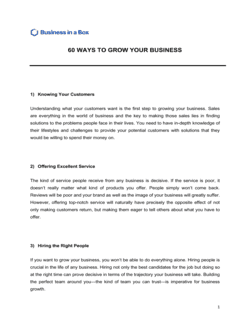
80 Ways To Leverage ChatGPT is a curated operational reference guide that maps 80 concrete, ready-to-use ChatGPT applications across every major business function β€” from content creation and customer service to finance, HR, and legal drafting. This free Word download is organized by department and use case so teams can immediately identify where AI fits into their existing workflows, edit the guide for their context, and export it as a PDF to share with staff or leadership.
When you need it
Use it when rolling out ChatGPT or any large language model to a team for the first time, when building an AI adoption policy, or when a manager needs a structured starting point for identifying which tasks to automate or accelerate. It is equally useful for solo entrepreneurs who want a systematic way to audit where AI can save them time.
What's inside
The guide covers use cases organized by business function β€” marketing, sales, operations, HR, finance, customer support, legal, and executive leadership β€” with a brief description of each application, the type of prompt or task involved, and the expected time or quality benefit. It also includes a section on prompt-writing best practices and a checklist for evaluating AI output quality before publishing or sending.

What is 80 Ways To Leverage ChatGPT?

80 Ways To Leverage ChatGPT is a structured operational reference guide that catalogs 80 concrete, tested applications of ChatGPT organized by business function β€” marketing, sales, customer support, HR, finance, operations, legal drafting support, and executive communication. Each use case includes a plain-English description of the task, a sample prompt structure with placeholders, and notes on where human review is required before the output is used. Unlike a generic AI tips article, this guide is formatted as an editable Word document your team can customize, brand, and distribute as an internal resource β€” turning a list of possibilities into an actionable adoption toolkit.

Why You Need This Document

Most businesses that sign up for ChatGPT use it sporadically for a handful of tasks and never capture the majority of available time savings. The barrier is not capability β€” it is awareness. Without a structured map of where AI fits into daily workflows, employees default to the two or three use cases they discovered on their own, and the investment in the tool flatlines. This guide eliminates that gap by giving every department a curated, relevant list of applications they can act on in the next week. Beyond individual productivity, a shared reference document establishes a consistent baseline for how your team uses AI β€” reducing the risk of someone pasting confidential data into a public tool or publishing unchecked output. Download this template, customize it for your context, and turn ChatGPT from an underused subscription into a measurable productivity driver across your organization.

Which variant fits your situation?

If your situation is…Use this template
Introducing AI tools to a team for the first time80 Ways To Leverage ChatGPT
Formalizing rules for how employees may use AI at workAI Usage Policy
Training staff on prompt engineering techniquesChatGPT Prompt Library
Auditing current workflows for automation opportunitiesBusiness Process Improvement Plan
Building a broader digital transformation roadmapDigital Transformation Plan
Presenting an AI strategy to a board or leadership teamTechnology Strategy Plan
Tracking which AI tools the team is actually usingSoftware Inventory and Usage Report

Common mistakes to avoid

❌ Publishing AI output without fact-checking

Why it matters: ChatGPT can confidently state incorrect figures, fabricate citations, and misrepresent industry data. Publishing unchecked output damages credibility and can create legal exposure.

Fix: Treat every AI-generated fact, statistic, or citation as unverified until confirmed against a primary source. Build this check into your content review workflow, not as an afterthought.
❌ Pasting confidential data into the public ChatGPT interface

Why it matters: Inputs to the standard ChatGPT web interface may be used to improve OpenAI's models by default. Client names, financial data, and proprietary processes should not be included.

Fix: Establish a written data-privacy rule specifying what categories of information may not be entered into public AI tools. Use ChatGPT Enterprise or the API with data-retention turned off for sensitive work.

❌ Distributing the guide without removing irrelevant use cases

Why it matters: A 80-item list handed to a five-person team that does no content marketing or legal work creates confusion and gets ignored. Volume without relevance signals poor implementation.

Fix: Edit the guide down to the 20–40 use cases most applicable to your team before distributing. A shorter, focused list drives higher adoption.

❌ Treating AI-generated legal or HR drafts as final

Why it matters: ChatGPT produces legally plausible language that can be unenforceable, non-compliant, or discriminatory. Using it without review creates real liability β€” not hypothetical risk.

Fix: Flag all legal, HR policy, and compliance use cases in the guide with a mandatory human review step. Never send AI-drafted legal communications without attorney review.

❌ Never updating the guide after initial distribution

Why it matters: ChatGPT's capabilities change significantly with each model update. A guide written for GPT-4 understates what GPT-4o or later models can do, leaving value on the table.

Fix: Assign a quarterly review owner to each section. Add a version history table to the first page so staff know the guide is actively maintained.

❌ Using generic prompts copied verbatim from the guide

Why it matters: Prompts without company-specific context β€” product names, target personas, tone of voice β€” produce generic output that requires heavy editing and defeats the time-saving purpose.

Fix: Train staff to customize every prompt with at least three context variables: the audience, the desired format, and the specific outcome they need. Generic in equals generic out.

The 9 key sections, explained

Introduction and AI readiness overview

Marketing and content creation

Sales and business development

Customer support and communications

HR and people operations

Finance and reporting

Operations and process documentation

Legal and compliance drafting support

Prompt quality and output review checklist

How to fill it out

  1. 1

    Add your company name and date to the header

    Replace the placeholder header with your organization's name, department, and the date the guide was distributed. This makes it a traceable internal document rather than a generic download.

    πŸ’‘ Add a version number (v1.0, v1.1) so staff know which iteration is current β€” AI tools and best practices evolve quickly.

  2. 2

    Remove use cases that don't apply to your business

    Review all 80 use cases and delete any that are irrelevant to your industry or team size. A 45-item list your team will actually use beats an 80-item list they ignore.

    πŸ’‘ Highlight the ten use cases most likely to save your team time in the next 30 days and put those at the top of each section.

  3. 3

    Add your own prompt examples to each use case

    Replace or supplement the sample prompts with prompts your team has already tested and found effective. Real examples from your context outperform generic ones.

    πŸ’‘ Build a shared prompt library (Google Doc or Notion page) alongside this guide so prompts that work get catalogued and reused.

  4. 4

    Insert your data-privacy and confidentiality rules

    Edit the introduction section to state clearly which types of data employees may and may not paste into ChatGPT β€” client names, financials, personal information, trade secrets.

    πŸ’‘ If your company uses ChatGPT Enterprise or a private API deployment, note this explicitly so staff know their inputs are not used for model training.

  5. 5

    Assign department owners to each section

    Add a 'Section owner' line to each functional section naming the manager responsible for keeping use cases current and reviewing AI outputs in that area.

    πŸ’‘ Department owners should review their section quarterly β€” new ChatGPT capabilities (image input, code execution, web browsing) change what's possible every few months.

  6. 6

    Customize the output review checklist

    Edit the checklist in the final section to reflect your specific quality standards β€” brand voice guidelines, legal review triggers, and the escalation path when AI output seems incorrect.

    πŸ’‘ A two-minute checklist run on every AI output before it leaves the building prevents the majority of AI-related errors from reaching clients or the public.

  7. 7

    Distribute and schedule a team walkthrough

    Export as PDF and distribute to all relevant staff. Schedule a 30-minute walkthrough to demonstrate two or three use cases live so the guide feels practical rather than theoretical.

    πŸ’‘ Record the walkthrough and link to the recording inside the document β€” new hires can onboard themselves to AI tooling without a live session.

Frequently asked questions

What is this guide and who is it for?

This guide is a structured reference document listing 80 practical applications of ChatGPT organized by business function. It is designed for small business owners, managers, and teams who want a concrete starting point for integrating AI into daily work β€” without spending hours researching use cases from scratch. It works equally well for solo entrepreneurs and multi-department organizations.

Do I need technical skills to use ChatGPT for business?

No coding or technical background is required for the vast majority of use cases in this guide. ChatGPT is a conversational tool β€” you type instructions in plain English and receive text output. The most important skill is writing clear, specific prompts, which this guide teaches through worked examples in each section.

Is it safe to use ChatGPT for confidential business information?

It depends on which version of ChatGPT you are using and your settings. The standard web interface (ChatGPT.com) may use your inputs to improve OpenAI's models unless you opt out or use ChatGPT Enterprise, which guarantees no data is used for training. As a general rule, do not paste client names, financial data, personal employee information, or trade secrets into a public AI tool without confirming your organization's data-privacy policy permits it.

Can ChatGPT replace employees in any of these use cases?

ChatGPT is an accelerator, not a replacement. In most of the 80 use cases covered here, AI produces a strong first draft or starting point that a human then reviews, edits, and approves. Tasks requiring judgment, relationship context, legal accountability, or creative originality still require a person. The realistic benefit is 30–70% time savings on specific tasks, not the elimination of roles.

How do I know if ChatGPT's output is accurate?

You verify it independently. ChatGPT does not have access to real-time data by default, can confabulate citations and statistics, and reflects its training cutoff date for factual claims. Treat every specific fact, figure, or reference in AI-generated content as unverified until you have confirmed it against a primary source. The output review checklist in this guide provides a step-by-step verification process.

What is the difference between ChatGPT and other AI writing tools?

ChatGPT is a general-purpose large language model capable of handling a wide range of tasks β€” drafting, summarizing, coding, translating, analyzing β€” through open-ended conversation. Purpose-built tools like Jasper, Copy.ai, or Notion AI are optimized for narrower tasks (primarily marketing copy) and wrap similar models in structured templates. ChatGPT's flexibility makes it more powerful for the diverse business use cases in this guide, but it requires more skill to prompt effectively.

How often should this guide be updated?

Quarterly updates are recommended for active teams. OpenAI releases significant model improvements multiple times per year, and new capabilities β€” image input, code execution, file analysis, web browsing β€” expand what is possible with each release. A guide that is more than six months old may understate current capabilities or reference limitations that no longer apply.

Can I share this guide with my entire team?

Yes. The template is designed to be customized and distributed internally. Edit it to reflect your company's specific use cases, data-privacy rules, and brand standards, then export as PDF and share with staff. You can also use it as the foundation for an internal AI onboarding session or training workshop.

What should I do if ChatGPT produces a wrong or harmful output?

Do not publish, send, or act on the output. Document the prompt and response, report it to your designated AI oversight owner, and regenerate with a more specific or constrained prompt. For outputs involving legal, medical, or financial claims, escalate to the relevant subject-matter expert before taking any action. The output review checklist in this guide is designed to catch most problems before they leave your organization.

How this compares to alternatives

vs AI Usage Policy

An AI usage policy defines the rules β€” what employees may and may not do with AI tools, data-privacy requirements, and review obligations. This guide defines the opportunities β€” the specific tasks where AI adds value. Both documents are complementary: deploy this guide to show teams what is possible, and pair it with a usage policy to establish the boundaries.

vs Digital Transformation Plan

A digital transformation plan is a strategic roadmap covering technology adoption across the entire organization over 12–36 months, including budgets, change management, and governance. This guide is a tactical reference tool for immediate, task-level AI adoption. The guide is a useful input to a broader transformation plan, but it operates at a different level of abstraction.

vs Business Process Improvement Plan

A business process improvement plan identifies specific workflows to redesign for efficiency, defines current-state and future-state process maps, and tracks improvement metrics. This ChatGPT guide identifies where AI can accelerate tasks within existing processes rather than redesigning the processes themselves. Use the improvement plan when the process is broken; use this guide when the process is sound but slow.

vs Employee Training Manual

An employee training manual provides step-by-step instruction for performing a defined role or using a specific system, with assessments and competency benchmarks. This guide is a use-case reference, not a training curriculum. For organizations rolling out AI at scale, this guide can serve as source material for a more formal AI training manual with exercises and assessments added.

Industry-specific considerations

Professional Services

Proposal drafting, client communication templates, meeting summarization, and research synthesis save 5–10 hours per consultant per week on non-billable work.

Retail and E-commerce

Product description generation, customer service response templates, and promotional email sequences are the highest-value use cases for retail teams with lean marketing staff.

SaaS and Technology

Technical documentation, release notes, support knowledge-base articles, and user onboarding copy are consistently produced faster with AI assistance than from scratch.

Healthcare and Wellness

Patient communication drafts, staff training materials, and administrative process documentation benefit from AI β€” but all clinical content requires licensed professional review before use.

Real Estate

Listing description drafting, buyer and seller communication templates, and market commentary for newsletters are among the most time-saving use cases for real estate professionals.

Education and Training

Curriculum outline drafting, assessment question generation, learner feedback templates, and course summary writing reduce instructor prep time without replacing instructional design judgment.

Template vs pro β€” what fits your needs?

PathBest forCostTime
Use the templateSmall businesses, solo founders, and teams ready to start using ChatGPT without a formal AI strategyFree1–2 hours to customize and distribute
Template + professional reviewMid-size teams combining this guide with a data-privacy audit and a custom prompt library$500–$2,000 for an AI consultant or operations specialist review1–2 weeks
Custom draftedEnterprise deployments requiring custom AI governance frameworks, compliance review, and department-specific playbooks$5,000–$20,000 for a full AI adoption strategy engagement4–8 weeks

Glossary

Prompt
The instruction or question a user types into ChatGPT to direct its output β€” the quality of the prompt directly determines the quality of the response.
Large Language Model (LLM)
An AI system trained on large volumes of text data to generate, summarize, classify, and translate language β€” ChatGPT is one example.
Zero-Shot Prompt
A prompt that gives the AI no examples, relying entirely on its training to produce a useful response.
Few-Shot Prompt
A prompt that includes two or three examples of the desired output format before asking the AI to generate a new one.
Hallucination
When an AI model generates a confident-sounding response that is factually incorrect or entirely fabricated β€” a key risk requiring human review.
System Prompt
A set of instructions given to ChatGPT at the start of a session to define its role, tone, and constraints for the entire conversation.
Token
The unit ChatGPT uses to process text β€” roughly three-quarters of a word β€” which determines how much context fits within a single conversation window.
Temperature
An API setting that controls how creative or predictable ChatGPT's output is β€” lower values produce consistent results; higher values produce more varied responses.
Retrieval-Augmented Generation (RAG)
A technique that connects an LLM to an external knowledge base so it generates responses grounded in specific company documents rather than general training data.
AI Governance
The policies, oversight processes, and controls a company puts in place to ensure AI tools are used responsibly, accurately, and in compliance with applicable regulations.

Part of your Business Operating System

This document is one of 3,000+ business & legal templates included in Business in a Box.

  • Fill-in-the-blanks β€” ready in minutes
  • Compatible with all office suites
  • Export to PDF and share electronically

Create your document in 3 simple steps.

From template to signed document β€” all inside one Business Operating System.
1
Download or open template

Access over 3,000+ business and legal templates for any business task, project or initiative.

2
Edit and fill in the blanks with AI

Customize your ready-made business document template and save it in the cloud.

3
Save, Share, Send, Sign

Share your files and folders with your team. Create a space of seamless collaboration.

Save time, save money, and create top-quality documents.

β˜…β˜…β˜…β˜…β˜…

"Fantastic value! I'm not sure how I'd do without it. It's worth its weight in gold and paid back for itself many times."

Managing Director Β· Mall Farm
Robert Whalley
Managing Director, Mall Farm Proprietary Limited
β˜…β˜…β˜…β˜…β˜…

"I have been using Business in a Box for years. It has been the most useful source of templates I have encountered. I recommend it to anyone."

Business Owner Β· 4+ years
Dr Michael John Freestone
Business Owner
β˜…β˜…β˜…β˜…β˜…

"It has been a life saver so many times I have lost count. Business in a Box has saved me so much time and as you know, time is money."

Owner Β· Upstate Web
David G. Moore Jr.
Owner, Upstate Web

Run your business with a system β€” not scattered tools

Stop downloading documents. Start operating with clarity. Business in a Box gives you the Business Operating System used by over 250,000 companies worldwide to structure, run, and grow their business.

Start freeΒ Β·Β No credit card required