Simple Menu Template

Free Word download β€’ Edit online β€’ Save & share with Drive β€’ Export to PDF

2 pagesβ€’20–30 min to fillβ€’Difficulty: Standard
Learn more ↓
FreeSimple Menu Template

At a glance

What it is
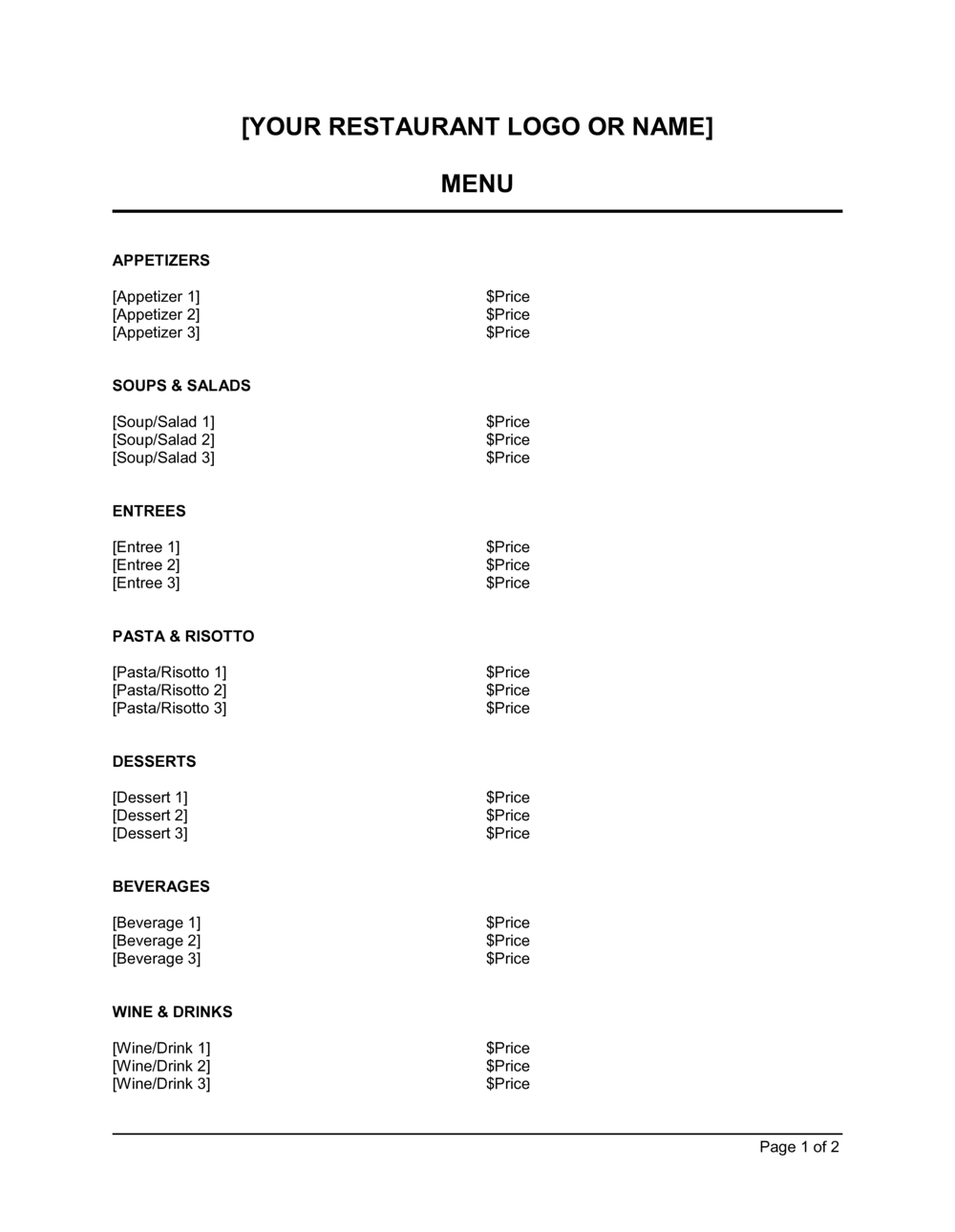
A Simple Menu Template is a pre-formatted Word document that lets food-service businesses list their dishes, beverages, and prices in a clean, readable layout β€” without starting from a blank page. This free Word download is fully editable online: swap in your logo, add or remove sections, update prices, and export as PDF in under 30 minutes.
When you need it
Use it when opening a new restaurant, cafe, food truck, or catering operation, or whenever you need to refresh your current menu for a seasonal update, price change, or rebrand. It is also the fastest way to produce a daily specials insert or a limited-time event menu.
What's inside
Restaurant name and logo block, organized food and beverage sections with item names, descriptions, and prices, allergen and dietary notation fields, and a footer for contact details or social handles. The template is structured so each section can be expanded, collapsed, or reordered to fit any cuisine type or service format.

What is a Simple Menu Template?

A Simple Menu Template is a pre-formatted Word document that gives food-service businesses β€” restaurants, cafes, food trucks, catering companies, and market vendors β€” a ready-to-edit structure for presenting their dishes, drinks, and prices to customers. It includes organized sections for item names, short descriptions, and prices, along with fields for allergen symbols, a restaurant header, and footer contact details. Rather than building a menu from a blank page or paying for design software, operators download the template, swap in their own content, and export a print-ready PDF in under an hour.

Why You Need This Document

Operating without a clearly formatted, up-to-date menu creates problems that compound quickly. Guests who cannot find what they want, navigate pricing, or identify allergen-safe options order less, complain more, and leave faster β€” each of those outcomes directly reduces revenue per cover. An out-of-date menu with stale prices forces staff to apologize and correct at the table, eroding the guest experience before the food arrives. In the UK and EU, operating without documented allergen information is a regulatory violation that carries fines and exposes the business to serious liability in the event of an allergic reaction. A consistently formatted, versioned menu template solves all three problems: it keeps pricing current, guides guests through ordering efficiently, and provides the structure for allergen compliance. This template gives you a professionally structured starting point you can update in minutes whenever prices, seasons, or the lineup changes.

Which variant fits your situation?

If your situation is…Use this template
Full dine-in restaurant with starters, mains, and dessertsRestaurant Menu Template
Coffee shop or cafe with drinks and light foodCafe Menu Template
Food truck with a short rotating daily menuSimple Menu Template (Single Page)
Catering company presenting event package options to clientsCatering Menu Proposal
Bar or lounge listing cocktails, wines, and spiritsDrinks Menu Template
Hotel or resort with room service and multiple dining outletsHotel Room Service Menu
Seasonal or limited-time specials insertDaily Specials Menu Template

Common mistakes to avoid

❌ Printing without proofreading prices

Why it matters: A menu with an incorrect price is a binding representation in most jurisdictions β€” guests can reasonably expect to pay the listed amount. A $14 item accidentally listed at $1.40 creates a difficult conversation and a small financial loss multiplied across every table.

Fix: Have at least two people verify every price against your current pricing sheet before each print run. Store a price-approved PDF as the master file.

❌ Omitting allergen information

Why it matters: In the UK and EU, failing to communicate the 14 major allergens to guests is a legal breach under food information regulations. In the US, while federal law focuses on packaged foods, allergen incidents in restaurants create serious liability exposure.

Fix: Add a dietary symbol system and an 'inform your server' disclaimer at minimum. For full compliance in the UK and EU, list all 14 regulated allergens per item or by section.

❌ Updating prices on screen but reprinting the wrong file

Why it matters: Menus printed from an outdated file create immediate confusion at the point of sale, erode guest trust, and lead to operational disputes between front-of-house staff and management.

Fix: Keep a single master file with the version date in the file name (e.g., MenuSpring2026_v3.docx). Archive all prior versions in a separate folder.

❌ Listing too many items per section

Why it matters: Research on menu psychology consistently shows that guests become less satisfied with their choices as the number of options increases. Menus with more than seven items per section increase decision anxiety and slow table turn times.

Fix: Limit each section to four to seven items. If you have more, split into subsections or rotate items seasonally rather than listing everything simultaneously.

❌ Using a description field to list every ingredient

Why it matters: An ingredient list is not a description β€” 'chicken, garlic, lemon, thyme, olive oil, capers, white wine' tells guests nothing about the dish experience and wastes the most valuable marketing space on the menu.

Fix: Write descriptions that highlight two or three key ingredients plus one preparation or sensory detail. Treat the description as a three-second sales pitch, not a recipe card.

❌ Failing to update the menu after price or item changes

Why it matters: Operating with an out-of-date printed menu while staff quote different prices creates guest complaints, comps, and revenue leakage. It also signals disorganized management to attentive guests.

Fix: Establish a menu update schedule tied to cost-of-goods reviews β€” quarterly at minimum, monthly for high-volatility ingredients. Use the template's version date to track the last update.

The 9 key clauses, explained

Header β€” restaurant name and branding

In plain language: The top of the menu carries your establishment name, logo, and optionally a tagline or cuisine descriptor that sets the tone before the guest reads a single item.

Sample language
[RESTAURANT NAME] | [CUISINE TYPE OR TAGLINE] | [WEBSITE OR SOCIAL HANDLE]

Common mistake: Using a low-resolution logo exported from a social media profile. Pixelated logos in a printed menu signal an unprofessional operation and reduce guest trust before they read the first item.

Section headers and layout structure

In plain language: Bold, clearly labeled headings divide the menu into logical categories β€” Starters, Mains, Sides, Desserts, Non-Alcoholic Drinks, Wines β€” so guests can navigate without reading every line.

Sample language
STARTERS | MAINS | SIDES | DESSERTS | BEVERAGES

Common mistake: Listing too many sections for the number of items available. A menu with eight sections and two items each looks sparse and confuses ordering β€” aim for three to five sections with at least four items per section.

Item name

In plain language: The dish or drink name as it will be called on the floor β€” specific enough to be identifiable, styled consistently across all items (e.g., all title case or all sentence case).

Sample language
Grilled Sea Bass | Truffle Mac and Cheese | Mango Sorbet

Common mistake: Inconsistent capitalization across items β€” mixing all-caps names with sentence-case names in the same section makes the menu look unfinished and harder to scan.

Item description

In plain language: A one-to-two line description naming key ingredients, preparation method, and one sensory detail (texture, temperature, flavor profile) that helps the guest visualize the dish.

Sample language
Pan-seared [PROTEIN] with [SAUCE], served on a bed of [STARCH/VEGETABLE], finished with [GARNISH].

Common mistake: Writing descriptions that repeat the item name verbatim rather than adding information. 'Grilled salmon β€” a grilled piece of salmon' wastes the description field and adds no selling value.

Price

In plain language: The per-item price shown after the name and description, formatted the same way throughout β€” either with a currency symbol or without, but never both on the same menu.

Sample language
$14 | $14.00 | 14

Common mistake: Mixing price formats β€” some items show '$12.00' and others show '$12' or '12.' The inconsistency draws the eye to price differences rather than item appeal, a well-documented menu psychology error.

Allergen and dietary symbols

In plain language: A symbol legend at the bottom of the menu (or next to each item) identifies dishes that are vegetarian, vegan, gluten-free, dairy-free, or contain common allergens such as nuts, shellfish, or eggs.

Sample language
(V) Vegetarian | (VE) Vegan | (GF) Gluten-Free | (N) Contains Nuts | (DF) Dairy-Free

Common mistake: Omitting allergen notation entirely. In many jurisdictions β€” including the UK and EU β€” failure to communicate the 14 major allergens to guests is a legal violation that carries fines and reputational risk.

Add-ons and modifications block

In plain language: An optional section or in-line callout listing available upgrades β€” extra protein, sauce substitutions, size options, or add-on sides β€” with their individual prices.

Sample language
Add grilled chicken +$4 | Upgrade to sweet potato fries +$2 | Extra sauce +$1

Common mistake: Hiding add-on pricing in fine print or leaving it off the menu entirely, forcing servers to memorize and recite every upsell. In-menu add-ons increase average check size by 8–15% when clearly displayed.

Footer β€” contact, hours, and policy notes

In plain language: The footer carries the establishment address, phone number, website, social media handles, and any short policy notes β€” gratuity for large parties, corkage fees, or a 'please inform your server of any allergies' notice.

Sample language
[RESTAURANT NAME] | [ADDRESS] | [PHONE] | [WEBSITE] | Gratuity of [X]% added to parties of [N] or more. Please inform your server of any dietary requirements.

Common mistake: Printing a phone number or address that is out of date. Menus shared digitally or photographed by guests function as persistent advertising β€” stale contact information sends potential customers to dead links or wrong locations.

Date or version identifier

In plain language: A small version date or season label (e.g., 'Spring 2026' or 'Updated May 2026') printed discreetly in the footer so staff and management can confirm they are using the current version.

Sample language
Menu effective [MONTH YEAR] | v[VERSION NUMBER]

Common mistake: Skipping version control entirely and reprinting without updating the file name. Operations with multiple locations routinely distribute the wrong version of a menu when there is no date stamp to differentiate files.

How to fill it out

  1. 1

    Add your restaurant name, logo, and branding

    Replace the placeholder header with your establishment name and upload a high-resolution logo (300 dpi minimum for print). Set the font and color palette to match your brand.

    πŸ’‘ Use the same two fonts throughout β€” one for section headers, one for item names and descriptions. More than two fonts makes a menu look cluttered.

  2. 2

    Define your menu sections

    Delete sections you don't need and rename the remaining ones to match your service style. Three to five sections (e.g., Starters, Mains, Desserts, Drinks) work for most formats.

    πŸ’‘ Order sections by the typical flow of a meal β€” guests scan menus the way they eat, not alphabetically.

  3. 3

    Enter item names in a consistent style

    Type each dish or drink name using the same capitalization convention throughout β€” title case (Grilled Sea Bass) or sentence case (Grilled sea bass) β€” and apply your chosen heading font.

    πŸ’‘ Keep item names under six words where possible. Shorter names are easier to remember and order verbally at the table.

  4. 4

    Write short, specific item descriptions

    For each item, write one to two lines naming key ingredients, preparation method, and one sensory detail. Skip filler words like 'delicious' or 'amazing' β€” specifics sell better than adjectives.

    πŸ’‘ Test descriptions by reading them aloud. If it takes more than 10 seconds to read, cut it.

  5. 5

    Set prices and format them consistently

    Enter the price for each item after the description. Choose one format β€” '$14', '$14.00', or '14' β€” and use it throughout. Never mix formats on the same menu.

    πŸ’‘ Prices without a currency symbol (just '14' rather than '$14') have been shown in hospitality research to reduce price sensitivity and increase average spend.

  6. 6

    Add allergen symbols and a legend

    Place the appropriate dietary symbols (V, VE, GF, N, DF) next to each qualifying item and add the symbol legend at the bottom of the menu or on a dedicated allergen section.

    πŸ’‘ If more than 30% of your items are vegan or gluten-free, consider a separate section rather than scattering symbols throughout β€” it's easier for guests with restrictions to find options.

  7. 7

    Complete the footer with current contact details

    Enter your address, phone number, website, and social handles. Add any standard policy notes β€” large party gratuity, corkage fee, allergy disclaimer.

    πŸ’‘ Add a version date in 8pt font at the bottom of the footer so you can confirm at a glance which version is in circulation.

  8. 8

    Export as PDF and proof before printing

    Export a PDF and review it on screen and as a printed test copy before sending to a printer or publishing online. Check that no text is cut off, all prices are visible, and the logo is sharp.

    πŸ’‘ Print one test copy on the actual paper stock you plan to use β€” colors and font weights render differently on glossy, matte, and uncoated paper.

Frequently asked questions

What is a simple menu template?

A simple menu template is a pre-formatted document β€” typically in Word or PDF β€” that gives food-service businesses a ready-to-edit structure for listing dishes, drinks, and prices. It includes placeholder sections for item names, descriptions, prices, and allergen symbols, so operators can produce a professional menu in under an hour without design software. It is the fastest starting point for a restaurant, cafe, food truck, or catering operation that needs a clean, readable menu quickly.

What should a simple menu include?

At minimum, a simple menu should include the establishment name, organized food and beverage sections with item names and prices, short descriptions for key items, allergen or dietary symbols, and footer contact details. A version date and an allergen disclaimer round out a fully functional menu. More elaborate menus add photos, wine pairings, and brand-specific typography, but none of those are required for day-to-day operations.

How do I format a restaurant menu in Word?

Start with a two-column table layout or a single-column list, depending on your item count. Use one font for section headers (bold, 14–16pt) and another for item names and descriptions (10–12pt). Set prices in a right-aligned tab stop so they line up vertically. Export as PDF before printing to lock the layout β€” Word documents reflow when opened on different computers, which shifts spacing and alignment.

How often should I update my menu?

Conduct a full menu review at least quarterly to align prices with current ingredient costs and remove slow-moving items. High-volatility ingredients β€” seafood, avocado, premium proteins β€” may require monthly price checks. Seasonal menus (spring, summer, fall, winter) build in a natural update cadence and give guests a reason to return. Every update should increment the version date in the footer so staff can confirm they are working from the current version.

Do I need to list allergens on my menu?

In the UK and EU, yes β€” food information regulations require that the 14 major allergens be communicated to guests for every food item sold in a food-service setting. In the US, federal allergen labeling law applies to packaged foods; restaurant menus are not federally mandated to list allergens, but many states and municipalities have adopted requirements, and allergen incidents create significant liability regardless of local law. Best practice is to add dietary symbols and an 'inform your server of any allergies' disclaimer on every menu.

What is the difference between a menu and a price list?

A price list is a functional catalog β€” item name and price, nothing more. A menu is a sales and branding document: it includes descriptions that frame the guest experience, uses layout and typography to guide attention toward high-margin items, and communicates the restaurant's identity through tone, imagery, and naming. A simple menu template sits closer to a price list but adds the structure (sections, descriptions, dietary symbols) that elevates it into an operational menu.

How many items should be on a simple menu?

For most food-service formats, 15 to 30 items across three to five sections is the effective range. Below 15, guests may perceive limited choice; above 30, decision fatigue slows ordering and table turn times. Food trucks and pop-ups often operate with 6 to 12 items deliberately β€” a short menu signals focus and speeds service. Cafes typically list 8 to 15 food items plus a full drinks menu separately.

Can I use a menu template for a catering business?

Yes β€” a simple menu template adapts well to catering by organizing offerings into packages (e.g., 'Package A: 3 canapes, 1 main, 1 dessert per head') or by event type (corporate lunch, wedding, private dinner). Catering menus are typically shared as PDFs during the booking process rather than printed and handed to guests, so the template is usually produced in a more document-like format with pricing per head rather than per item.

What paper size and format should I use for a printed menu?

Letter (8.5 Γ— 11 in) or A4 works for single-page and folded menus and prints on any office or commercial printer. Trifold menus use the same sheet folded to three panels. For a premium feel, some restaurants use A5 (half-letter) laminated cards or single large-format A3 sheets on the table. Export as PDF before printing β€” PDF locks fonts, layout, and image resolution so the print output matches your screen exactly.

How this compares to alternatives

vs Restaurant Business Plan

A restaurant business plan is a strategic document used to secure financing, present to investors, or plan a new location β€” it includes market analysis, financial projections, and an operational model. A simple menu template is an operational sales tool used daily on the floor. The business plan justifies opening the restaurant; the menu runs it.

vs Price List Template

A price list is a stripped-down catalog of items and prices with no descriptive or brand content. A menu template adds descriptions, sections, allergen symbols, branding, and layout designed to guide ordering behavior. Use a price list for internal cost-tracking or wholesale quoting; use a menu template for any customer-facing food-service context.

vs Catering Proposal Template

A catering proposal is a client-facing sales and contract document that includes event details, package pricing, deposit terms, and service agreements. A menu template lists what you serve; a catering proposal packages that information into a bookable offer with terms. Catering businesses typically need both β€” the menu inside the proposal.

vs Food Truck Business Plan

A food truck business plan covers startup costs, location strategy, licensing, and financial projections for launching a mobile food operation. A simple menu template is the product document the food truck uses once operational. The business plan gets the truck on the road; the menu template tells customers what is on the window.

Industry-specific considerations

Food and Beverage / Restaurant

Multi-section dine-in menus with Γ  la carte pricing, wine lists, and allergen callouts β€” updated seasonally as ingredient costs shift.

Hospitality / Hotels

Room-service menus, in-restaurant menus, and bar menus that must align with brand standards across multiple outlets in a single property.

Catering and Events

Per-head package menus shared as PDFs during client consultations, with customizable course options and dietary accommodation notes.

Retail / Specialty Food

Counter menus for delis, bakeries, and specialty food shops listing daily-made items, rotating specials, and grab-and-go pricing.

Jurisdictional notes

United States

Federal allergen labeling law (FALCPA) applies to packaged foods, not restaurant menus. However, several states and municipalities β€” including New York City β€” require restaurants to disclose certain allergens or calorie counts on menus. The FDA's menu labeling rule mandates calorie counts for chain restaurants with 20 or more locations. Check your state and local health department requirements before finalizing your menu.

Canada

Ontario's Making Healthier Choices Act requires chain restaurants with 20 or more locations to post calorie counts on menus. Other provinces have varying disclosure requirements. Federal food labeling regulations under the Safe Food for Canadians Act focus on packaged goods, but restaurants with allergen incidents face liability under general negligence and food safety laws in every province.

United Kingdom

The UK Food Information Regulations (Natasha's Law, effective October 2021) require full ingredient and allergen labeling on pre-packaged-for-direct-sale foods. For food sold by restaurants and cafes, the 14 major allergens regulated under EU Food Information Regulation (retained in UK law) must be communicated to guests β€” either on the menu, via a separate allergen sheet, or verbally with a documented system. Non-compliance carries fines and reputational risk.

European Union

EU Regulation 1169/2011 on the provision of food information to consumers requires food-service businesses to communicate the 14 major allergens for every dish sold. This applies to menus, verbal communication, and written allergen sheets β€” operators must have a documented system. Some member states (Germany, France) have additional local labeling or calorie-disclosure requirements for restaurants above certain turnover thresholds.

Template vs lawyer β€” what fits your deal?

PathBest forCostTime
Use the templateAny food-service operator who needs a clean, professional menu quickly without design softwareFree30–60 minutes
Template + legal reviewMulti-outlet hospitality groups standardizing menus across locations or adding full allergen compliance documentation$100–$400 (graphic designer or food-service consultant review)1–3 days
Custom draftedUpscale or fine-dining establishments where menu design, paper stock, and typography are central to the brand experience$500–$3,000+ (professional menu designer)1–3 weeks

Glossary

Menu Section
A labeled grouping of related items on a menu β€” for example, Starters, Mains, Desserts, or Beverages.
Menu Item Description
A short line of text beneath an item name that describes key ingredients, preparation style, or flavors β€” typically 10 to 20 words.
Price Point
The displayed cost of a single menu item, shown after the item name and description, formatted consistently throughout the menu.
Allergen Notation
A symbol or abbreviation (e.g., GF for gluten-free, V for vegetarian, N for contains nuts) placed next to a menu item to flag potential allergens.
Table d'Hote
A fixed-price menu offering a set number of courses at a single price, as opposed to an Γ  la carte menu where each item is priced individually.
Γ€ la Carte
A menu format in which each dish is priced and ordered separately, giving guests full flexibility to build their own meal.
Menu Engineering
The practice of analyzing item profitability and popularity to decide which dishes to highlight, reposition, or remove from the menu.
Cover
One paying guest or meal served β€” used in food-service operations to measure daily volume and revenue per seat.
Upsell Item
A higher-margin dish or add-on β€” such as a premium protein option or a specialty dessert β€” positioned on the menu to increase average spend per cover.
Dietary Identifier
A standardized label (vegan, gluten-free, dairy-free, halal, kosher) used to help guests with dietary restrictions identify suitable items quickly.
Menu Insert
A loose single-page or half-page addition placed inside a printed menu to list daily specials, seasonal items, or promotional offers.
Contribution Margin
The selling price of a menu item minus its food cost β€” the amount each item contributes to covering overhead and generating profit.

Part of your Business Operating System

This document is one of 3,000+ business & legal templates included in Business in a Box.

  • Fill-in-the-blanks β€” ready in minutes
  • 100% customizable Word document
  • Compatible with all office suites
  • Export to PDF and share electronically

Create your document in 3 simple steps.

From template to signed document β€” all inside one Business Operating System.
1
Download or open template

Access over 3,000+ business and legal templates for any business task, project or initiative.

2
Edit and fill in the blanks with AI

Customize your ready-made business document template and save it in the cloud.

3
Save, Share, Send, Sign

Share your files and folders with your team. Create a space of seamless collaboration.

Save time, save money, and create top-quality documents.

β˜…β˜…β˜…β˜…β˜…

"Fantastic value! I'm not sure how I'd do without it. It's worth its weight in gold and paid back for itself many times."

Managing Director Β· Mall Farm
Robert Whalley
Managing Director, Mall Farm Proprietary Limited
β˜…β˜…β˜…β˜…β˜…

"I have been using Business in a Box for years. It has been the most useful source of templates I have encountered. I recommend it to anyone."

Business Owner Β· 4+ years
Dr Michael John Freestone
Business Owner
β˜…β˜…β˜…β˜…β˜…

"It has been a life saver so many times I have lost count. Business in a Box has saved me so much time and as you know, time is money."

Owner Β· Upstate Web
David G. Moore Jr.
Owner, Upstate Web

Run your business with a system β€” not scattered tools

Stop downloading documents. Start operating with clarity. Business in a Box gives you the Business Operating System used by over 250,000 companies worldwide to structure, run, and grow their business.

Free Forever PlanΒ Β·Β No credit card required