Reservation Confirmation Letter Template

Free Word download • Edit online • Save & share with Drive • Export to PDF

1 page15–25 min to fillDifficulty: Standard
Learn more ↓
FreeReservation Confirmation Letter Template

At a glance

What it is
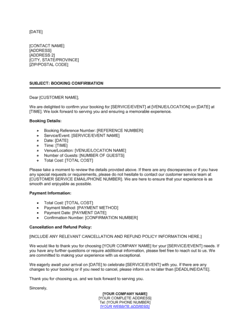
A Reservation Confirmation Letter is a formal written communication a service provider sends to a customer to confirm the details of an accepted booking. This free Word download lets you fill in the date, time, party size, services included, total cost, deposit received, and cancellation policy, then export as PDF or email directly to the guest in minutes.
When you need it
Send it as soon as a booking is accepted — whether for a hotel stay, restaurant private dining, event venue, spa, or tour — to put all agreed details in writing and reduce the chance of a no-show or a dispute.
What's inside
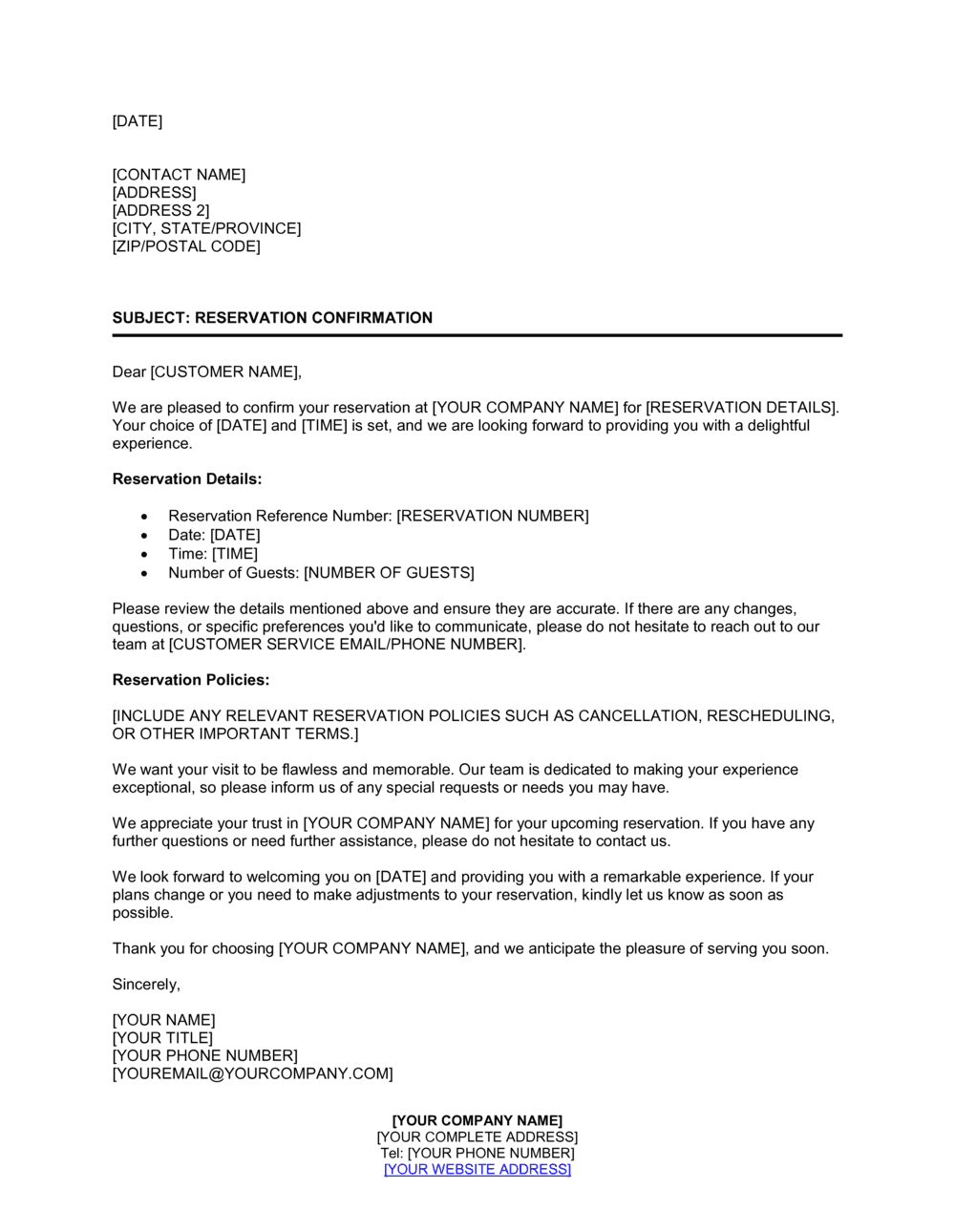
Header and greeting, confirmed reservation details (date, time, party size, and location), services and inclusions summary, total cost and deposit status, cancellation and refund policy, and a warm closing with contact information for changes or questions.

What is a Reservation Confirmation Letter?

A Reservation Confirmation Letter is a formal written communication sent by a service provider to a customer immediately after accepting a booking. It consolidates every agreed detail — the date, time, party size, specific room or space reserved, services included, total cost, deposit received, balance due, and cancellation policy — into a single document both parties can refer to before and after the visit. Unlike a casual text message or verbal agreement, a properly completed confirmation letter eliminates the ambiguity that causes no-shows, disputed charges, and last-minute service disagreements in hospitality, food service, and events.

Why You Need This Document

Without a written confirmation, the terms of a booking exist only in someone's memory or in a thread of informal messages that is difficult to enforce. Guests who arrive expecting a different table size, a room that was already re-let, or a menu you never agreed to have genuine grounds for a complaint — and no paper trail means the dispute is resolved by goodwill rather than agreed terms. A same-day confirmation letter locks in the details, starts the cancellation notice period from a clear date, and gives both parties a reference number to use in any follow-up. For operators taking deposits, it also documents that the payment was received against a specific booking, reducing chargebacks and refund disputes. This template gives you a professional, complete confirmation you can send in five minutes — covering every field that matters so nothing falls through the gap between booking and arrival.

Which variant fits your situation?

If your situation is…Use this template
Confirming a hotel room or suite bookingHotel Reservation Confirmation Letter
Confirming a private dining or large restaurant partyRestaurant Reservation Confirmation Letter
Confirming an event venue hire with setup and cateringEvent Venue Booking Confirmation Letter
Confirming a tour, excursion, or activity bookingTour Booking Confirmation Letter
Notifying a customer that a reservation has been modifiedReservation Amendment Letter
Notifying a customer that their reservation has been cancelledReservation Cancellation Letter
Requesting a deposit payment before confirming a bookingDeposit Request Letter

Common mistakes to avoid

❌ Vague cancellation terms

Why it matters: Without a specific day count and a clear refund or forfeiture rule, the policy is unenforceable and disputes are decided by goodwill rather than agreed terms.

Fix: Replace all vague language with exact figures: '48 hours' notice, '50% deposit forfeited', and a specific contact method for cancellations.

❌ Missing confirmation number

Why it matters: Without a unique reference, guests calling to amend or cancel have no way to quickly identify their booking, slowing down your team and increasing the risk of the wrong booking being changed.

Fix: Assign a unique confirmation number to every booking before the letter is sent and include it in both the subject line and the body of the letter.

❌ Omitting the balance due date and payment method

Why it matters: Guests who do not know when or how to pay the remaining balance frequently arrive unprepared, creating checkout delays and payment disputes.

Fix: State the balance amount, the exact due date or trigger (arrival, 7 days prior), and the accepted payment methods in the cost section of the letter.

❌ Confirming special requests as guaranteed

Why it matters: Writing 'confirmed: gluten-free menu' when availability depends on the kitchen's prep schedule creates a liability if the request cannot be fulfilled on the day.

Fix: Use qualified language: 'We have noted your request and will do our best to accommodate it. Please contact us 48 hours before arrival to confirm availability.'

The 9 key clauses, explained

Header and date

In plain language: Your business name, address, contact details, the date of the letter, and the guest's name and address at the top.

Sample language
[BUSINESS NAME] | [ADDRESS] | [PHONE] | [EMAIL] [DATE] [GUEST FULL NAME] [GUEST ADDRESS]

Common mistake: Using the booking date instead of the letter date — the letter date establishes when confirmation was issued and matters if a dispute arises over notice timelines.

Subject line and greeting

In plain language: A clear subject line referencing the confirmation number and a professional salutation addressing the guest by name.

Sample language
Subject: Reservation Confirmation — Booking Ref [CONFIRMATION NUMBER] Dear [GUEST NAME],

Common mistake: Using a generic 'Dear Guest' greeting. Addressed confirmations feel professional and reduce the chance the email is treated as automated spam.

Confirmation statement

In plain language: One or two sentences explicitly stating that the reservation is confirmed and thanking the guest for their booking.

Sample language
We are pleased to confirm your reservation at [VENUE NAME]. Thank you for choosing us — we look forward to welcoming you.

Common mistake: Being ambiguous about whether the booking is confirmed or pending. Use the word 'confirmed' explicitly so the guest has no reason to call and check.

Reservation details

In plain language: The specific date, arrival time, departure or end time, party or group size, and the specific room, table, or space reserved.

Sample language
Date: [DATE] | Arrival: [TIME] | Departure / End Time: [TIME] | Party Size: [NUMBER] | Reserved: [ROOM / TABLE / SPACE NAME OR NUMBER]

Common mistake: Omitting the party size or space identifier. A guest who shows up with 12 people expecting a table for 8 is a common, easily preventable conflict.

Services and inclusions

In plain language: A concise list of exactly what is included in the booking — meals, beverages, equipment, amenities, or services — so there is no ambiguity at check-in.

Sample language
Your reservation includes: [SERVICE 1], [SERVICE 2], and [SERVICE 3]. Items not listed above are available at an additional charge.

Common mistake: Listing inclusions vaguely as 'breakfast included' without specifying whether it covers all guests or just two. Vague inclusions generate disputes at checkout.

Total cost and deposit received

In plain language: States the full price for the reservation, the deposit amount already paid, and the balance due with the date and method of payment expected.

Sample language
Total: $[AMOUNT] | Deposit Received: $[DEPOSIT] on [DATE] | Balance Due: $[BALANCE] payable by [DATE / at check-in] via [PAYMENT METHOD].

Common mistake: Confirming the deposit without stating when and how the balance is due. Guests who do not know the payment deadline frequently arrive with no payment arranged.

Cancellation and amendment policy

In plain language: Specifies the notice period required to cancel or modify without penalty, the refund or forfeiture terms, and how to notify the business.

Sample language
Cancellations made [X] or more days before [DATE] will receive a full refund of the deposit. Cancellations within [Y] days will forfeit [PERCENTAGE OR FULL DEPOSIT AMOUNT]. To cancel or amend, contact us at [EMAIL / PHONE].

Common mistake: Stating the policy in vague terms like 'reasonable notice required.' A specific number of days and a clear forfeiture rule are the only way to enforce the policy if disputed.

Special requests and notes

In plain language: Acknowledges any dietary requirements, accessibility needs, decoration requests, or other notes the guest submitted, and confirms whether they have been accommodated.

Sample language
Special Requests Noted: [REQUEST 1], [REQUEST 2]. We will do our best to accommodate the above; please contact us at [CONTACT] if your requirements change.

Common mistake: Confirming special requests without qualification. Write 'we will do our best' rather than 'confirmed' for requests that depend on availability on the day.

Closing and contact information

In plain language: A warm closing sentence, the contact name, direct phone, and email the guest should use for any questions or changes.

Sample language
We look forward to seeing you on [DATE]. Should you have any questions, please contact [CONTACT NAME] at [PHONE] or [EMAIL]. Sincerely, [SIGNATORY NAME], [TITLE], [BUSINESS NAME].

Common mistake: Providing only a general inbox without a named contact. Guests with last-minute changes need to reach a person, not a monitored mailbox that may not be checked until it is too late.

How to fill it out

  1. 1

    Enter your business header and the letter date

    Add your business name, full address, phone, and email at the top. Enter today's date — not the booking date — as the letter date.

    💡 Save a pre-filled header version as a master file so you only need to update guest details for each new confirmation.

  2. 2

    Add the guest's name and address

    Enter the guest's full name and mailing or email address. For group bookings, use the primary contact's details and note the group name.

    💡 Match the guest's name exactly as they provided it — spelling errors here undermine professionalism before the guest even reads the body.

  3. 3

    Fill in the subject line with the confirmation number

    Insert a unique confirmation number in the subject line. Use a consistent format such as YYYY-MMDD-001 so records are easy to search and sort.

    💡 Log the confirmation number in your booking system at the same time you issue the letter — never send a number you haven't recorded internally.

  4. 4

    Complete the reservation details block

    Enter the date, arrival time, end or departure time, party size, and the specific room, table, or space identifier. Double-check against your booking system before sending.

    💡 If the booking spans multiple days, list each date on its own line rather than a compressed date range to avoid ambiguity.

  5. 5

    List services and inclusions precisely

    Name each item included in the reservation — meals, beverages, equipment, or amenities — and state 'not included' for anything commonly assumed but excluded.

    💡 Bullet-point inclusions rather than writing them as a sentence. Guests scan confirmation letters; a list is harder to miss than embedded prose.

  6. 6

    State the total cost, deposit, and balance due

    Enter the full reservation price, the deposit amount and date it was received, and the exact balance due with payment method and deadline.

    💡 If the balance is due at arrival, write 'payable on arrival' — not 'at check-in' — to avoid confusion for venues where check-in and arrival are at different times.

  7. 7

    Insert the cancellation policy with specific day counts

    Replace any placeholder text with the actual number of days' notice required and the exact refund or forfeiture amount. Add the direct contact method for cancellations.

    💡 Use calendar days, not business days, in your cancellation policy — 'business days' requires the guest to calculate weekends and holidays.

  8. 8

    Review, export as PDF, and send

    Proofread the completed letter against the original booking record. Export as PDF to lock formatting, then send to the guest's confirmed email address.

    💡 Send the confirmation the same day the booking is made — a delay of even 24 hours increases the chance the guest double-books elsewhere.

Frequently asked questions

What is a reservation confirmation letter?

A reservation confirmation letter is a formal written communication sent by a service provider to a customer confirming that a booking has been accepted. It states the key details — date, time, party size, services included, total cost, deposit paid, and cancellation policy — in one document both parties can reference. It reduces no-shows, prevents misunderstandings, and provides a written record if a dispute arises.

When should I send a reservation confirmation letter?

Send it on the same day the booking is accepted, ideally within a few hours of receiving payment or verbal confirmation. A same-day confirmation reduces the chance the guest double-books elsewhere, reassures them the reservation is secure, and starts the cancellation notice period clock from a clear, documented date.

Does a reservation confirmation letter need to be signed?

A signature is not required for the letter to be effective as a confirmation record. However, for large-group or high-value bookings — such as event venue hires or wedding receptions — many operators ask the guest to countersign and return a copy to acknowledge the cancellation policy and deposit terms. A separate booking deposit agreement or event contract is more appropriate for those situations.

What is the difference between a reservation confirmation letter and a booking contract?

A confirmation letter is a brief, friendly document summarizing the agreed details of a booking — typically one page. A booking contract is a longer legal agreement that creates binding obligations, includes indemnity clauses, and is signed by both parties. Use a confirmation letter for standard reservations; upgrade to a signed contract for large events, multi-day venue hires, or any booking where the financial exposure to either party is significant.

What cancellation terms should I include?

At minimum, state the number of days' notice required to cancel without penalty, the amount of the deposit that will be forfeited for late cancellations, the method the guest must use to notify you (email or phone), and whether amendments are treated the same as cancellations. A common structure for hospitality is: full refund with 7+ days' notice, 50% deposit forfeiture with 3–6 days' notice, and full deposit forfeiture inside 48 hours.

Can I send the confirmation letter by email instead of post?

Yes — email is standard for reservation confirmations across hospitality, food service, and events. Export the completed template as a PDF attachment and send it from a named business email address rather than a no-reply mailbox. Include the confirmation number and guest name in the email subject line so the guest can locate it quickly if they need to reference it later.

How do I handle a guest who disputes the cancellation terms after booking?

If the confirmation letter was sent promptly and the cancellation policy was clearly stated in the letter, you have a written record to reference. Reply by forwarding the original confirmation with the relevant clause highlighted. For large-value disputes, a signed acknowledgment at booking is the strongest protection — consider adding a checkbox or countersignature requirement to your process for high-value reservations.

Should I include a force majeure clause in a confirmation letter?

A confirmation letter is not the right document for a detailed force majeure clause — that belongs in a booking contract. However, a brief sentence noting that the business is not liable for cancellations caused by events outside its reasonable control is reasonable to include in the cancellation policy section of the letter, particularly for outdoor venues or event spaces exposed to weather risk.

What details are most commonly missing from reservation confirmations?

The four most common omissions are the confirmation number, the balance due date and payment method, the party size or specific space reserved, and the precise cancellation notice period in calendar days. Leaving out any one of these creates the conditions for a guest dispute or a last-minute scramble at the time of the booking.

How this compares to alternatives

vs Reservation Cancellation Letter

A confirmation letter tells the guest their booking is accepted and sets out the terms. A cancellation letter tells the guest — or comes from the guest — that the booking is being cancelled and states any refund or forfeiture amount. Both letters should reference the same confirmation number so both documents form a clear paper trail for the same booking.

vs Event Venue Rental Agreement

A confirmation letter is a one-page summary of agreed booking details — suitable for standard reservations. A venue rental agreement is a multi-page binding contract with indemnity, liability, and force majeure clauses, signed by both parties. For any event booking involving significant spend or setup, a signed rental agreement should accompany or replace the confirmation letter.

vs Booking Deposit Invoice

A deposit invoice requests payment of the deposit amount and is issued before or at the time of booking. A confirmation letter is sent after the deposit is received to confirm the booking is secured. Both documents are typically issued for the same booking — the invoice requests money; the confirmation letter acknowledges it was received and the booking is held.

vs Thank-You Letter

A thank-you letter expresses appreciation after a guest's stay or visit but contains no operational booking details. A reservation confirmation letter is issued before the visit and is a functional document containing dates, costs, and policy terms. A thank-you letter can reference the booking in warm terms; a confirmation letter must state the terms precisely.

Industry-specific considerations

Hospitality and Hotels

Confirms room type, check-in and check-out dates, rate plan, prepayment or deposit terms, and the specific cut-off date for cancellation without charge.

Food and Beverage

Covers private dining room hire, set menu or à la carte arrangements, minimum spend requirements, and the deposit amount required to hold a large-party table.

Events and Venues

Documents room hire periods including setup and teardown time, catering packages, AV equipment inclusions, and the deposit schedule tied to a separate venue hire agreement.

Travel and Tourism

Confirms tour departure date, meeting point, group size, what is included (transport, meals, guide), total cost, and the prepayment or refund policy for weather-dependent activities.

Template vs pro — what fits your needs?

PathBest forCostTime
Use the templateHotels, restaurants, event venues, and tour operators confirming standard bookingsFree5 minutes per confirmation
Template + professional reviewOperators adding custom cancellation structures, minimum-spend clauses, or multi-day group attrition terms$0–$100 (operations or legal team check)30–60 minutes
Custom draftedHigh-value event bookings or venues that need a legally binding contract rather than a confirmation letter$300–$1,000 (legal drafting)3–5 days

Glossary

Confirmation Number
A unique reference code assigned to a booking that both parties use to locate and verify the reservation in any follow-up communication.
Deposit
A partial upfront payment made by the customer to secure the reservation, typically expressed as a percentage of the total cost or a fixed amount.
Balance Due
The remaining amount owed by the customer after the deposit has been deducted, payable at check-in, on arrival, or on the date specified in the confirmation.
Cancellation Policy
The rules governing refunds, forfeiture of deposits, and notice periods if either party needs to cancel or significantly change the booking.
No-Show
When a customer fails to arrive for a confirmed reservation without cancelling in advance, often resulting in forfeiture of the deposit.
Force Majeure
An unforeseeable event outside either party's control — such as a natural disaster or government order — that may excuse non-performance of the reservation.
Attrition
In group bookings, the minimum number of rooms or covers the customer commits to filling; shortfalls below this number may incur a fee.
Rooming List
A document submitted by a group organizer listing individual guest names assigned to each reserved room or seat.
Prepayment
Full payment collected at the time of booking rather than on arrival, common for non-refundable rate reservations.
Cut-off Date
The deadline by which a guest must confirm, modify, or cancel a reservation without incurring a penalty or losing a held room or table.

Part of your Business Operating System

This document is one of 3,000+ business & legal templates included in Business in a Box.

  • Fill-in-the-blanks — ready in minutes
  • 100% customizable Word document
  • Compatible with all office suites
  • Export to PDF and share electronically

Create your document in 3 simple steps.

From template to signed document — all inside one Business Operating System.
1
Download or open template

Access over 3,000+ business and legal templates for any business task, project or initiative.

2
Edit and fill in the blanks with AI

Customize your ready-made business document template and save it in the cloud.

3
Save, Share, Send, Sign

Share your files and folders with your team. Create a space of seamless collaboration.

Save time, save money, and create top-quality documents.

★★★★★

"Fantastic value! I'm not sure how I'd do without it. It's worth its weight in gold and paid back for itself many times."

Managing Director · Mall Farm
Robert Whalley
Managing Director, Mall Farm Proprietary Limited
★★★★★

"I have been using Business in a Box for years. It has been the most useful source of templates I have encountered. I recommend it to anyone."

Business Owner · 4+ years
Dr Michael John Freestone
Business Owner
★★★★★

"It has been a life saver so many times I have lost count. Business in a Box has saved me so much time and as you know, time is money."

Owner · Upstate Web
David G. Moore Jr.
Owner, Upstate Web

Run your business with a system — not scattered tools

Stop downloading documents. Start operating with clarity. Business in a Box gives you the Business Operating System used by over 250,000 companies worldwide to structure, run, and grow their business.

Start free · No credit card required