Questions To Ask On A Customer Experience Survey Template

Free Word download β€’ Edit online β€’ Save & share with Drive β€’ Export to PDF

3 pagesβ€’20–25 min to fillβ€’Difficulty: Standard
Learn more ↓
FreeQuestions To Ask On A Customer Experience Survey Template

At a glance

What it is
This is a categorized question bank for product, marketing, and customer experience teams designing customer surveys. It provides ready-to-use questions across six categories β€” satisfaction, effort, recommendation likelihood, feature requests, churn drivers, and onboarding feedback β€” with guidance on when to deploy each type. Download it free in Word, edit the questions to match your product and audience, and export as PDF for internal review before publishing to your survey platform.
When you need it
Use it when launching a new CX measurement program, redesigning an existing survey that is getting low response rates, or adding a targeted pulse survey after a product release, support interaction, or onboarding milestone.
What's inside
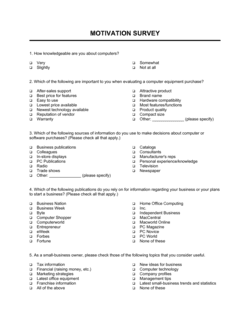
Six categorized question banks covering CSAT, NPS, CES, feature discovery, churn-exit, and onboarding β€” each with multiple question variants, scale options, and follow-up prompts. Guidance notes explain the metric each category measures and when to use it versus alternatives.

What is a Customer Experience Survey Questions Template?

A Customer Experience Survey Questions Template is a categorized reference guide that gives product, marketing, and CX teams a ready-to-use bank of tested survey questions organized by measurement goal β€” satisfaction, recommendation likelihood, task effort, feature prioritization, churn drivers, and onboarding feedback. Rather than a single finished survey, it is the raw material for building targeted survey instruments, with guidance on which question type to use in each customer lifecycle scenario and how to sequence closed-ended scales with open-text follow-ups. This free Word download can be edited to match your product's language and exported as PDF for team review before publishing to your survey platform of choice.

Why You Need This Document

Designing a customer experience survey without a structured question framework produces one of two common failures: surveys so long and unfocused that customers abandon them, or surveys so shallow that the scores cannot be acted on. The gap between "we have survey data" and "we know what to fix" almost always comes down to whether the right question was asked at the right moment. A churn exit survey buried in a quarterly email produces noise; an NPS question with no follow-up probe gives you a number you cannot explain. This template closes that gap by providing categorized, pre-tested questions with guidance on trigger timing, scale selection, and sequencing β€” so the data your team collects maps directly to the product, support, and onboarding decisions it needs to make.

Which variant fits your situation?

If your situation is…Use this template
Measuring overall relationship satisfaction at a fixed cadenceCustomer Satisfaction Survey (CSAT)
Tracking likelihood to recommend as a single top-level metricNet Promoter Score (NPS) Survey
Evaluating friction in a specific interaction or support ticketCustomer Effort Score (CES) Survey
Collecting feedback immediately after a purchase or transactionPost-Purchase Feedback Survey
Understanding why churned customers canceled or did not renewChurn Exit Survey
Gathering feedback from users who completed onboardingOnboarding Feedback Survey
Capturing open-ended product improvement ideas from active usersProduct Feedback Form

Common mistakes to avoid

❌ Asking leading questions that suggest the desired answer

Why it matters: Questions like 'How much did our excellent support team help you?' inflate scores and make benchmarks meaningless for internal decision-making.

Fix: Use neutral phrasing β€” 'How satisfied were you with the support you received?' β€” and test each question by asking whether a dissatisfied customer could honestly select the lowest option.

❌ Sending surveys too frequently to the same customers

Why it matters: Customers who receive a survey after every interaction stop completing them carefully, and eventually stop opening them β€” destroying the longitudinal data needed to track trends.

Fix: Set a suppression window of at least 30 days for transactional surveys and 90 days for relationship surveys so no individual customer receives more than one survey per period.

❌ Including more than seven questions in a single survey

Why it matters: Completion rates drop significantly beyond seven questions on mobile, and response quality degrades as respondents rush through the later questions to finish.

Fix: Prioritize ruthlessly β€” if a question's data would not change a specific decision, remove it. Run separate short surveys for separate goals rather than combining them.

❌ Collecting responses but not closing the feedback loop with customers

Why it matters: Customers who complete surveys and never see any change, acknowledgment, or follow-up become progressively less willing to respond and more likely to share frustration externally.

Fix: Implement a minimum response protocol: auto-acknowledge all submissions, follow up personally with detractors (NPS 0–6) within 48 hours, and publish a quarterly summary of changes made based on feedback.

The 8 key sections, explained

Satisfaction questions (CSAT)

Recommendation likelihood questions (NPS)

Effort and ease questions (CES)

Feature request and prioritization questions

Churn and cancellation exit questions

Onboarding feedback questions

Support and resolution quality questions

Open-ended discovery questions

How to fill it out

  1. 1

    Define the survey's single primary goal

    Before selecting any questions, decide what decision this survey will inform β€” a product roadmap prioritization, a support process improvement, or a quarterly NPS benchmark. Surveys built around one clear goal get higher completion rates and more actionable data.

    πŸ’‘ Write the decision you will make with the results at the top of the working document before you pick a single question.

  2. 2

    Select the right question category for your goal

    Match your goal to the appropriate category in this guide: CSAT for interaction-level satisfaction, NPS for relationship loyalty, CES for friction diagnosis, churn questions for retention analysis, and onboarding questions for activation improvement.

    πŸ’‘ Mixing more than two or three categories in a single survey is the most common cause of survey fatigue and low completion rates.

  3. 3

    Choose a maximum of 5–7 questions per survey

    Select the core closed-ended question for your primary metric, one or two follow-up probes, and one open-text question at the end. Surveys with more than seven questions see completion rates drop sharply, especially on mobile.

    πŸ’‘ Every question that does not directly support your stated goal is a candidate for removal.

  4. 4

    Customize placeholder text to match your product and audience

    Replace all [PLACEHOLDERS] in the template with your actual product name, company name, feature names, and specific tasks relevant to your customers' workflow.

    πŸ’‘ Use the exact language your customers use to describe your product β€” check support tickets and sales call transcripts for authentic phrasing.

  5. 5

    Set the rating scales and response options consistently

    Pick one scale (1–5, 1–7, or 0–10) and use it consistently throughout. Switching scales between questions creates confusion and inflates measurement error.

    πŸ’‘ For CSAT, 1–5 outperforms 1–10 in response reliability for most B2B and SMB audiences. Reserve 0–10 exclusively for the NPS question.

  6. 6

    Sequence questions from closed to open-ended

    Start with the rated scale question, follow with two to three closed-ended probes, and close with one open-text question. This order reduces abandonment and produces higher-quality qualitative responses.

    πŸ’‘ The final open-text question β€” 'Is there anything else you'd like us to know?' β€” consistently produces the most actionable verbatim feedback in post-survey analysis.

  7. 7

    Define the trigger and delivery timing before publishing

    Specify exactly when the survey fires β€” immediately on support ticket close, 3 days post-onboarding, 30 days post-purchase β€” and document that timing alongside the survey so it can be reproduced consistently each cycle.

    πŸ’‘ Transactional surveys (CSAT, CES) should fire within 24 hours of the interaction. Relationship surveys (NPS) are most reliable at a consistent quarterly or annual interval.

Frequently asked questions

What questions should a customer experience survey include?

A well-structured CX survey includes a core metric question (CSAT, NPS, or CES depending on the goal), one to two closed-ended follow-up probes that diagnose the score, and one open-text question inviting the customer's own words. The right combination depends on whether you are measuring relationship loyalty, interaction satisfaction, or task friction. This template provides categorized question banks for each scenario so you can mix and match without starting from scratch.

What is the difference between CSAT, NPS, and CES?

CSAT (Customer Satisfaction Score) measures satisfaction with a specific interaction or product on a 1–5 scale. NPS (Net Promoter Score) measures likelihood to recommend on a 0–10 scale and is used as a top-level relationship loyalty metric. CES (Customer Effort Score) measures how easy a specific task was on a 1–7 agreement scale and is the best predictor of repeat purchase for service-heavy businesses. Each metric answers a different question and should not be used interchangeably.

How many questions should a customer experience survey have?

Five to seven questions is the sweet spot for most CX surveys. Surveys under five questions often lack the follow-up probes needed to explain a score; surveys over seven see measurable drops in completion rate and response quality, especially on mobile devices. If you have more goals than seven questions can address, run separate targeted surveys rather than combining them into one long instrument.

When should I send a customer experience survey?

Transactional surveys β€” CSAT after a support interaction, CES after onboarding completion β€” should fire within 24 hours of the triggering event while the experience is fresh. Relationship surveys β€” NPS, quarterly satisfaction β€” perform best at a consistent interval such as 90 days or annually, sent at the same time each cycle to make trend data comparable. Avoid sending any survey immediately after a known service disruption or billing event.

What is a good CSAT or NPS score?

CSAT benchmarks vary by industry, but a score above 80% (percentage of 4s and 5s on a 1–5 scale) is generally considered strong across B2B SaaS, professional services, and e-commerce. For NPS, scores above 30 are considered good, above 50 excellent, and above 70 world-class β€” though industry norms vary significantly. The more actionable approach is to track your own score over time and measure directional improvement rather than comparing against industry averages from different customer profiles.

How do I increase customer survey response rates?

Keep the survey under seven questions, send it immediately after the relevant interaction, and use a subject line or introduction that explains exactly how long it will take and what will be done with the feedback. Personalize the sender name to a real person rather than a generic company address. For B2B accounts, having the customer success manager send the survey personally consistently outperforms automated bulk sends by 20–40 percentage points on response rate.

Should I use open-ended or closed-ended questions in a CX survey?

Both, in the right order and proportion. Closed-ended questions (scales, multiple choice) produce the quantifiable metrics needed for tracking and benchmarking. Open-ended questions produce the specific customer language and unanticipated issues that drive product and service improvements. A practical ratio is three to five closed-ended questions followed by one open-ended prompt at the end, where the customer can elaborate on anything the structured questions missed.

What is an exit or churn survey and when should I use it?

An exit survey β€” also called a churn survey or cancellation survey β€” is triggered when a customer cancels a subscription, declines to renew, or explicitly churns. It asks the customer to identify their primary reason for leaving and whether any change could have retained them. It should be triggered at the exact moment of cancellation, not days later by email. Exit survey data is among the most actionable CX data a product team can collect, but it is only reliable if the question options match the actual churn drivers in your business.

How do I analyze customer experience survey results?

Start with the quantitative scores β€” calculate CSAT percentage, NPS, or CES mean β€” and track them over time against a consistent baseline. Then analyze open-text responses by tagging recurring themes manually or with a text-analysis tool. Cross-segment results by customer tier, tenure, or product line to identify whether low scores are concentrated in a specific cohort. The final step is mapping the top themes to specific product, support, or onboarding changes and assigning owners.

How this compares to alternatives

vs Customer Satisfaction Survey

A customer satisfaction survey is a ready-to-send instrument with pre-structured questions, rating scales, and layout for a specific deployment. This question bank is a reference guide for teams designing or customizing their own surveys β€” it provides the question inventory and methodology guidance, not the finished survey form. Use the survey template when you need something deployable today; use this question bank when you are building or redesigning your CX measurement program.

vs Customer Feedback Form

A customer feedback form is a passive, always-on channel β€” typically embedded on a website or in a product β€” where customers can submit comments at will. A CX survey is an active, triggered measurement instrument sent at a specific moment in the customer lifecycle. Feedback forms capture unsolicited input; surveys capture structured, comparable data from a defined population.

vs Net Promoter Score Survey

An NPS survey is a single-metric instrument built around the 0–10 recommendation question. This question bank covers NPS as one of six measurement categories and provides the surrounding context β€” when NPS is the right metric versus CSAT or CES, how to write the follow-up probe, and how to sequence it within a broader survey. Use the standalone NPS template when that metric alone is your goal.

vs Employee Satisfaction Survey

An employee satisfaction survey applies similar measurement principles β€” scales, effort questions, open-ended probes β€” but to the internal workforce rather than customers. The question categories, driver structures, and benchmarks differ significantly. Customer experience survey questions are not appropriate for employee feedback programs without substantial modification.

Industry-specific considerations

SaaS / Technology

In-app NPS surveys triggered at 30 and 90 days post-activation, feature-specific CES questions after new capability releases, and exit surveys tied to subscription cancellation events.

Retail / E-commerce

Post-purchase CSAT questions covering delivery speed, product accuracy, and packaging quality, plus return-experience CES questions triggered on return confirmation.

Professional Services

Project-completion CSAT surveys sent to client contacts at every milestone, quarterly relationship NPS for ongoing retainer clients, and exit interviews for non-renewing accounts.

Healthcare

Patient satisfaction questions measuring wait time, communication clarity, and care coordination β€” with response options and phrasing adapted to comply with CAHPS survey standards.

Template vs pro β€” what fits your needs?

PathBest forCostTime
Use the templateProduct, marketing, and CX teams building or refreshing their customer survey program without a dedicated research functionFree2–4 hours to select, customize, and sequence questions
Template + professional reviewTeams launching a new CX measurement program where benchmarking and statistical reliability are important$500–$2,000 for a CX consultant or market research advisor review1–2 weeks
Custom draftedEnterprise programs requiring validated psychometric scales, conjoint analysis, or regulatory compliance (e.g., CAHPS for healthcare)$5,000–$25,000+ for a market research firm engagement4–12 weeks

Glossary

CSAT (Customer Satisfaction Score)
A metric derived from asking customers to rate their satisfaction on a 1–5 or 1–10 scale, typically immediately after an interaction or at a regular cadence.
NPS (Net Promoter Score)
A loyalty metric calculated by subtracting the percentage of detractors (0–6) from the percentage of promoters (9–10) on a single 0–10 recommendation question.
CES (Customer Effort Score)
A metric that measures how easy it was for a customer to complete a specific task or resolve an issue, typically on a 1–7 agreement scale.
Closed-Ended Question
A survey question with a fixed set of response options β€” scales, multiple choice, or yes/no β€” that produces quantifiable data.
Open-Ended Question
A free-text survey question that invites customers to answer in their own words, producing qualitative insight rather than a numeric score.
Response Bias
The tendency for survey respondents to answer in ways they think are expected or socially desirable rather than reflecting their true experience.
Survey Fatigue
Declining response quality or abandonment caused by surveys that are too long, too frequent, or too repetitive.
Likert Scale
A rating scale β€” typically 5 or 7 points β€” that measures the degree of agreement or satisfaction from one extreme to the other.
Churn Driver
A specific reason β€” price, missing feature, poor support, or a competitor switch β€” that caused a customer to stop using a product or service.
Transactional Survey
A survey triggered by a specific customer interaction such as a purchase, support call, or onboarding session β€” as opposed to a relationship survey sent on a fixed schedule.

Part of your Business Operating System

This document is one of 3,000+ business & legal templates included in Business in a Box.

  • Fill-in-the-blanks β€” ready in minutes
  • 100% customizable Word document
  • Compatible with all office suites
  • Export to PDF and share electronically

Create your document in 3 simple steps.

From template to signed document β€” all inside one Business Operating System.
1
Download or open template

Access over 3,000+ business and legal templates for any business task, project or initiative.

2
Edit and fill in the blanks with AI

Customize your ready-made business document template and save it in the cloud.

3
Save, Share, Send, Sign

Share your files and folders with your team. Create a space of seamless collaboration.

Save time, save money, and create top-quality documents.

β˜…β˜…β˜…β˜…β˜…

"Fantastic value! I'm not sure how I'd do without it. It's worth its weight in gold and paid back for itself many times."

Managing Director Β· Mall Farm
Robert Whalley
Managing Director, Mall Farm Proprietary Limited
β˜…β˜…β˜…β˜…β˜…

"I have been using Business in a Box for years. It has been the most useful source of templates I have encountered. I recommend it to anyone."

Business Owner Β· 4+ years
Dr Michael John Freestone
Business Owner
β˜…β˜…β˜…β˜…β˜…

"It has been a life saver so many times I have lost count. Business in a Box has saved me so much time and as you know, time is money."

Owner Β· Upstate Web
David G. Moore Jr.
Owner, Upstate Web

Run your business with a system β€” not scattered tools

Stop downloading documents. Start operating with clarity. Business in a Box gives you the Business Operating System used by over 250,000 companies worldwide to structure, run, and grow their business.

Free Forever PlanΒ Β·Β No credit card required