1
Define the learning objectives before anything else
Write 3–5 objectives using action verbs — 'demonstrate', 'calculate', 'apply', 'explain'. Each objective should be testable, meaning you can confirm whether a participant achieved it.
💡 Use the format 'By the end of this session, participants will be able to [ACTION VERB] [SPECIFIC TASK] [IN WHAT CONTEXT]' — this structure forces specificity.
2
Identify your audience and their baseline knowledge
Note the target role, team size, and what participants already know about the topic. This determines the starting point for content, the appropriate depth, and how much pre-work to assign.
💡 A brief pre-session survey (three to five questions) eliminates guesswork about baseline knowledge and signals to participants that their experience is valued.
3
Build the timed agenda around the objectives
Allocate time blocks to each objective, not to each slide. Add a 10% buffer at the end. Place the highest-priority content in the first half of the session when attention is highest.
💡 If you cannot fit all objectives in the available time at a realistic pace, remove an objective — do not compress delivery time to fit everything in.
4
Select delivery methods and prepare all materials
Choose at least two delivery methods per session. Prepare the slide deck, facilitator guide, participant handouts, and any activity instructions. Test all technology at least 24 hours before the session.
💡 Print a physical copy of the facilitator guide even for virtual sessions — technology failures happen, and a paper backup keeps delivery on track.
5
Plan engagement activities at 15–20-minute intervals
Insert a discussion, poll, pair activity, or scenario exercise at least every 20 minutes. Write the exact instructions for each activity in the facilitator notes so they can be delivered consistently.
💡 Time each activity during a rehearsal — activities consistently take 30–50% longer than facilitators estimate when real participants are involved.
6
Prepare the knowledge check and evaluation tools
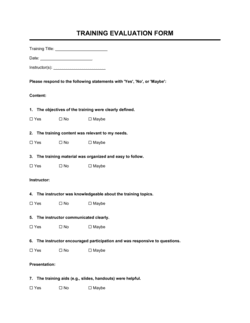
Draft assessment questions directly tied to each learning objective. Set a clear pass threshold. Finalize the post-session evaluation survey and decide how it will be administered.
💡 Write at least one scenario-based question per objective — scenario questions reveal application ability far better than recall questions do.
7
Complete the pre-session preparation checklist
Work through every item on the checklist at least 48 hours before the session: confirm attendance, send pre-work, test equipment, and prepare the physical or virtual space.
💡 Send a calendar reminder to participants 24 hours before the session with the agenda attached — late arrivals and no-shows drop noticeably with a timely reminder.
8
Document the follow-up plan before you deliver
Write the follow-up email, prepare any job aids or reference cards, and brief the relevant managers on what to observe and reinforce after the session. Do this before delivery, not after.
💡 Schedule the Day 30 reinforcement check-in on everyone's calendar at the end of the session itself — it is nearly impossible to coordinate retroactively.