Checklist Trade Show

Free download β€’ Use as a template β€’ Print or share

4 pagesβ€’20–25 min to useβ€’Difficulty: Standard
Learn more ↓
FreeChecklist Trade Show Template

At a glance

What it is
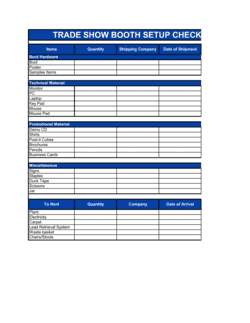
A Trade Show Checklist is a structured pre-event planning document that walks exhibiting teams through every preparation task β€” from booth design and material shipping to staff scheduling and post-show lead follow-up. This free Word download is fully editable online and can be exported as PDF for distribution to every team member before the show floor opens.
When you need it
Use it as soon as you confirm booth space at an upcoming trade show β€” typically 8 to 12 weeks before the event β€” and update it through setup day and post-show debrief.
What's inside
Categorized task lists covering pre-show logistics, booth setup, marketing materials, lead-capture tools, staff assignments and schedules, travel and shipping, on-site operations, and post-event follow-up with budget tracking fields throughout.

What is a Trade Show Checklist?

A Trade Show Checklist is a categorized pre-event planning document that guides marketing and sales teams through every task required to exhibit successfully at a trade show β€” from submitting show service orders and shipping booth materials to staffing the floor, capturing leads, and executing post-event follow-up. It consolidates dozens of time-sensitive tasks, deadlines, and owner assignments into a single reference document that keeps the entire team aligned from booth confirmation through post-show debrief.

Why You Need This Document

Trade shows involve more moving parts than most events: freight shipments with hard advance warehouse deadlines, venue service orders that double in price if submitted late, lead-capture tools that must be tested before the show floor opens, and follow-up windows that close faster than most teams expect. Missing a single deadline β€” a late electrical order, a shipment that arrives after the advance warehouse closes, or a follow-up email sent four days after the show β€” translates directly into higher costs and lost revenue. A completed checklist eliminates the reliance on individual memory and tribal knowledge, gives every team member clear ownership of specific tasks, and creates an auditable record you can refine for the next event. This template gives you a ready-to-use starting point so your team spends its preparation time executing, not building the list from scratch.

Which variant fits your situation?

If your situation is…Use this template
Planning a large multi-day conference booth with multiple staff membersTrade Show Checklist (Enterprise)
Tracking the full event budget across booth, travel, and materialsEvent Budget Template
Assigning staff shifts and booth coverage hour by hourEvent Staff Schedule
Following up with leads captured at the showSales Follow-Up Email Template
Running an internal product launch event rather than exhibitingEvent Planning Checklist
Tracking and reporting on event ROI for leadershipMarketing Campaign Report

Common mistakes to avoid

❌ Missing advance warehouse deadlines

Why it matters: Shipments arriving after the advance warehouse closing date are refused or diverted to show-site receiving, which adds unpredictable drayage fees and may not arrive before your setup window closes.

Fix: Enter the advance warehouse open and close dates from the exhibitor kit immediately and set a calendar reminder for three days before the ship deadline.

❌ Underbudgeting show services and drayage

Why it matters: Drayage, electrical, and internet fees routinely add 20–40% to the total exhibiting cost and are not negotiable once on-site.

Fix: Request the show's official service order forms within one week of confirming booth space and include every line item in the budget tracker before approving total spend.

❌ No backup lead-capture method

Why it matters: Badge scanners fail, apps lose connectivity, and batteries die β€” a show without a backup means losing every lead captured after the failure.

Fix: Print a simple paper lead form with name, company, email, and qualification questions and keep a stack in the booth at all times.

❌ Delaying post-show follow-up beyond 72 hours

Why it matters: Prospect recall of specific booth conversations drops sharply after three days, and competing exhibitors who follow up first capture the appointment.

Fix: Draft the follow-up email sequence before leaving for the show and schedule the send within 24 hours of the last show day closing.

The 10 key fields, explained

Pre-show logistics task list

Booth setup and design notes

Marketing materials inventory

Lead capture setup

Staff schedule and role assignments

Travel and accommodation details

Shipping and freight tracker

On-site operations and contingency notes

Post-event follow-up task list

Budget tracker

How to fill it out

  1. 1

    Enter the show details and key dates

    Fill in the event name, venue, booth number, move-in window, and show dates at the top. These anchor every deadline in the document.

    πŸ’‘ Pull the exact move-in and advance warehouse deadlines from the exhibitor kit the day you receive it β€” these dates drive every other task due date.

  2. 2

    Assign an owner to every task

    For each checklist item, enter the name of the person responsible. Unassigned tasks do not get done, especially in the week before the show.

    πŸ’‘ If a task has no obvious owner, the marketing or event lead should claim it by default rather than leave it blank.

  3. 3

    Set deadlines working backward from move-in day

    Identify move-in day, then count backward: shipping must leave by [X days prior], materials must be printed by [Y days prior], travel booked by [Z weeks prior].

    πŸ’‘ Build in a two-day buffer before the shipping deadline β€” freight carriers miss pickups and domestic ground shipments are frequently delayed by 24 hours.

  4. 4

    Confirm lead-capture setup and CRM integration

    Identify the lead scanner or form tool, test the login in advance, and confirm how data exports to your CRM. Document the backup method if the primary tool fails.

    πŸ’‘ Run a full end-to-end test β€” scan a badge, export the file, and confirm it imports cleanly into your CRM β€” at least one week before the show.

  5. 5

    Build the staff schedule with specific shift times

    List every attending staff member, their role, and their exact shift start and end times for each show day. Include mobile numbers for day-of coordination.

    πŸ’‘ Plan at least one 90-minute off-floor break per person per day β€” booth staff who eat and rest convert more leads in the afternoon than those who skip breaks.

  6. 6

    Log all shipments with tracking numbers

    As each box ships, enter the carrier, tracking number, contents, and expected delivery date. Mark each shipment confirmed when the advance warehouse acknowledges receipt.

    πŸ’‘ Take a photo of every box's label and packed contents before sealing β€” this is your proof of contents if a shipment is lost or a drayage dispute arises.

  7. 7

    Complete post-show tasks within 72 hours

    Import leads to the CRM, trigger the first follow-up email sequence, schedule the debrief meeting, and submit expense receipts while they are still on hand.

    πŸ’‘ Draft the follow-up email sequence before the show so it can be sent within 24 hours of close β€” a pre-written template requires only minor personalization.

Frequently asked questions

What is a trade show checklist?

A trade show checklist is a categorized task list that guides exhibiting teams through every preparation and execution step β€” from booking show services and shipping materials to staffing the booth and following up with leads after the event. It ensures nothing is forgotten across the weeks of planning that precede a show and keeps multiple team members coordinated on shared deadlines.

How far in advance should I start using a trade show checklist?

Start 8 to 12 weeks before the show. The first tasks β€” submitting booth registration, reviewing the exhibitor kit, and booking show services at early-order rates β€” have deadlines that fall 6 to 10 weeks out. Teams that start the checklist fewer than four weeks before the show frequently miss advance warehouse deadlines or pay late-order surcharges on electricity and internet.

What should a trade show checklist include?

A complete checklist covers eight categories: pre-show logistics (exhibitor kit review, service orders, deadlines), booth setup and design, marketing materials inventory, lead-capture tool setup, staff schedules and role assignments, travel and accommodation, shipping and freight tracking, and post-event follow-up with a budget tracker. Missing any category creates a gap that shows up as a problem on the show floor.

How do I track leads at a trade show?

Most shows provide a badge scanner rental that exports contact data directly. Alternatively, use a dedicated lead-capture app with offline mode, a QR-code landing form, or a simple paper lead sheet. The critical step is confirming before the show that captured data exports cleanly to your CRM β€” manual re-entry of hundreds of contacts after the event is slow and error-prone.

What is drayage and why does it matter for planning?

Drayage is the fee a trade show venue charges to move your freight from the loading dock to your assigned booth space β€” and back at teardown. It is billed by weight and is non-negotiable on-site. Drayage costs frequently surprise first-time exhibitors because they are not included in booth space fees. Budget for $300 to $800 per 100 pounds of freight at major US venues and include this in your cost-per-lead calculation.

What should happen within 72 hours after a trade show?

Import all captured leads to your CRM, trigger the first follow-up email sequence, hold a team debrief to capture operational lessons, submit expense receipts, and initiate return freight pickup. Leads contacted within 24 hours of show close have significantly higher response rates than those contacted a week later, when the prospect has moved on and forgotten the conversation.

How do I calculate trade show ROI?

Divide total event spend β€” booth space, show services, materials, travel, staff time, and shipping β€” by the number of qualified leads captured to get cost per lead. Track those leads through your sales pipeline and divide closed revenue by total event spend for revenue ROI. Include staff time at a fully-loaded cost rate; it is typically the largest single line item and is most often omitted from the calculation.

Can I use this checklist for virtual or hybrid trade shows?

The physical logistics sections (shipping, drayage, booth setup) do not apply to virtual events, but the remaining categories β€” materials preparation, lead-capture setup, staff scheduling, and post-event follow-up β€” are directly relevant. For hybrid events, use the full checklist for the in-person component and add a separate digital section covering virtual booth setup, platform testing, and online chat staffing.

How this compares to alternatives

vs Event Planning Checklist

An event planning checklist is designed for organizers running their own event β€” venue booking, catering, speaker management, and attendee registration. A trade show checklist is for exhibitors attending someone else's event β€” booth logistics, show services, and lead capture. The two roles have almost no task overlap.

vs Marketing Campaign Plan

A marketing campaign plan maps the full strategy, messaging, channels, and success metrics for a campaign of which a trade show may be one element. A trade show checklist is a tactical execution tool focused entirely on the show itself. Use both: the campaign plan sets the strategy; the checklist executes the on-site component.

vs Sales Action Plan

A sales action plan outlines pipeline targets, outreach cadences, and closing strategies across a quarter or year. A trade show checklist is a short-term operational document covering a single event. Trade show lead targets and follow-up tasks should feed into the broader sales action plan.

vs Budget Spreadsheet

A standalone budget spreadsheet tracks all expense categories in depth with formulas, variance analysis, and approval workflows. The trade show checklist includes a lightweight budget tracker sufficient for single-event cost tracking. Teams with complex multi-show budgets or strict approval processes should pair the checklist with a dedicated budget template.

Industry-specific considerations

Technology / SaaS

Demo device setup, product version confirmation, and lead-capture integration with Salesforce or HubSpot are the highest-stakes prep tasks.

Manufacturing

Heavy product samples and equipment require advance freight planning, oversize drayage budgeting, and rigging permits from the venue.

Professional Services

Thought-leadership materials, speaking session scheduling, and prospect meeting pre-booking are as important as the physical booth setup.

Retail / Consumer Goods

Product sampling logistics, packaging display, and retailer buyer meeting schedules require additional checklist sections beyond standard exhibitor tasks.

Template vs pro β€” what fits your needs?

PathBest forCostTime
Use the templateAny exhibiting team preparing for a trade show, from a first-time small business to an experienced marketing departmentFree30–60 minutes to complete; ongoing updates over 8–12 weeks
Template + professional reviewTeams exhibiting at a major industry show for the first time or managing a booth budget over $20,000$500–$1,500 for an event logistics consultant review1–2 additional days
Custom draftedEnterprises running multiple simultaneous shows, international exhibitions, or shows requiring custom freight and rigging management$2,000–$8,000 for a full-service event management firmOngoing engagement from confirmation to post-show debrief

Glossary

Exhibitor Kit
A package sent by the show organizer containing deadlines, rules, approved vendors, electrical and rigging forms, and move-in/move-out schedules.
Lead Capture Tool
A device or app β€” badge scanner, QR code form, or CRM integration β€” used to record prospect contact details during the show.
Drayage
The fee charged by a trade show venue to move shipped freight from the loading dock to your booth space.
Move-In / Move-Out Window
The time slots designated by the show organizer during which exhibitors may set up and dismantle their booths.
Booth Footprint
The physical floor dimensions of your assigned booth space, typically expressed in feet β€” e.g., 10Γ—10, 10Γ—20, or 20Γ—20.
Swag / Promotional Items
Branded giveaway merchandise distributed at the booth to attract traffic and reinforce brand recall after the show.
Show Services
Vendor-supplied services at the venue, including electrical, internet, furniture rental, cleaning, and audio-visual equipment.
Post-Show Debrief
A structured review meeting held within 48–72 hours of show close to assess lead quality, budget performance, and operational lessons.
Qualified Lead
A prospect captured at the show who meets predefined criteria β€” budget, authority, need, and timeline β€” that indicate genuine purchase potential.
Cost Per Lead
Total trade show spend (booth, travel, materials, staff time) divided by the number of qualified leads captured, used to evaluate event ROI.

Part of your Business Operating System

This document is one of 3,000+ business & legal templates included in Business in a Box.

  • Fill-in-the-blanks β€” ready in minutes
  • 100% customizable Word document
  • Compatible with all office suites
  • Export to PDF and share electronically

Create your document in 3 simple steps.

From template to signed document β€” all inside one Business Operating System.
1
Download or open template

Access over 3,000+ business and legal templates for any business task, project or initiative.

2
Edit and fill in the blanks with AI

Customize your ready-made business document template and save it in the cloud.

3
Save, Share, Send, Sign

Share your files and folders with your team. Create a space of seamless collaboration.

Save time, save money, and create top-quality documents.

β˜…β˜…β˜…β˜…β˜…

"Fantastic value! I'm not sure how I'd do without it. It's worth its weight in gold and paid back for itself many times."

Managing Director Β· Mall Farm
Robert Whalley
Managing Director, Mall Farm Proprietary Limited
β˜…β˜…β˜…β˜…β˜…

"I have been using Business in a Box for years. It has been the most useful source of templates I have encountered. I recommend it to anyone."

Business Owner Β· 4+ years
Dr Michael John Freestone
Business Owner
β˜…β˜…β˜…β˜…β˜…

"It has been a life saver so many times I have lost count. Business in a Box has saved me so much time and as you know, time is money."

Owner Β· Upstate Web
David G. Moore Jr.
Owner, Upstate Web

Run your business with a system β€” not scattered tools

Stop downloading documents. Start operating with clarity. Business in a Box gives you the Business Operating System used by over 250,000 companies worldwide to structure, run, and grow their business.

Start freeΒ Β·Β No credit card required