1
Assign a sequential change order number
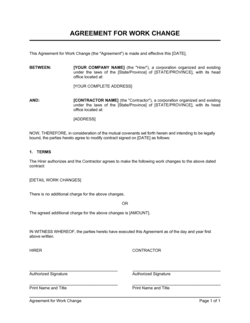
Number each change order sequentially starting at CO-001. Enter the number at the top of the form along with the project name and original contract date.
💡 Keep a running change order log spreadsheet that tracks every CO number, description, cost, and status — this becomes essential for final accounting and dispute resolution.
2
Reference the original contract precisely
Enter the full legal names of both parties, the original contract date, and the project description exactly as they appear in the base contract. This ties the change order to the right agreement.
💡 If the original contract has a unique identifier or purchase order number, include it here — large owners and government clients use it to route the CO through their approval system.
3
Write a specific description of the change
Describe the modified, added, or deleted work in enough detail that someone unfamiliar with the project understands exactly what is and is not included. Attach drawings, specifications, or photos as an exhibit if the change involves physical work.
💡 If the change was discussed verbally or by email, quote the client's request language in the description — this eliminates later disagreements about who initiated the change.
4
State the cost adjustment and revised contract total
Enter the incremental cost change (positive for additions, negative for deductions), the cumulative total of all change orders to date, and the new revised contract sum. All three numbers should appear on the form.
💡 For T&M changes, attach a labor and material breakdown as Exhibit B even when using a not-to-exceed cap — it protects you if the client disputes line items at invoicing.
5
Record any schedule impact
State the number of calendar days added to or removed from the completion date, and calculate the new completion date explicitly. If the change has no schedule impact, write 'Zero (0) days' — do not leave it blank.
💡 Distinguish between calendar days and working days. Most construction contracts use calendar days; IT and professional services contracts often use business days.
6
Document the reason for the change
Check or write the reason category — owner request, unforeseen condition, design revision, regulatory requirement, or other — and attach any supporting documentation that substantiates the cause.
💡 For unforeseen site conditions, photograph and date the condition before any remediation work begins. Photos attached to the change order are the most persuasive evidence in a later dispute.
7
Obtain signatures from authorized representatives
Both parties must sign before any changed work begins. Confirm that the signing individual has actual authority to bind their organization — a project manager may not have authority to execute change orders above a certain dollar threshold.
💡 Check the original contract for any approval threshold clause: many owner contracts require a VP or CFO signature for change orders above $25,000 or $50,000.
8
Attach the executed CO to the original contract
File the signed change order with your project contract binder, update your change order log, and issue a revised schedule or budget summary to all stakeholders if the change is material.
💡 Send the client a PDF of the fully executed change order as a receipt immediately after both parties sign — this eliminates any 'I never received the final version' dispute months later.