Process Improvement Templates
★★★★★4.7from 280+ reviews· Trusted by 20M+ businesses
Document, standardize, and optimize every business process with ready-to-use templates your team can apply today.
WordEditable onlinePDF10+ process improvement templates
Other Production & Operations categories
Most popular process improvement templates
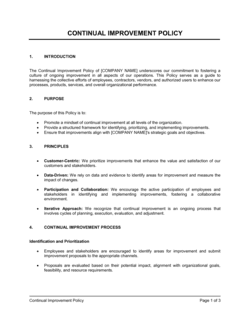
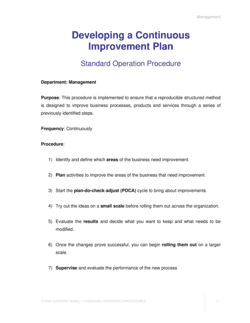
Continuous improvement and planning
Process automation and how-to guides
250K+Clients
20M+Free users
20+Years
190+Countries
10,000+Law firms
50M+Downloads
Trusted across review platforms
- Capterra★★★★☆4.649 reviews
- G2★★★★☆4.713 reviews
- GetApp★★★★☆4.649 reviews
- Google Play★★★★☆4.6179 ratings
- Google Reviews★★★★☆4.567 reviews
Frequently asked questions
What is a process improvement template?
A process improvement template is a pre-structured document that guides teams through the steps of analyzing, redesigning, and documenting a business process. Templates save time by providing the right sections, prompts, and structure — teams fill in the specifics rather than building the framework from scratch. They range from simple one-page forms to multi-section plans covering root cause analysis, redesign, and rollout.
What is the difference between continuous improvement and process improvement?
Process improvement is a single project: identify one problem, fix it, and move on. Continuous improvement is an ongoing management philosophy — often associated with Lean, Kaizen, or Six Sigma — where teams repeatedly revisit processes to make incremental gains over time. A continuous improvement plan template supports the latter by building a repeating cycle of review and optimization into regular operations.
How do I know which process to improve first?
Prioritize processes that are causing the most measurable pain: highest error rate, longest cycle time, most customer complaints, or greatest cost relative to output. A business process mapping exercise across your key workflows will surface the most critical bottlenecks. Start with one process where the improvement is achievable within 60–90 days so the team builds confidence before tackling larger changes.
Can small businesses use process improvement templates?
Yes — in fact, small businesses often benefit more immediately because even a simple SOP or one-page process improvement form eliminates the informal, person-dependent ways of working that create risk when staff turn over. Start with your highest-volume or most error-prone process and document it before attempting to improve it.
What is a standard operating procedure and when do I need one?
A standard operating procedure (SOP) is a written document that describes the correct sequence of steps for completing a repeatable task. You need one whenever a process must produce consistent results regardless of who performs it — onboarding new employees, handling customer complaints, processing invoices, or running end-of-day reconciliations. SOPs reduce training time, cut errors, and make audits straightforward.
How often should business processes be reviewed?
Most operational processes should be reviewed at least annually, and immediately after any significant change to technology, staffing, regulation, or customer expectation. High-volume or high-risk processes — such as financial controls, safety procedures, or customer onboarding — typically warrant quarterly review. Build the review schedule into the process document itself so it doesn't get skipped.
What is business process automation?
Business process automation (BPA) means using software tools to execute repetitive, rule-based process steps without manual intervention — for example, automatically routing an invoice for approval, sending onboarding emails, or generating reports from a data source. Automation works best after a process has been documented and improved; automating a broken process just produces errors faster.
Do I need a separate template for each department?
Not necessarily. A single process documentation or SOP template can be reused across departments by changing the content. However, some industries and functions have specific requirements — a hotel SOP looks different from a restaurant SOP, and an accounting procedures document has compliance elements that a general operations SOP does not. Use a department-specific template when regulatory requirements or operational complexity warrant it.
Process Improvement vs. related documents
A process improvement template diagnoses and redesigns how work flows; a standard operating procedure documents how work should be done once the process is settled. Use a process improvement template first to fix or design the process, then capture the result in an SOP. Both are needed — one drives change, the other locks it in.
A process improvement template focuses on fixing a workflow, system, or operational method at the team or organizational level. A performance improvement plan targets an individual employee whose output or behavior needs to change. The two are complementary: sometimes a process failure looks like a people problem, and sometimes a people problem is actually a broken process.
Process improvement identifies what needs to change and how to redesign it; change management covers how to communicate, train for, and embed that change across the organization. For small procedural tweaks, a process improvement document is sufficient. For changes that affect many people or shift how a department operates, pair it with a change management procedure.
Business process management is an ongoing discipline of modeling, monitoring, and optimizing all processes across an organization. Process improvement templates are the practical tools — forms, plans, guides — used within a BPM program. BPM is the strategy; the templates are the execution.
Key clauses every Process Improvement contains
Most process improvement documents share the same core sections regardless of which specific process they address.
- Process scope and objectives. Defines which process is being improved and what measurable outcome the improvement is targeting.
- Current state description. Captures how the process works today, including each step, owner, input, and output.
- Gap or problem statement. Identifies the specific inefficiency, error rate, delay, or cost that triggered the improvement effort.
- Proposed changes. Describes the redesigned process steps and explains what is being added, removed, or modified.
- Roles and responsibilities. Names the process owner and every team member accountable for executing or approving the new process.
- Implementation timeline. Sets the milestones and target dates for piloting, rolling out, and fully adopting the new process.
- Metrics and success criteria. Specifies how improvement will be measured — cycle time, error rate, cost per unit, or similar KPIs.
- Review and update schedule. Establishes how often the process will be re-evaluated to confirm the improvement is holding.
How to write a process improvement plan
A useful process improvement plan is specific enough to act on and simple enough for the people doing the work to follow without interpretation.
1
Select the process to improve
Choose one specific process — not a department or function — and confirm it is within scope for your team to change.
2
Document the current state
Map every step of how the process works today, including who does what, what tools are used, and where handoffs occur.
3
Define the problem precisely
Write a single-sentence problem statement that names the gap between current performance and the target outcome.
4
Identify root causes
Use a structured method (five whys, fishbone diagram, or process analysis) to find the source of the problem, not just its symptoms.
5
Design the improved process
Redraw the process map with the proposed changes, assign owners to each step, and remove or consolidate redundant activities.
6
Set measurable success criteria
Define 2–3 KPIs — cycle time, error rate, cost, or throughput — that will confirm whether the improvement worked.
7
Pilot, measure, and standardize
Run the new process with a small team first, measure against your KPIs, adjust if needed, then document the final version as an SOP.
At a glance
- What it is
- A process improvement template is a structured document that helps teams identify inefficiencies, standardize workflows, and implement measurable changes to how work gets done. These templates range from standard operating procedures and process maps to continuous improvement plans and performance improvement forms.
- When you need one
- Any time a process is producing inconsistent results, causing bottlenecks, or consuming more time and resources than it should, a process improvement template gives your team a structured starting point for analysis and change.
Which Process Improvement do I need?
The right template depends on whether you're documenting an existing process, improving a broken one, or building a system from scratch. Match your situation to the template below.
Your situation
Recommended template
Documenting how a business process currently works
Captures inputs, outputs, steps, and owners in a reusable format.Building a formal plan to improve operations over time
Provides a structured framework for setting improvement goals and tracking progress.Establishing company-wide policies around improvement practices
Sets the governance framework for improvement as an ongoing organizational commitment.Mapping out a process visually to spot waste or redundancy
Visual process maps reveal handoff gaps, redundant steps, and bottlenecks.Standardizing how a team performs repeatable operational tasks
SOPs reduce variation and give every team member the same reference point.Helping an employee improve their job performance
Provides a clear, documented path with goals, timeline, and accountability.Rolling out changes to an existing process or procedure
Structures the transition from old to new process with defined steps and sign-offs.Reducing manual work by automating repetitive business processes
Step-by-step guide to identifying automation candidates and selecting the right tools.Glossary
- Process improvement
- A structured effort to identify and eliminate inefficiencies in how a specific workflow operates.
- Standard operating procedure (SOP)
- A written document that specifies the exact steps required to complete a repeatable task correctly and consistently.
- Continuous improvement
- An ongoing management practice of making small, incremental process changes over time rather than large periodic overhauls.
- Process mapping
- A visual technique for diagramming the steps, decisions, and handoffs in a process to reveal bottlenecks and redundancy.
- Business process management (BPM)
- A discipline focused on systematically modeling, monitoring, and optimizing all of an organization's processes.
- Root cause analysis
- A method for tracing a process problem back to its origin rather than treating surface-level symptoms.
- Key performance indicator (KPI)
- A measurable value used to assess whether a process is performing at the desired level.
- Process owner
- The person accountable for a process performing correctly and for driving improvements when it does not.
- Cycle time
- The total elapsed time from when a process starts to when it is complete, used as a baseline measurement for improvement.
- Change management
- The structured approach to transitioning individuals and teams from a current process to a new or improved one.
- Business process automation (BPA)
- The use of software to perform repetitive, rule-based process steps without manual effort.
- Gap analysis
- A comparison between current process performance and the target state, used to define the scope of an improvement effort.
What is a process improvement template?
A process improvement template is a structured document that guides teams through the analysis, redesign, and documentation of a business process. Rather than starting from a blank page, teams use these templates to capture the current state of a workflow, identify where it breaks down, define the improved version, and assign accountability for making and sustaining the change. The category covers a wide range of document types — from one-page forms and checklists to multi-section plans, visual process maps, and standard operating procedures.
Process improvement as a discipline draws on well-established methodologies including Lean, Six Sigma, Kaizen, and business process management (BPM). What these approaches share is a commitment to measuring current performance before changing anything, identifying root causes rather than symptoms, and verifying that changes actually produced improvement. The templates in this folder put that discipline into practice — they are not theoretical frameworks but working documents teams fill out and act on.
When you need a process improvement template
If a process is producing inconsistent results, taking longer than it should, generating frequent errors, or depending too heavily on one person's institutional knowledge, it's time to document and improve it. Process improvement work is triggered by operations scaling faster than procedures can keep up, by quality problems with no clear owner, or simply by a decision to run the business more deliberately.
Common triggers:
- A core workflow produces different results depending on who performs it
- A new employee takes weeks to get up to speed because no process is written down
- A recurring error or customer complaint traces back to a missing or unclear step
- A department is preparing to scale, automate, or hand off a function
- An audit or compliance review reveals that informal practices differ from stated policy
- A team member leaves and takes critical process knowledge with them
- Leadership wants to reduce operational costs without adding headcount
Skipping process documentation doesn't mean the process doesn't exist — it means every person on the team is running a slightly different version of it. Over time, those variations compound into errors, delays, and rework that are expensive to fix. A single well-written SOP, process map, or improvement plan eliminates most of that variance and gives the team a shared standard to build on.
Award-winning platform
- Great Place to Work 2025
- BIG Award — Product of the Year 2025
- Smartest Companies 2025
- Global 100 Excellence 2026
- Best of the Best 2025