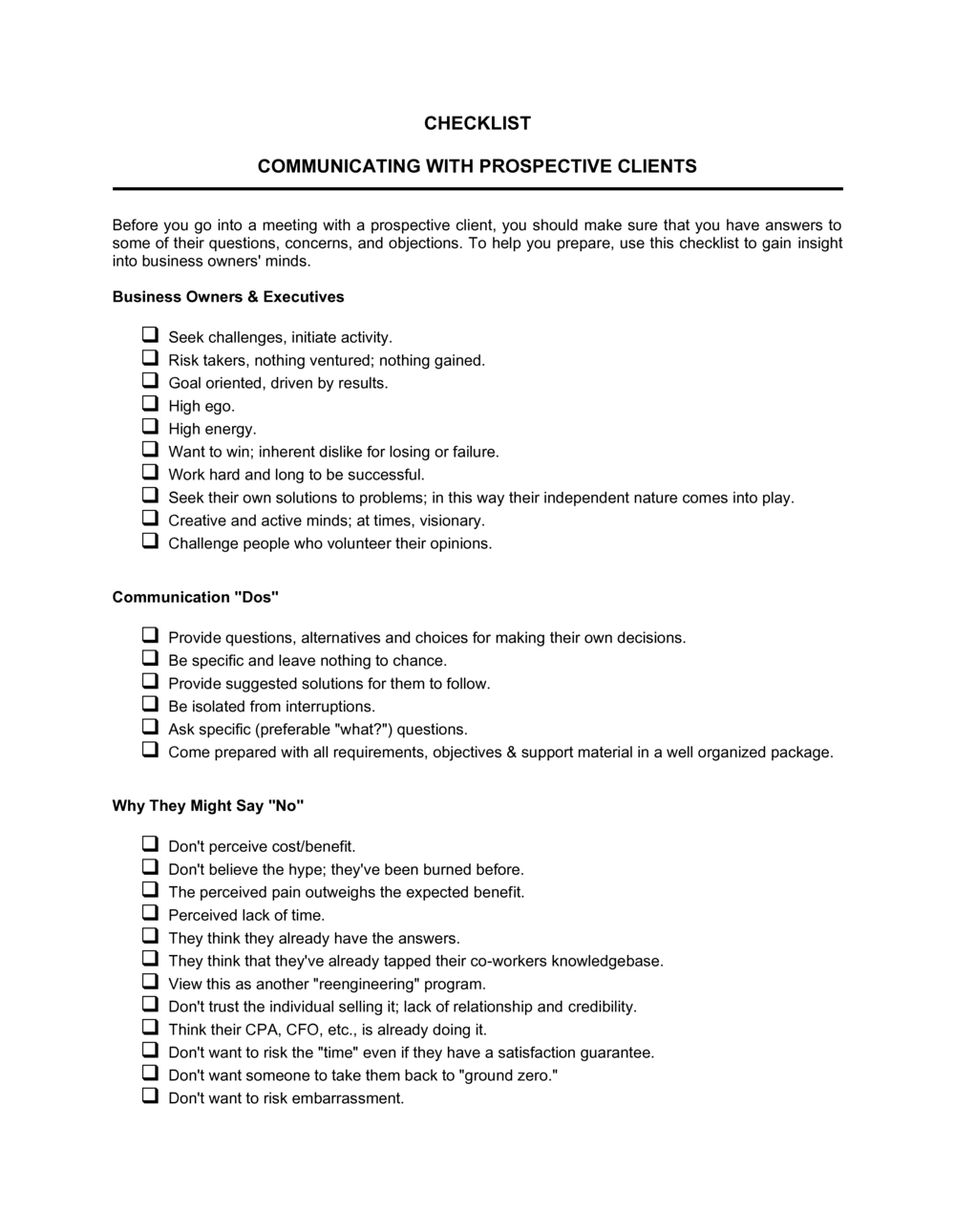
Checklist Communicating with Prospective Clients

Free download β€’ Use as a template β€’ Print or share

2 pagesβ€’20–25 min to useβ€’Difficulty: Standard
Learn more ↓
FreeChecklist Communicating with Prospective Clients Template

At a glance

What it is
A Checklist Communicating With Prospective Clients is a structured form that guides sales and business development teams through every key touchpoint and message required to move a prospect from first contact to a closed engagement. This free Word download is editable online and exportable as PDF, giving every team member a consistent, repeatable process for professional prospect communication.
When you need it
Use it whenever a new prospect enters your pipeline, when onboarding a new sales or account management hire, or when you need to standardize outreach quality across a team handling multiple leads simultaneously.
What's inside
Prospect identification fields, initial contact details, follow-up scheduling, key message confirmation, objection notes, decision-maker verification, and next-step action items β€” organized as a sequential checklist that can be completed and filed per prospect.

What is a Checklist Communicating With Prospective Clients?

A Checklist Communicating With Prospective Clients is a structured form that guides sales and business development professionals through every required touchpoint in the prospect outreach process β€” from initial identification and first contact through follow-ups, objection handling, and final disposition. It functions as both a task list and a communication log, ensuring that each prospect receives consistent, timely outreach and that every interaction is documented in one place. Unlike a CRM workflow, this checklist requires no software setup and works immediately for any team member managing an active pipeline.

Why You Need This Document

Without a structured checklist, prospect communication becomes inconsistent β€” some leads receive five thoughtful follow-ups while others go cold after a single email because there was no system to prompt the next step. The cost is concrete: studies of B2B sales consistently show that the majority of deals close after the fifth contact, yet most outreach stops at one or two attempts due to lack of a tracking system. A completed checklist also protects against team handoff failures β€” when a lead changes owner, every prior touchpoint, key message, objection, and agreed next step is immediately visible without a time-consuming knowledge transfer. This template gives any team member a consistent, professional outreach process they can execute from day one.

Which variant fits your situation?

If your situation is…Use this template
Tracking a high volume of inbound leads from a campaignLead Tracking Log
Formalizing terms once a prospect becomes a clientClient Service Agreement
Sending a structured introduction to a new prospectBusiness Introduction Letter
Preparing for a formal client discovery or needs-assessment meetingClient Needs Assessment Form
Following up after a proposal has been submittedFollow-Up Letter After Sending a Quote
Recording outcomes from a completed sales callSales Call Report
Sending a formal proposal after initial communication is completeBusiness Proposal

Common mistakes to avoid

❌ Skipping the lead source field

Why it matters: Without lead source data, you cannot measure which channels generate the most qualified prospects or calculate cost per acquisition by source.

Fix: Make lead source a required field before the checklist can be moved to 'active' status. Include the specific campaign or referral name, not just the broad channel.

❌ Not verifying the decision maker before multiple follow-ups

Why it matters: Weeks of outreach to an influencer who lacks approval authority wastes time and can damage the relationship when you eventually escalate.

Fix: Confirm decision-making authority on the first or second call using a direct, neutral question. Update the decision-maker field before scheduling further follow-ups.

❌ Logging calls without recording outcomes

Why it matters: A checklist showing five follow-up dates with no outcome notes is useless for handoffs, forecasting, or diagnosing a stalled deal.

Fix: Require a brief outcome note β€” even 'no response' or 'left voicemail' β€” for every logged touchpoint before the date can be entered.

❌ Leaving pipeline status as 'active' indefinitely

Why it matters: Stale active prospects inflate your pipeline, distort conversion rate calculations, and mask the true state of your sales forecast.

Fix: Set a review trigger β€” if no activity or response in 30 days, the status must be updated to 'on hold' or 'lost' with a reason noted.

The 10 key fields, explained

Prospect Identification

Lead Source

Initial Contact Confirmation

Key Message and Value Proposition

Decision Maker Verified

Follow-Up Schedule

Objections Noted

Materials Sent

Agreed Next Step and Owner

Outcome and Pipeline Status

How to fill it out

  1. 1

    Complete prospect identification before first contact

    Fill in the prospect's full name, company, title, and contact details as soon as they enter your pipeline. Confirm the legal company name against their website or LinkedIn.

    πŸ’‘ Look up the prospect on LinkedIn before entering their title β€” job titles on business cards are often outdated.

  2. 2

    Record the lead source immediately

    Note how the prospect was identified β€” referral, inbound inquiry, event, or campaign. Log the date identified and the team member who owns the lead.

    πŸ’‘ Tag the specific campaign or referral source, not just the channel. 'Referral from [CLIENT NAME]' is far more useful than 'referral' when measuring ROI.

  3. 3

    Confirm initial contact and log the channel

    Check the initial contact box only after the message has been sent. Record the exact date and channel β€” email, phone, or LinkedIn β€” and the team member who sent it.

    πŸ’‘ Send initial contact before noon on a Tuesday, Wednesday, or Thursday β€” open rates and callback rates for cold outreach peak mid-week, mid-morning.

  4. 4

    Tailor and document the key message

    Write one or two sentences summarizing the value proposition delivered to this specific prospect and the pain point it addresses. Generic messages should not pass through this field without customization.

    πŸ’‘ Reference a specific detail from the prospect's company β€” a recent announcement, a known challenge in their industry, or a mutual connection β€” to signal genuine research.

  5. 5

    Verify the decision maker

    Confirm whether your contact has authority to approve the purchase. If not, identify the decision maker by name and title and log whether they have been contacted.

    πŸ’‘ Ask directly during the first call: 'Other than yourself, who else would be involved in approving this?' β€” it surfaces stakeholders without sounding presumptuous.

  6. 6

    Log every follow-up attempt and its outcome

    After each contact attempt, record the date, channel, and result β€” response received, no response, voicemail left, or callback scheduled. Update this log immediately after the interaction.

    πŸ’‘ A follow-up cadence of Day 1, Day 3, Day 7, Day 14 outperforms daily contact and reduces unsubscribe rates on email sequences.

  7. 7

    Update status and next step after every interaction

    At the close of every call or meeting, record the agreed next action, the responsible party, and the due date. Update the pipeline status field at the same time.

    πŸ’‘ If the prospect did not commit to a next step, do not leave the field blank β€” log 'follow up on [DATE] if no response' to keep the lead from going cold.

  8. 8

    Close out the checklist with a final outcome

    When the prospect converts, goes cold, or is disqualified, mark the final status and log the reason. Archive the completed checklist per client file.

    πŸ’‘ Lost-reason data is one of the highest-value inputs for improving sales messaging β€” review it quarterly as a team.
Frequently asked questions

What is a checklist for communicating with prospective clients?

A checklist for communicating with prospective clients is a structured form that guides sales and business development teams through every key step of the prospect outreach process β€” from initial identification and first contact through follow-ups, objection handling, and final outcome. It ensures no touchpoint is missed and creates a documented record of every interaction per prospect.

Why use a checklist instead of relying on a CRM?

A CRM records what happened; a checklist tells you what should happen next. For small teams, early-stage businesses, or anyone managing a modest pipeline, a structured checklist provides the same directional discipline as a CRM workflow without the setup time or subscription cost. It also serves as a printable, shareable reference in meetings or client reviews where screen access is limited.

How many follow-ups should the checklist include?

Most effective B2B sales processes include four to six follow-up attempts over a two-to-four-week window before reclassifying a prospect as unresponsive. The checklist should have rows for at least four logged follow-ups with date, channel, and outcome fields for each. Research consistently shows that 80% of closed deals require five or more contacts.

Should one checklist be used per prospect or per campaign?

One checklist per prospect is the recommended approach. It keeps the communication history clean, allows accurate per-prospect pipeline status tracking, and makes handoffs between team members straightforward. Campaign-level reporting can be built by aggregating individual checklists rather than cramming multiple prospects into a single form.

Can this checklist replace a formal sales process document?

No β€” a communication checklist is a tactical execution tool, not a strategic sales process document. It tracks what to do and records what happened, but it does not define qualification criteria, pricing authority, or deal-stage exit requirements. For growing teams, use the checklist alongside a sales playbook or defined pipeline stage framework.

What is the best way to store completed checklists?

Store one completed checklist per prospect in a dedicated client folder β€” either in a shared drive organized by company name or within the relevant CRM record as an attached document. Consistent naming conventions (e.g., [COMPANY NAME]_ProspectChecklist_[DATE]) make retrieval fast and support pipeline reviews without manual searching.

How does this checklist help with team handoffs?

When a prospect is reassigned β€” due to territory changes, role transitions, or team restructuring β€” a fully completed checklist gives the incoming team member instant context: who was contacted, what was said, what objections were raised, and what the agreed next step is. Without it, the new owner must either re-research the entire history or risk repeating conversations the prospect has already had.

Is this checklist suitable for service businesses as well as product sales?

Yes. The checklist is format-agnostic and works equally well for professional services firms, agencies, consultants, and SaaS companies as for product-based sales teams. The key message and value proposition fields should simply reflect the specific outcome or deliverable being offered rather than a product specification.

How this compares to alternatives

vs Sales Call Report

A sales call report documents what was discussed during a single call β€” it is a retrospective record of one interaction. A prospect communication checklist is a forward-looking tool that covers the entire outreach lifecycle from first contact to close. Use the call report to capture call detail; use the checklist to manage the full sequence.

vs Business Proposal

A business proposal is a formal document presenting your solution, pricing, and terms to a prospect who is ready to evaluate options. The communication checklist precedes the proposal β€” it ensures the right relationships are built, the decision maker is identified, and the prospect is qualified before a proposal is drafted.

vs Client Needs Assessment Form

A needs assessment form captures a prospect's goals, pain points, and requirements in structured detail, typically used during a discovery meeting. The communication checklist is broader β€” it covers the entire outreach process including touchpoints before and after the needs assessment takes place.

vs Business Introduction Letter

A business introduction letter is a single outbound document used to initiate contact with a prospect. The communication checklist begins where the introduction letter ends β€” tracking every subsequent interaction, follow-up, and next step through to a final outcome.

Industry-specific considerations

Professional Services

Tracks multiple decision-maker contacts within a single prospect firm, documents the scope discussed at each touchpoint, and captures fee-sensitivity objections.

Marketing and Creative Agencies

Logs which case studies and portfolio samples were shared, records the prospect's campaign goals mentioned during calls, and tracks proposal submission and follow-up timing.

Real Estate

Documents buyer or seller qualification details, tracks property preference discussions across multiple showings, and records financing status as a key qualification field.

Financial Services

Captures regulatory suitability notes, logs disclosure documents sent to prospects, and tracks compliance-required communication timelines alongside standard follow-up steps.

Template vs pro β€” what fits your needs?

PathBest forCostTime
Use the templateFreelancers, small business owners, and sales teams managing up to 50 active prospects without a CRMFree5 minutes per prospect to set up; 2 minutes per interaction to update
Template + professional reviewTeams wanting to customize fields for a specific industry or integrate the checklist into an existing sales playbook$100–$300 for a sales consultant or operations specialist to adapt the templateHalf a day to tailor and roll out
Custom draftedOrganizations building a bespoke sales operations system with stage gates, automated reminders, and CRM integration$500–$2,000+ for a CRM administrator or sales ops consultant1–3 weeks

Glossary

Prospect
A potential client who has been identified as a good fit but has not yet committed to a purchase or engagement.
Touchpoint
Any single interaction between your business and a prospect β€” an email, phone call, meeting, or LinkedIn message.
Follow-Up Cadence
A predetermined schedule of outreach attempts, specifying the channel and timing between each contact.
Decision Maker
The individual at the prospect organization with authority to approve and sign off on a purchase or contract.
Value Proposition
A concise statement of the specific benefit your product or service delivers to the prospect and why it outperforms alternatives.
Objection
A concern or barrier raised by the prospect that must be addressed before they will agree to move forward.
Qualification
The process of confirming a prospect has the budget, authority, need, and timeline that make them a viable potential client.
Next Step
A specific, agreed-upon action β€” with an owner and a date β€” that advances the prospect toward a decision.
Pipeline
The full set of prospects at various stages of the sales process, used to forecast future revenue.
CRM (Customer Relationship Management)
Software used to store, track, and manage interactions with prospects and clients across the entire sales lifecycle.

Part of your Business Operating System

This document is one of 3,000+ business & legal templates included in Business in a Box.

  • Fill-in-the-blanks β€” ready in minutes
  • 100% customizable Word document
  • Compatible with all office suites
  • Export to PDF and share electronically

Create your document in 3 simple steps.

From template to signed document β€” all inside one Business Operating System.
1
Download or open template

Access over 3,000+ business and legal templates for any business task, project or initiative.

2
Edit and fill in the blanks with AI

Customize your ready-made business document template and save it in the cloud.

3
Save, Share, Send, Sign

Share your files and folders with your team. Create a space of seamless collaboration.

Save time, save money, and create top-quality documents.

β˜…β˜…β˜…β˜…β˜…

"Fantastic value! I'm not sure how I'd do without it. It's worth its weight in gold and paid back for itself many times."

Managing Director Β· Mall Farm
Robert Whalley
Managing Director, Mall Farm Proprietary Limited
β˜…β˜…β˜…β˜…β˜…

"I have been using Business in a Box for years. It has been the most useful source of templates I have encountered. I recommend it to anyone."

Business Owner Β· 4+ years
Dr Michael John Freestone
Business Owner
β˜…β˜…β˜…β˜…β˜…

"It has been a life saver so many times I have lost count. Business in a Box has saved me so much time and as you know, time is money."

Owner Β· Upstate Web
David G. Moore Jr.
Owner, Upstate Web

Run your business with a system β€” not scattered tools

Stop downloading documents. Start operating with clarity. Business in a Box gives you the Business Operating System used by over 250,000 companies worldwide to structure, run, and grow their business.

Start freeΒ Β·Β No credit card required