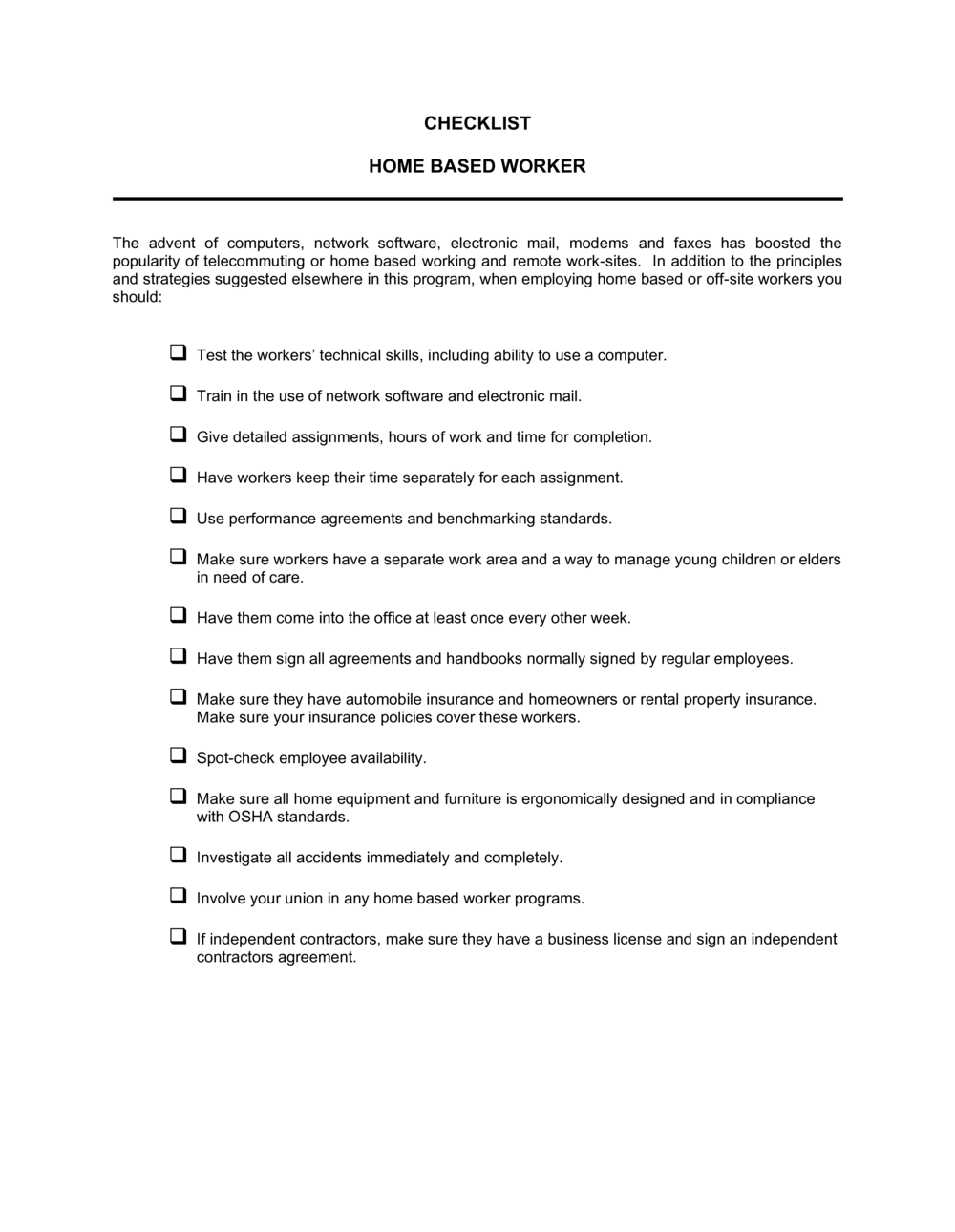
Checklist Home-Based Employee

Free download β€’ Use as a template β€’ Print or share

1 pageβ€’20–25 min to useβ€’Difficulty: Standard
Learn more ↓
FreeChecklist Home-Based Employee Template

At a glance

What it is
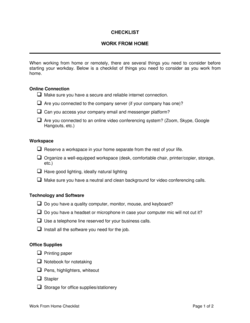
A Home Based Employee Checklist is a structured form managers and HR teams use to confirm that a remote or telecommuting employee has everything required to work safely, securely, and productively from a home office. This free Word download covers equipment, data security, workspace conditions, policy acknowledgment, and communication setup in a single printable or digital form.
When you need it
Use it when onboarding a new remote hire, transitioning an existing employee to a work-from-home arrangement, or conducting a periodic review of a home-based worker's setup and compliance status.
What's inside
Employee and manager details, home workspace assessment, equipment and technology inventory, data security and IT requirements, health and safety acknowledgment, communication and availability expectations, and a policy sign-off section.

What is a Home Based Employee Checklist?

A Home Based Employee Checklist is a structured form that HR managers and supervisors use to verify that a remote or telecommuting employee has the equipment, workspace conditions, IT security setup, and policy acknowledgments in place before beginning or continuing home-based work. It walks through every operational requirement β€” from a dedicated desk and reliable internet connection to VPN access and signed policy acknowledgments β€” and records which items are confirmed, which are outstanding, and who is responsible for resolving gaps. Unlike a general onboarding form, it is designed specifically for the physical, technical, and compliance requirements that are unique to employees working outside a company-controlled office.

Why You Need This Document

Without a completed home based employee checklist, remote onboarding relies on informal email threads and verbal confirmations that are impossible to audit if something goes wrong. If a remote employee suffers a workplace injury at home, the employer's workers' compensation exposure depends partly on whether the workspace was documented as safe. If a company device is lost or a data breach occurs, the absence of a recorded equipment inventory or security verification makes the company's response harder and its liability exposure larger. Managers who skip the checklist also routinely discover weeks later that a remote employee is working on an unsecured network, using an outdated laptop, or unaware of the remote work policy they were supposed to acknowledge. This template closes those gaps in under 20 minutes per employee and creates the paper trail that HR, IT, and legal teams need when issues arise.

Which variant fits your situation?

If your situation is…Use this template
Onboarding a brand-new remote employee before their first dayHome Based Employee Checklist
Transitioning an office employee to a permanent remote arrangementRemote Work Agreement
Documenting IT equipment issued to a home-based workerEquipment Loan Agreement
Capturing a formal policy acknowledgment from a remote hireEmployee Acknowledgment Form
Reviewing and updating remote work conditions on an annual basisEmployee Performance Review Form
Managing a large cohort of newly remote employees during rapid expansionEmployee Onboarding Checklist
Setting communication and availability expectations for telecommutersTelecommuting Policy

Common mistakes to avoid

❌ Self-reported security confirmation without IT verification

Why it matters: Employees who believe they have installed security software may have outdated versions or misconfigured settings that leave company data exposed.

Fix: Require an IT team sign-off β€” not just an employee checkbox β€” on VPN, 2FA, and endpoint security before marking the IT section complete.

❌ Omitting equipment serial numbers

Why it matters: Without serial numbers, the company cannot prove ownership in a dispute, cannot track devices in an MDM system, and cannot file an accurate insurance or theft report.

Fix: Add a serial number or asset tag field for every item in the equipment inventory and confirm each number before the employee takes the device home.

❌ No resolution date for incomplete items

Why it matters: Outstanding items with no deadline are effectively ignored β€” the employee starts work with unresolved compliance gaps that accumulate over time.

Fix: Assign a specific calendar date to every open item in the manager approval section and follow up before that date.

❌ Using a generic company address as the home office location

Why it matters: Recording the wrong work location affects state or provincial payroll tax withholding, workers' compensation coverage, and local tax obligations β€” all of which follow where the employee physically works.

Fix: Require the employee to provide their actual home workspace address and update it in payroll and HR systems before their first paycheck.

The 10 key fields, explained

Employee and manager information

Home office address

Workspace assessment

Equipment and technology inventory

Internet and connectivity requirements

IT security and access setup

Communication and availability expectations

Health, safety, and ergonomics acknowledgment

Policy and data handling acknowledgment

Manager approval and completion date

How to fill it out

  1. 1

    Enter employee and manager details

    Fill in the employee's full legal name, job title, department, and the official start date of the remote arrangement. Record the direct manager's name in the approver field.

    πŸ’‘ Use the same name format as your payroll system to avoid discrepancies in HR records.

  2. 2

    Record the home office address

    Enter the full street address of the workspace where the employee will actually work. Confirm this is where the employee will be physically located on a day-to-day basis.

    πŸ’‘ Flag addresses in a different state or province from the employer β€” payroll tax withholding and workers' compensation jurisdiction follow the employee's work location.

  3. 3

    Complete the workspace assessment with the employee

    Walk through the physical workspace items with the employee during an onboarding call or ask them to submit photos. Confirm dedicated space, lighting, electrical safety, and noise levels.

    πŸ’‘ A five-minute video call to visually confirm the workspace catches issues that self-reported checklists miss.

  4. 4

    List all company-issued equipment with serial numbers

    Record every device or item issued to the employee, its serial number or asset tag, and the condition at the time of issue. Both parties should retain a copy.

    πŸ’‘ Keep this section updated when equipment is swapped, upgraded, or returned β€” treat it as a living inventory record.

  5. 5

    Confirm internet speed and connectivity

    Ask the employee to run a speed test and share the result. Confirm the Wi-Fi network is password-protected and that the employee has a backup plan for connectivity outages.

    πŸ’‘ Tools like fast.com take under 30 seconds and give a screenshot the employee can attach directly to the checklist.

  6. 6

    Verify IT security setup with your IT team

    Have IT confirm VPN access, endpoint security installation, and 2FA enrollment before marking this section complete. Do not rely solely on the employee's self-report for security items.

    πŸ’‘ Many IT systems generate an automated confirmation email when a device enrolls in endpoint management β€” attach it to the checklist as evidence.

  7. 7

    Obtain signed policy acknowledgments

    Have the employee sign and date both the health and safety acknowledgment and the policy acknowledgment sections. Record the revision date of each referenced policy.

    πŸ’‘ Store the completed, signed checklist in the employee's HR file alongside the remote work agreement and equipment loan documentation.

  8. 8

    Manager review, sign off, and set follow-up dates

    Review all sections, note any outstanding items, assign a resolution date to each, and sign the approval block. Send the employee a copy of the completed checklist.

    πŸ’‘ Schedule a 30-day check-in to confirm outstanding items were resolved and that the employee's setup is working in practice.

Frequently asked questions

What is a home based employee checklist?

A home based employee checklist is a structured form used by HR teams and managers to verify that a remote or telecommuting employee has the equipment, technology, workspace conditions, and policy acknowledgments required to work safely and productively from home. It creates a documented record of the setup review and any outstanding items at the time the remote arrangement begins.

When should I use a home based employee checklist?

Use it when onboarding a new remote hire before their first day, when transitioning an existing in-office employee to a permanent or hybrid work-from-home arrangement, or when conducting a periodic compliance review of existing home-based workers. It is also useful after a major policy update to re-confirm employee acknowledgment.

Does a home based employee checklist need to be signed?

A signature is not strictly required for the checklist to be functional, but including a dated employee signature on the policy and safety acknowledgment sections significantly strengthens the employer's position in workers' compensation disputes, data breach investigations, or employment claims. Most HR best practices recommend at least an employee initials or electronic acknowledgment on those sections.

What equipment should be listed on the checklist?

List every company-owned device or item provided to the employee for home use β€” laptop, external monitor, keyboard, mouse, headset, webcam, phone, and any peripheral equipment. Record the serial number or asset tag for each item. Personal devices used for work under a BYOD policy should also be noted, along with confirmation that required security software has been installed on them.

Who is responsible for completing the checklist?

The direct manager or HR team typically drives completion, but the employee actively participates β€” confirming workspace conditions, connectivity, and policy acknowledgment. IT should independently verify the security and access section rather than relying on the employee's self-report. The manager signs off to confirm all items are complete or assigns follow-up dates for outstanding issues.

How does a home based employee checklist relate to a remote work agreement?

A remote work agreement is the governing policy document that defines the terms of the remote arrangement β€” eligibility, hours, expenses, and obligations. The home based employee checklist is the operational verification tool that confirms those terms have been implemented in practice. The two documents work together: the agreement sets the rules; the checklist confirms the setup meets them.

Should the completed checklist be stored in the employee's HR file?

Yes. Store the completed, signed checklist alongside the remote work agreement, equipment loan documentation, and any IT security confirmation in the employee's HR file. This provides an auditable record if a dispute arises over equipment ownership, workspace safety, or policy compliance. Retain it for at least as long as the employment relationship is active, plus the document retention period required in your jurisdiction.

How often should the checklist be reviewed or updated?

Conduct a full checklist review whenever the employee changes their primary home office location, receives new company equipment, or when company policies are significantly updated. An annual review is also recommended for all active home-based employees to confirm that workspace conditions, security software, and connectivity still meet current standards.

How this compares to alternatives

vs Remote Work Agreement

A remote work agreement is a binding policy document that defines the legal and operational terms of a work-from-home arrangement β€” hours, expenses, equipment ownership, and termination of remote privileges. The home based employee checklist is an operational verification form confirming those terms have been implemented. Use both: the agreement establishes the rules, and the checklist confirms the setup meets them.

vs Employee Onboarding Checklist

A general employee onboarding checklist covers the full range of tasks for any new hire β€” payroll setup, benefits enrollment, system access, and introductions. The home based employee checklist focuses specifically on the physical workspace, equipment, and remote-specific security and policy requirements. For a remote hire, both are typically needed.

vs Equipment Loan Agreement

An equipment loan agreement is a dedicated legal document recording the specific terms under which company-owned devices are issued to an employee β€” including liability for damage and return obligations. The home based employee checklist includes an equipment inventory section, but for high-value or sensitive equipment, a standalone loan agreement provides stronger legal protection.

vs Telecommuting Policy

A telecommuting policy is a company-wide governance document setting eligibility criteria, expectations, and rules for remote work across the organization. The home based employee checklist is an individual-level implementation form applied to each specific employee. The policy applies to everyone; the checklist documents each person's compliance with it.

Industry-specific considerations

Technology / SaaS

Emphasis on VPN configuration, endpoint device management enrollment, and data classification compliance for distributed engineering and support teams.

Financial Services

Regulatory requirements around secure document handling and client data access make a documented home office audit essential for compliance with FINRA, FCA, or equivalent bodies.

Healthcare

HIPAA-compliant workstation setup, secure screen positioning to prevent unauthorized viewing of patient data, and encrypted storage verification are critical additions.

Professional Services

Client confidentiality requirements and professional indemnity coverage often depend on demonstrable workspace security and controlled access to sensitive files.

Template vs pro β€” what fits your needs?

PathBest forCostTime
Use the templateHR teams and managers onboarding remote employees in standard roles without complex regulatory requirementsFree10–20 minutes per employee
Template + professional reviewCompanies onboarding remote workers in regulated industries or multiple jurisdictions$100–$300 for an HR consultant or employment lawyer review1–2 days
Custom draftedEnterprises with specific data security frameworks, union agreements, or multi-country remote workforces$500–$2,000 for a custom HR or legal build1–2 weeks

Glossary

Home Based Employee
An employee who performs their job duties primarily or exclusively from a home office rather than a company-owned workspace.
Telecommuting
A work arrangement in which an employee works remotely from a location outside the employer's main office, typically using technology to stay connected.
VPN (Virtual Private Network)
A secure encrypted connection that allows remote employees to access company systems as if they were on the internal office network.
Ergonomic Assessment
An evaluation of a worker's physical workspace setup β€” chair, desk height, monitor position, and lighting β€” to reduce injury risk.
Acceptable Use Policy
A company rule set governing how employees may use employer-issued devices, software, and internet connections.
Data Classification
A scheme for labeling company information by sensitivity level (e.g., public, internal, confidential, restricted) to guide handling and storage.
Equipment Loan Agreement
A document recording which company-owned devices have been issued to an employee for home use and the conditions for their return.
Remote Work Policy
A formal policy document defining eligibility, expectations, expense reimbursement, and compliance requirements for employees working outside a company office.
Two-Factor Authentication (2FA)
A login security method requiring a second verification step β€” such as a mobile code β€” beyond a username and password.
Workspace Safety Checklist
A structured list confirming that a home office meets basic occupational health and safety standards, including safe electrical setup, adequate lighting, and fire safety.

Part of your Business Operating System

This document is one of 3,000+ business & legal templates included in Business in a Box.

  • Fill-in-the-blanks β€” ready in minutes
  • 100% customizable Word document
  • Compatible with all office suites
  • Export to PDF and share electronically

Create your document in 3 simple steps.

From template to signed document β€” all inside one Business Operating System.
1
Download or open template

Access over 3,000+ business and legal templates for any business task, project or initiative.

2
Edit and fill in the blanks with AI

Customize your ready-made business document template and save it in the cloud.

3
Save, Share, Send, Sign

Share your files and folders with your team. Create a space of seamless collaboration.

Save time, save money, and create top-quality documents.

β˜…β˜…β˜…β˜…β˜…

"Fantastic value! I'm not sure how I'd do without it. It's worth its weight in gold and paid back for itself many times."

Managing Director Β· Mall Farm
Robert Whalley
Managing Director, Mall Farm Proprietary Limited
β˜…β˜…β˜…β˜…β˜…

"I have been using Business in a Box for years. It has been the most useful source of templates I have encountered. I recommend it to anyone."

Business Owner Β· 4+ years
Dr Michael John Freestone
Business Owner
β˜…β˜…β˜…β˜…β˜…

"It has been a life saver so many times I have lost count. Business in a Box has saved me so much time and as you know, time is money."

Owner Β· Upstate Web
David G. Moore Jr.
Owner, Upstate Web

Run your business with a system β€” not scattered tools

Stop downloading documents. Start operating with clarity. Business in a Box gives you the Business Operating System used by over 250,000 companies worldwide to structure, run, and grow their business.

Start freeΒ Β·Β No credit card required