1
Define the objective and audience before writing a single line
Write one sentence stating what the viewer will do after watching and one paragraph describing who they are — role, knowledge level, and pain point. Pin this to the top of the document.
💡 If you cannot state the objective in one sentence, the script is not ready to be written. Time spent clarifying the goal saves multiple rounds of revision.
2
List and rank your key messages
Brainstorm every point you want to make, then cut to the top three. Rank them by persuasive impact for the defined audience. Every scene in the script must connect to at least one of these three messages.
💡 Test each message by asking: 'Would this make my target audience more likely to take the desired action?' If the answer is no, cut it.
3
Build the scene breakdown before drafting dialogue
Create a table with scene name, duration estimate, speaker format, and message served. Confirm the scene order creates a logical persuasive arc before writing any dialogue.
💡 A two-minute video should have no more than five scenes. More scenes mean faster cuts and less time to land each message.
4
Write the dialogue draft in spoken language
Draft each scene's dialogue using short sentences, contractions, and the vocabulary your audience actually uses. Read every line aloud as you write — if you stumble, the audience will too.
💡 Record yourself reading the draft on your phone. Playback reveals awkward phrasing faster than reading silently ever will.
5
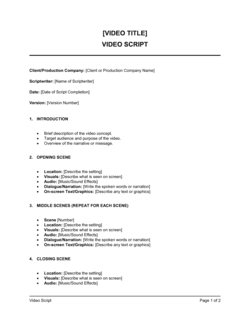
Add visual and production direction inline
Insert production notes in brackets beside the relevant dialogue lines. Specify camera angles, B-roll descriptions, screen recordings, on-screen text, and transition cues.
💡 Use consistent notation — [VISUAL:], [CUT TO:], [ON-SCREEN TEXT:] — so editors and directors can parse the script without a briefing call.
6
Calculate timing and trim to fit
Count words per scene, divide by your target reading pace (125–150 wpm), and sum to a total runtime. If the script runs long, cut full scenes rather than trimming dialogue across every scene — partial cuts rarely solve pacing problems.
💡 Budget 10% extra time for natural pauses, audience reaction, and editing transitions. A 2:00 script should read at about 1:48 in the draft.
7
Run structured revision passes
Assign each revision pass to a specific dimension: accuracy first, then tone, then timing, then compliance. Send each pass to the relevant reviewer separately rather than consolidating all feedback in one round.
💡 Set a 48-hour response window per pass and a maximum of two revision rounds. Open-ended feedback cycles are the single biggest cause of production delays.
8
Lock the script and obtain final sign-off before production
Once all revision passes are complete, mark the document 'Final — Approved' with the approver's name and date. No changes should be accepted after this point without a formal change request.
💡 Version-control every draft with a date stamp (e.g., Script_v1_2026-05-02). 'Latest version' is not a file name.