Pre-Authorized Payment Template

Free Word download • Edit online • Save & share with Drive • Export to PDF

1 page20–30 min to fillDifficulty: StandardSignature requiredLegal review recommended
Learn more ↓
FreePre-Authorized Payment Template

At a glance

What it is
A Pre-Authorized Payment Agreement is a legally binding document in which a payor (customer or debtor) authorizes a payee (business or creditor) to withdraw a fixed or variable amount from a specified bank account or payment card on a recurring basis. This free Word download lets you collect, document, and store that authorization — covering payment amount, frequency, account details, cancellation rights, and NSF fee terms — and export it as PDF for signature before the first charge runs.
When you need it
Use it any time you bill customers on a scheduled recurring basis — monthly subscriptions, installment plans, membership dues, or lease payments — and need written authorization before initiating a bank debit or card charge. A signed agreement is required by ACH network rules in the US, Payments Canada rules for PADs, and equivalent schemes in the UK and EU.
What's inside
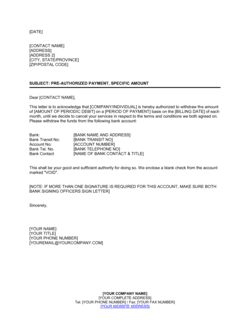
Payor and payee identification, authorized bank account or card details, payment amount and frequency, start and end date, notice requirements for changes, NSF and failed-payment fee terms, cancellation procedure, and dispute resolution. The agreement also includes a signature block and date field to confirm the payor's informed consent.

What is a Pre-Authorized Payment Agreement?

A Pre-Authorized Payment Agreement is a legally binding authorization document in which a payor grants a business the ongoing right to withdraw a fixed or variable amount from a specified bank account on a recurring schedule. It records the payor's informed consent — including the exact amount, payment frequency, bank account details, and cancellation rights — and serves as the mandatory written authorization required by ACH network rules in the United States, Payments Canada Rule H1, the UK Direct Debit scheme, and the EU's SEPA Direct Debit framework before any recurring bank debit can legally be initiated. Without a signed, compliant authorization on file, every scheduled debit is legally unauthorized and reversible by the payor's bank at any time.

Why You Need This Document

Initiating recurring bank debits without a signed pre-authorized payment agreement exposes your business to four immediate risks: the payor's bank can reverse every debit ever processed, your payment processor can suspend your ACH or PAD origination privileges, consumer-protection regulators can fine you for each non-compliant transaction, and the payor can dispute the entire billing history as unauthorized. Beyond compliance, a well-drafted agreement eliminates the most common recurring-billing disputes — failed payments misread as cancellations, NSF fees the payor claims were never disclosed, and payors who argue that revoking the debit authorization cancelled their underlying contract. This template gives you a compliant, court-tested starting point for domestic recurring billing that covers every required disclosure, from dispute rights to cancellation procedure, so your payment operations are protected from the first charge.

Which variant fits your situation?

If your situation is…Use this template
Fixed monthly charge for a subscription or membershipPre-Authorized Payment Agreement (Fixed Amount)
Variable billing amounts that change each cycle based on usageVariable Pre-Authorized Debit Agreement
One-time advance authorization for a single future chargeOne-Time Payment Authorization Form
Installment repayment schedule tied to a loan agreementLoan Repayment Agreement
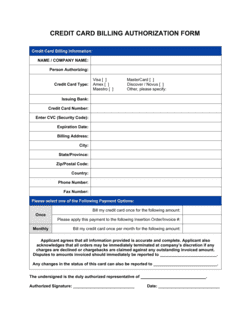
Recurring credit card charge rather than bank account debitCredit Card Authorization Form
Tenant rent collected automatically each monthRental Payment Authorization
Donor pledge collected on a recurring charitable giving scheduleDonation Authorization Form

Common mistakes to avoid

❌ Initiating a debit without a signed authorization on file

Why it matters: ACH and PAD network rules treat an unsupported debit as unauthorized — the payor's bank can reverse it at any time, and the originating bank will charge the payee a return fee plus potential penalty. Repeated violations result in suspension from the payment network.

Fix: Obtain a signed authorization before running any debit and store it for a minimum of 3 years after the last transaction — the standard audit retention period under NACHA and Payments Canada rules.

❌ Using vague or approximate amounts in a fixed-payment authorization

Why it matters: Language like 'approximately $50 per month' does not constitute a valid fixed-amount authorization under NACHA or Payments Canada rules — the exact amount must be stated, and the debit must match it.

Fix: State the precise dollar-and-cent amount for every fixed recurring charge. For variable billing, add a notification-of-amount clause requiring advance written notice before each debit.

❌ Omitting the payor's dispute and recourse rights

Why it matters: Consumer protection regulations in the US, Canada, UK, and EU require that payors be informed of their right to dispute unauthorized charges. Omitting this disclosure exposes the payee to regulatory fines and unlimited chargeback liability.

Fix: Include a dedicated dispute-rights clause citing the applicable dispute window — 90 days under Payments Canada Rule H1, 60 days under Regulation E in the US — and the payor's right to contact their financial institution.

❌ Setting an NSF fee above the statutory maximum

Why it matters: Multiple US states cap NSF fees at $20–$35 per item, and some Canadian provinces have similar limits. Charging above the cap violates consumer-protection statutes and can trigger class-action exposure.

Fix: Check the NSF fee cap for each jurisdiction in which you bill customers before finalizing your authorization form, and set your fee at or below the lowest applicable cap if you operate across multiple states or provinces.

❌ Failing to send the payor a copy of their signed authorization

Why it matters: Payments Canada Rule H1 explicitly requires that the payee provide the payor with a copy of the signed PAD agreement. Failure to do so makes the authorization non-compliant and gives the payor grounds to dispute any debit indefinitely.

Fix: Automate a copy of the signed authorization to the payor's email immediately after execution, and retain proof of delivery in your records.

❌ No reference to the underlying payment obligation

Why it matters: When a payor revokes the PAD or ACH authorization, some interpret revocation as cancelling the entire debt — especially if the authorization is not linked to a governing agreement. This creates costly collection disputes.

Fix: Add a clause explicitly stating that the authorization supplements the underlying agreement, and that revocation cancels only the debit mechanism — not the payor's obligation to pay by another method.

The 10 key clauses, explained

Parties and account identification

In plain language: Identifies the payor by full legal name and the payee by business name, and specifies the exact bank account — institution name, transit/routing number, and account number — authorized for debiting.

Sample language
I, [PAYOR FULL NAME], authorize [BUSINESS NAME] ('Company') to debit my account at [FINANCIAL INSTITUTION NAME], Transit/Routing No. [XXXXXX], Account No. [XXXXXXXXXX], for the payments described below.

Common mistake: Recording only the last four digits of the account number on the authorization form. Payment processors and banks require the full account number to initiate an ACH or PAD entry; partial numbers cause processing failures.

Payment amount and frequency

In plain language: States the exact dollar amount (or the formula for calculating a variable amount) and the schedule — weekly, monthly, quarterly — on which debits will occur.

Sample language
The authorized debit amount is $[AMOUNT] per [WEEK / MONTH / QUARTER], drawn on the [DAY] of each [WEEK / MONTH]. For variable amounts, the Company will provide [X] days' notice of the amount before each debit.

Common mistake: Using approximate language like 'approximately $X' for fixed-amount authorizations. Courts and payment networks require a specific, unambiguous amount — vague figures void the authorization.

Start date and end date

In plain language: Specifies when the first authorized debit will occur and whether the authorization runs indefinitely or terminates on a defined date or event.

Sample language
Debits will commence on [START DATE] and will continue on the same day of each subsequent [PERIOD] until [END DATE / the outstanding balance reaches $0 / this authorization is revoked in writing].

Common mistake: Leaving the end date blank on installment agreements. An open-ended authorization on a fixed-term loan creates a disputed overpayment risk if the payor doesn't cancel after the final installment.

Notice of change in amount or frequency

In plain language: Requires the payee to provide advance written notice — typically 10–30 days — before changing the debit amount or schedule, and gives the payor an opportunity to cancel before the change takes effect.

Sample language
The Company will provide [10 / 30] days' written notice to the Payor at [EMAIL / MAILING ADDRESS] before any change in the debit amount, frequency, or account charged takes effect.

Common mistake: Omitting the notice-of-change clause entirely. Payments Canada Rule H1 and the US NACHA operating rules both mandate pre-notification of amount changes — non-compliance exposes the payee to chargeback and indemnification liability.

NSF and failed-payment fees

In plain language: Sets out the fee the payee will charge — or pass through from the bank — when a debit attempt is returned for non-sufficient funds, and states how many retry attempts are permitted.

Sample language
If a debit is returned NSF or unpaid for any reason, the Payor authorizes the Company to charge an NSF fee of $[AMOUNT] per returned item and to re-attempt the debit up to [2] times within [10] business days.

Common mistake: Setting an NSF fee without checking the maximum fee permitted in the applicable jurisdiction. Several US states and Canadian provinces cap NSF fees by statute — exceeding the cap voids fee collection and may trigger consumer-protection penalties.

Cancellation and revocation procedure

In plain language: Describes exactly how the payor can cancel the authorization — written notice, minimum advance notice period, and the contact address to which notice must be sent.

Sample language
The Payor may revoke this authorization at any time by providing written notice to [COMPANY NAME] at [EMAIL / MAILING ADDRESS] no later than [10] business days before the next scheduled debit. Revocation does not affect amounts already debited or outstanding obligations under any underlying agreement.

Common mistake: Requiring more than 30 days' cancellation notice for a consumer PAD or ACH authorization. Payments Canada and NACHA consumer rules require that cancellation take effect within 10–30 business days — longer notice periods are unenforceable against consumers.

Payor dispute and reimbursement rights

In plain language: Informs the payor of their right to dispute a debit they believe was unauthorized or incorrect, the time window for filing a dispute with their bank, and the process for obtaining a refund.

Sample language
The Payor has certain recourse rights if any debit does not comply with this authorization. For a PAD that was not properly authorized, the Payor may obtain reimbursement from their financial institution by contacting them within [90] calendar days of the debit date.

Common mistake: Omitting the dispute-rights disclosure entirely. Payments Canada Rule H1 and NACHA consumer rules both require a recourse statement — its absence renders the authorization non-compliant and exposes the payee to unlimited chargeback liability.

Underlying agreement reference

In plain language: Cross-references the contract, membership agreement, loan agreement, or lease that gives rise to the payment obligation, making clear that the PAD or ACH authorization supplements but does not replace that underlying document.

Sample language
This authorization is given in connection with the [SERVICE AGREEMENT / LOAN AGREEMENT / LEASE AGREEMENT] dated [DATE] between the parties ('Underlying Agreement'). Revocation of this authorization does not affect the Payor's obligations under the Underlying Agreement.

Common mistake: Omitting the underlying agreement reference and treating the PAD authorization as a standalone contract. Without the reference, a revoked authorization appears to extinguish the entire payment obligation rather than just the debit mechanism.

Indemnification of financial institution

In plain language: Confirms that the payee will indemnify the payor's bank against any claims, losses, or costs arising from debits initiated in excess of or contrary to the authorization.

Sample language
The Company agrees to indemnify and hold harmless the Payor's financial institution from any and all claims, damages, or costs arising from any debit initiated by the Company that exceeds the amount authorized or that is initiated after proper revocation has been received.

Common mistake: Reversing the indemnification so the payor indemnifies the payee's bank. The standard commercial practice and Payments Canada/NACHA rules require the originating party — the payee — to bear indemnification liability toward the receiving bank.

Governing law and entire agreement

In plain language: Specifies which jurisdiction's law governs the authorization, confirms that the written authorization is the complete and final record of the payor's consent, and supersedes any prior verbal authorizations.

Sample language
This authorization is governed by the laws of [STATE / PROVINCE / COUNTRY]. It constitutes the entire authorization of the Payor for the debits described herein and supersedes any prior oral or written authorizations for the same payments.

Common mistake: Choosing a governing law that does not match the payor's location. Consumer protection laws — including maximum NSF fees, notice periods, and dispute windows — apply based on where the consumer resides, not where the business is incorporated.

How to fill it out

  1. 1

    Identify both parties and their roles

    Enter the payor's full legal name (individual or business entity) and the payee's registered business name. For business payors, include the authorized signatory's name and title.

    💡 For consumer authorizations, use the name exactly as it appears on the bank account to avoid processing mismatches.

  2. 2

    Record the full bank account details

    Enter the financial institution name, the full routing or transit number, and the complete account number. Do not use masked or partial account numbers on the authorization form itself — keep the signed original in a secure, access-controlled location.

    💡 Scan and store the signed original in an encrypted document vault; never transmit the signed form by unencrypted email.

  3. 3

    Specify the exact payment amount and frequency

    State the dollar amount to the cent for fixed payments. For variable amounts, describe the formula or cap clearly — for example, 'the monthly invoice total, not to exceed $[MAXIMUM AMOUNT].' Set the recurrence interval and the specific day of the week or month the debit will run.

    💡 If your business uses tiered pricing that changes at contract renewal, add a notice-of-change period of at least 10 business days to avoid compliance failures.

  4. 4

    Set the start date and termination condition

    Enter the first debit date and choose a termination condition: a specific end date, a total number of payments, a balance reaching zero, or an open-ended authorization that runs until revoked. Match the termination condition to the underlying agreement's payment schedule.

    💡 For installment loans, calculate the exact number of payments and state it explicitly — 'this authorization covers [24] monthly debits' — rather than relying on an open-ended authorization.

  5. 5

    Set the NSF fee and retry policy

    Enter your NSF fee amount (verify the statutory cap in the payor's jurisdiction) and state the maximum number of retry attempts and the window within which retries will occur. Two retries within 10 business days is the standard commercial practice.

    💡 Inform your payment processor of your retry policy — some processors have their own network rules that override the number of retries in your authorization form.

  6. 6

    Include the dispute rights and cancellation procedure

    State the payor's right to dispute an unauthorized debit and the 90-day window for filing with their bank. Describe the cancellation procedure — written notice, minimum advance notice period, and the exact address or email for revocation notices.

    💡 For Canadian PADs, the dispute window is 90 days for unauthorized debits and 10 business days for debits that do not comply with the authorization — include both in your form.

  7. 7

    Cross-reference the underlying agreement

    Enter the name, date, and parties of the contract, lease, or loan agreement that creates the underlying payment obligation. This prevents the payor from arguing that revoking the authorization eliminates the debt itself.

    💡 Attach a copy of the underlying agreement to the PAD authorization at signing so both documents share the same execution date.

  8. 8

    Obtain a wet or electronic signature before the first debit

    Both parties should sign and date the form before the first scheduled debit runs. For electronic signatures, use a compliant e-signature platform that captures a timestamp and IP address.

    💡 Send the signed copy to the payor immediately after execution — Payments Canada Rule H1 requires that the payor receive a copy of their signed authorization.

Frequently asked questions

What is a pre-authorized payment agreement?

A pre-authorized payment agreement is a written authorization signed by a payor that permits a business to withdraw funds from the payor's bank account or charge a payment card on a recurring schedule. It specifies the amount, frequency, account details, and the payor's right to cancel. Without a signed authorization, bank debit networks — including ACH in the US and PAD in Canada — will treat any recurring debit as unauthorized and allow the payor's bank to reverse it.

Is a pre-authorized payment agreement legally required?

Yes, in every major jurisdiction. In the US, NACHA's ACH operating rules require written or electronic authorization before initiating a recurring consumer debit. In Canada, Payments Canada Rule H1 mandates a signed PAD agreement before the first debit. In the UK and EU, Direct Debit and SEPA rules require a signed mandate. Operating recurring debits without a compliant authorization exposes the business to payment reversals, network fines, and potential consumer-protection penalties.

What is the difference between a PAD and an ACH authorization?

A Pre-Authorized Debit (PAD) is the Canadian equivalent of an ACH authorization in the US — both permit a business to pull funds from a customer's bank account on a recurring basis with prior written consent. The key differences are regulatory: Canadian PADs are governed by Payments Canada Rule H1, while US ACH debits are governed by NACHA operating rules and Regulation E. Dispute windows, notice periods, and NSF fee caps differ between the two schemes. Businesses operating in both countries need jurisdiction-specific authorization language.

Can a payor cancel a pre-authorized payment at any time?

Yes. Under NACHA consumer rules and Payments Canada Rule H1, a payor can revoke a pre-authorized payment authorization at any time by providing written notice to the payee, typically 10 business days before the next scheduled debit. Revocation of the authorization does not, however, cancel any underlying debt or contractual payment obligation — the payor remains liable for amounts owed under the governing agreement and must arrange an alternative payment method.

How long must I retain a signed pre-authorized payment agreement?

Retain signed authorizations for a minimum of 3 years after the last transaction under that authorization. NACHA recommends a 2-year minimum for ACH authorizations, but 3 years aligns with the standard audit and chargeback lookback period used by most payment processors and banks. In Canada, Payments Canada recommends retaining PAD agreements for the duration of the authorization plus 7 years.

What happens if a pre-authorized debit is returned NSF?

When a debit is returned for non-sufficient funds, the payor's bank reverses the transaction, and the originating bank charges a return fee to the payee. The payee may also charge the payor a contractual NSF fee if the authorization form includes one, subject to any statutory cap in the payor's jurisdiction. Most payment networks permit up to two retry attempts within 10 business days of the original failed debit. Repeated NSF returns on the same account may result in the payee's bank restricting ACH origination privileges.

Can I use an electronic signature on a pre-authorized payment agreement?

Yes. Electronic signatures are accepted under NACHA rules for ACH authorizations, Payments Canada guidelines for PADs, and eIDAS regulations for SEPA mandates, provided the e-signature platform captures a timestamp, IP address, and audit trail linking the signature to the specific document. The payor must also receive an electronic copy of the signed authorization immediately after execution. Some platforms require additional identity-verification steps for high-value recurring debits.

What is the dispute window for an unauthorized pre-authorized debit?

In the US, Regulation E gives consumers 60 days from the statement date to dispute an unauthorized ACH debit. In Canada, Payments Canada Rule H1 provides a 90-day window to dispute a PAD that was not authorized, and 10 business days to dispute a PAD that does not comply with the authorization terms. In the UK, the Direct Debit Guarantee gives consumers an unlimited right to claim a full refund for any unauthorized or incorrect direct debit charge.

Do I need separate authorizations for each payment amount change?

For fixed-amount authorizations, a change in the debit amount requires either a new authorization form signed by the payor or written pre-notification at least 10 business days before the changed amount is debited — the specific requirement depends on your payment network and jurisdiction. For variable-amount authorizations that include a notification-of-amount clause, advance notice of each specific debit amount satisfies the authorization requirement without requiring a new signed form.

How this compares to alternatives

vs Credit Card Authorization Form

A credit card authorization form authorizes charges to a payment card rather than a bank account. Card authorizations are governed by card network rules (Visa, Mastercard) and carry higher processing fees than ACH or PAD debits. Bank account authorizations (ACH/PAD) typically cost $0.25–$0.50 per transaction versus 1.5–3.5% for card charges, making them preferable for high-value or high-volume recurring billing. Use a credit card authorization form when the payor does not have a bank account or when the business requires card-network chargeback protections.

vs Direct Debit Mandate

A Direct Debit Mandate is the UK and EU equivalent of a pre-authorized debit agreement, used under the Bacs Direct Debit scheme in the UK or SEPA Direct Debit in the EU. The core authorization concepts are identical, but the regulatory framework, mandate format, and dispute rights differ significantly. US and Canadian businesses billing customers in the UK or EU must use jurisdiction-specific mandate forms rather than their domestic ACH or PAD authorization templates.

vs Loan Agreement

A loan agreement governs the full terms of a lending relationship — principal, interest, security, and default remedies. A pre-authorized payment agreement is a narrower instrument that authorizes the mechanical collection of payments defined in the loan agreement. Both documents are typically executed together for consumer or commercial installment loans; the loan agreement creates the obligation, and the PAD or ACH authorization enables automatic collection. Neither document substitutes for the other.

vs Service Agreement

A service agreement defines the scope of work, deliverables, fees, and contractual obligations between a service provider and client. It creates the payment obligation but does not itself authorize recurring bank debits. A pre-authorized payment agreement supplements a service agreement by providing the compliant written authorization required by payment networks to pull funds automatically. Businesses with retainer or subscription clients need both documents executed before billing begins.

Industry-specific considerations

SaaS and subscription software

Monthly and annual plan billing requires ACH or PAD authorization at sign-up; variable usage-based charges require a notification-of-amount clause covering each billing cycle.

Property management

Rent collected via automatic bank debit on the first of the month; NSF fee clauses must align with state or provincial landlord-tenant statutes that cap returned-payment fees.

Financial services and lending

Installment loan repayments require a fixed number of authorized debits tied to the amortization schedule, with a clear termination condition when the balance reaches zero.

Fitness, wellness, and membership clubs

Recurring membership dues collected monthly; cancellation-notice requirements must align with state automatic-renewal laws that govern gym memberships specifically in California, New York, and several other states.

Jurisdictional notes

United States

ACH recurring debits are governed by NACHA operating rules and Regulation E (12 CFR Part 205). Written or electronic authorization is mandatory before the first consumer debit. Regulation E gives consumers a 60-day window to dispute unauthorized entries. NSF fee caps vary by state — California caps them at $25 for the first return; other states range from $20–$35. The FTC's Restore Online Shoppers' Confidence Act (ROSCA) imposes additional disclosure requirements for online recurring billing sign-ups.

Canada

Pre-authorized debits are governed by Payments Canada Rule H1, which mandates a written PAD agreement before the first debit, a 90-day dispute window for unauthorized debits, and immediate delivery of a copy to the payor. Personal PADs (consumer accounts) and business PADs are treated as distinct categories with different notice requirements. Quebec's Consumer Protection Act imposes additional disclosure obligations for consumer recurring billing arrangements. PAD agreements must be in French for Quebec consumers under the Charter of the French Language.

United Kingdom

UK direct debits are processed under the Bacs Direct Debit scheme and governed by the Direct Debit Guarantee, which gives consumers an unconditional right to a full and immediate refund from their bank for any unauthorized or incorrectly collected charge. Businesses must be approved originators under the Bacs scheme and use the standard mandate format. The Payment Services Regulations 2017 implement the EU PSD2 framework in UK law. Continuous Payment Authorities (CPAs) on debit or credit cards are governed separately under FCA rules.

European Union

Recurring euro-denominated bank debits across the EU use the SEPA Direct Debit (SDD) scheme, governed by the SEPA Rulebook and implemented nationally under EU Payment Services Directive 2 (PSD2). A signed SEPA mandate is required before the first debit; the creditor must quote the mandate reference on every transaction. Consumers have an 8-week window to dispute authorized debits and an unlimited window for unauthorized ones. GDPR applies to all personal data — including bank account details — collected in the authorization process, requiring a lawful basis for processing and appropriate data retention controls.

Template vs lawyer — what fits your deal?

PathBest forCostTime
Use the templateSmall businesses and SaaS companies billing domestic customers under standard fixed-amount recurring plansFree15–20 minutes
Template + legal reviewBusinesses billing across multiple US states or provinces with varying NSF caps, or adding variable-amount clauses$200–$5001–3 days
Custom draftedFintech lenders, high-volume payment originators, or businesses collecting recurring debits in multiple countries under different payment network rules$1,000–$3,500+1–2 weeks

Glossary

Pre-Authorized Debit (PAD)
A Canadian payment mechanism governed by Payments Canada Rule H1 that allows a business to pull funds from a customer's bank account with prior written consent.
ACH Authorization
Written permission from a US account holder allowing a third party to initiate Automated Clearing House debit entries against their bank account.
Payor
The individual or entity whose bank account or payment card is being debited — typically the customer, tenant, or borrower.
Payee
The business or individual receiving the authorized payment — the party initiating the debit on the agreed schedule.
RDFI (Receiving Depository Financial Institution)
The payor's bank — the institution that receives the debit instruction and debits the payor's account.
NSF Fee
A 'non-sufficient funds' charge assessed when a debit attempt fails because the payor's account lacks sufficient balance to cover the payment.
Revocation Notice
Formal written notice from the payor cancelling their authorization, typically required 10–30 days before the next scheduled debit.
Pre-Notification
Advance notice sent to the payor before the first debit or before a change in amount, informing them of the exact amount and date of the upcoming charge.
SEPA Direct Debit
The EU's standardized direct debit scheme allowing euro-denominated recurring payments across 36 participating countries using a standardized mandate form.
Indemnification Clause
A provision under which the payee agrees to reimburse the payor's bank for any losses arising from an unauthorized or erroneous debit instruction.
Recurrence Period
The defined interval between authorized charges — weekly, bi-weekly, monthly, quarterly, or annually — as stated in the agreement.

Part of your Business Operating System

This document is one of 3,000+ business & legal templates included in Business in a Box.

  • Fill-in-the-blanks — ready in minutes
  • 100% customizable Word document
  • Compatible with all office suites
  • Export to PDF and share electronically

Create your document in 3 simple steps.

From template to signed document — all inside one Business Operating System.
1
Download or open template

Access over 3,000+ business and legal templates for any business task, project or initiative.

2
Edit and fill in the blanks with AI

Customize your ready-made business document template and save it in the cloud.

3
Save, Share, Send, Sign

Share your files and folders with your team. Create a space of seamless collaboration.

Save time, save money, and create top-quality documents.

★★★★★

"Fantastic value! I'm not sure how I'd do without it. It's worth its weight in gold and paid back for itself many times."

Managing Director · Mall Farm
Robert Whalley
Managing Director, Mall Farm Proprietary Limited
★★★★★

"I have been using Business in a Box for years. It has been the most useful source of templates I have encountered. I recommend it to anyone."

Business Owner · 4+ years
Dr Michael John Freestone
Business Owner
★★★★★

"It has been a life saver so many times I have lost count. Business in a Box has saved me so much time and as you know, time is money."

Owner · Upstate Web
David G. Moore Jr.
Owner, Upstate Web

Run your business with a system — not scattered tools

Stop downloading documents. Start operating with clarity. Business in a Box gives you the Business Operating System used by over 250,000 companies worldwide to structure, run, and grow their business.

Free Forever Plan · No credit card required