Clean Desk Policy Template

Free Word download β€’ Edit online β€’ Save & share with Drive β€’ Export to PDF

3 pagesβ€’20–25 min to fillβ€’Difficulty: Standard
Learn more ↓
FreeClean Desk Policy Template

At a glance

What it is
A Clean Desk Policy is a written workplace rule requiring employees to clear their workstations of sensitive documents, removable media, and confidential materials at the end of each working day or when leaving their desk unattended. This free Word download gives you a ready-to-edit template covering physical document handling, screen-locking requirements, secure storage, and visitor access controls β€” exportable as PDF and ready to distribute to staff.
When you need it
Use it when implementing or renewing an information security program, preparing for ISO 27001 or SOC 2 certification, onboarding employees in roles that handle confidential data, or responding to an audit finding that physical security controls are undocumented.
What's inside
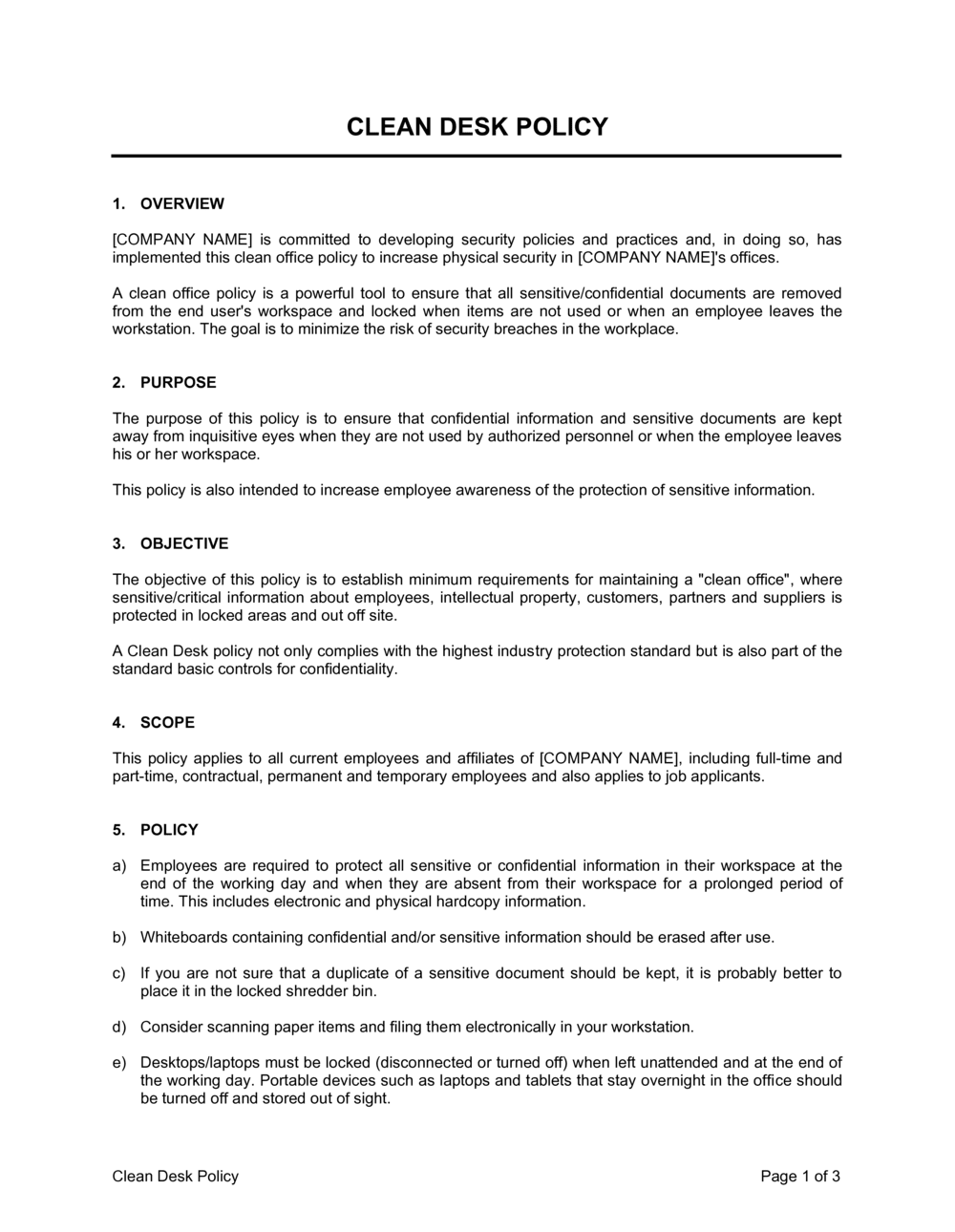
Purpose and scope, definitions of sensitive materials, desk and workstation rules, clear screen requirements, secure storage procedures, visitor and shared-space protocols, compliance and enforcement steps, and an employee acknowledgement section.

What is a Clean Desk Policy?

A Clean Desk Policy is a written workplace rule requiring employees to secure sensitive documents, removable media, and confidential materials on their workstation whenever they leave their desk unattended β€” and to fully clear their workspace at the end of each working day. It functions as a physical information security control, closing the gap between strong digital security practices and the real-world risk posed by printed documents, visible screens, and unsecured storage media. Most organizations publish a clean desk policy alongside a clear screen rule, since both address the same underlying threat: unauthorized access to confidential information through physical rather than digital means.

Why You Need This Document

Without a documented clean desk policy, even well-secured digital environments remain exposed at the physical layer β€” a printed client report left on a desk overnight, a whiteboard visible to a visiting contractor, or a USB drive stored in an unlocked drawer can each trigger a data breach with no digital footprint. Regulatory frameworks including ISO 27001, HIPAA, and GDPR explicitly expect physical safeguard controls to be in place and documented; an undocumented policy cannot be cited as audit evidence. Employees who have never been given a clear rule cannot be held accountable when incidents occur, complicating disciplinary action and incident response. This template gives you a complete, audit-ready policy you can customize and distribute in under two hours β€” creating the documented control your security program, your auditors, and your clients expect to see.

Which variant fits your situation?

If your situation is…Use this template
General office environment with assigned desksClean Desk Policy
Hot-desking or flexible seating arrangementHot Desk Clean Desk Policy
Remote or hybrid workforce working from homeRemote Work Security Policy
Healthcare organization subject to HIPAAHIPAA Workstation Security Policy
Organization pursuing ISO 27001 certificationISO 27001 Information Security Policy
Office with frequent external visitors or contractorsVisitor Access and Security Policy
Combined physical and digital security rolloutAcceptable Use Policy

Common mistakes to avoid

❌ Excluding remote workers from scope

Why it matters: Home offices and co-working spaces present the same physical exposure risk as corporate offices β€” unsecured printed documents, visible screens, and removable media are just as vulnerable.

Fix: Explicitly name remote and hybrid workers in the scope section and add a paragraph covering home-office storage, screen positioning, and guest access restrictions.

❌ Using vague storage instructions

Why it matters: Telling employees to 'store documents securely' without naming a specific location results in inconsistent behavior β€” some lock up documents, others slide them into a bag or pile them face-down.

Fix: Name the exact storage location available to each team or floor, confirm it is accessible during normal working hours, and include instructions for what to do when the location is full.

❌ Setting the screen-lock timeout too long

Why it matters: A 30-minute auto-lock is the most common default β€” it leaves screens readable for the entire duration of a meeting, a lunch break, or an unescorted visitor walkthrough.

Fix: Set the timeout to 10 minutes maximum for standard environments and 5 minutes for roles handling regulated data. Enforce it via IT policy, not just by asking employees to configure it themselves.

❌ Collecting acknowledgements only at onboarding

Why it matters: A policy signed once at hiring does not cover updates. If the policy changes and an employee breaches a new requirement, a single historic signature is difficult to rely on for disciplinary action.

Fix: Require re-acknowledgement annually and after any material revision. Track acknowledgement dates in your HR system so compliance is auditable.

The 10 key sections, explained

Purpose and objectives

Scope and applicability

Definitions of sensitive materials

Workstation rules during working hours

End-of-day desk clearance requirements

Clear screen and device locking rules

Visitor and shared-space protocols

Secure storage and disposal procedures

Compliance, enforcement, and exceptions

Employee acknowledgement

How to fill it out

  1. 1

    Customize the scope and applicability section

    Enter your company name and define which locations, employee types, and work arrangements the policy covers. Explicitly include remote workers, contractors, and anyone who handles company data off-site.

    πŸ’‘ If you operate in multiple countries, note any jurisdiction-specific data protection rules (e.g., GDPR for EU employees) that reinforce the policy rationale.

  2. 2

    Define your data classification levels

    List the sensitivity categories used in your organization β€” such as public, internal, confidential, and restricted β€” and map each category to the storage and handling requirements in the policy.

    πŸ’‘ Align your classification labels with those already used in your IT acceptable-use or data-handling policy so employees see a consistent framework.

  3. 3

    Specify storage locations by name

    Replace generic references to 'secure storage' with the actual locations available to employees β€” a locked desk drawer, a key-coded filing room, or a shared secure cabinet. Vague instructions produce inconsistent behavior.

    πŸ’‘ Walk the office before finalizing this section. If the named storage location is inconvenient to use, employees will ignore it.

  4. 4

    Set the screen-lock idle timeout

    Enter the maximum idle time before automatic screen lock β€” 5 minutes for high-security environments, 10 minutes for standard offices. Confirm with IT that this setting can be enforced via Group Policy or MDM.

    πŸ’‘ Coordinate the policy timeout with the IT team's GPO settings before publishing, so the stated rule matches the technical control already in place.

  5. 5

    Define the disposal method and vendor

    Name the shredder model or shred-bin vendor used at each location. If you use a certified destruction service, add their name and the collection schedule so employees know when bins are emptied.

    πŸ’‘ Include a note on electronic media disposal β€” employees often overlook USB drives and printed reports equally, but physical media destruction is frequently missed in audit findings.

  6. 6

    Set the enforcement and audit schedule

    Decide whether desk audits will be scheduled (monthly) or random, name the role responsible for conducting them, and define the consequence tiers for violations β€” from verbal reminder to formal disciplinary action.

    πŸ’‘ Unannounced audits are significantly more effective than scheduled ones. Announcing a 'clean desk week' in advance tells employees to tidy up temporarily rather than change behavior.

  7. 7

    Distribute, collect acknowledgements, and store records

    Share the final policy with all in-scope employees, collect signed acknowledgement forms, and store them in the relevant HR files or your compliance management system.

    πŸ’‘ Set a calendar reminder to re-distribute the policy annually or whenever a material change is made, and collect fresh acknowledgements each time.

Frequently asked questions

What is a clean desk policy?

A clean desk policy is a workplace rule requiring employees to secure sensitive documents, removable media, and confidential materials on their workstation whenever they step away from their desk β€” and to fully clear their workspace at the end of each working day. It is a physical information security control designed to prevent unauthorized access to confidential data by colleagues, visitors, cleaners, or anyone else who passes through the workspace.

Why do companies implement a clean desk policy?

Companies implement a clean desk policy to reduce the risk of confidential information being seen, photographed, or taken by unauthorized individuals. It also supports compliance with data protection frameworks including ISO 27001, SOC 2, HIPAA, and GDPR, which require documented physical security controls. Beyond compliance, a clean desk policy reduces the likelihood of internal data leaks and supports a culture of information security awareness.

Is a clean desk policy required by ISO 27001?

ISO 27001 Annex A includes a control (A.11.2.9 in the 2013 version, referenced in the 2022 revision under physical and environmental security) that explicitly references clean desk and clear screen practices. Organizations pursuing ISO 27001 certification are expected to have a documented clean desk policy as evidence that this control has been implemented. A well-structured template that is actively enforced satisfies this audit requirement in most certification assessments.

Does a clean desk policy apply to remote workers?

Yes β€” remote and hybrid employees handling confidential data at home face the same physical security risks as office workers. A clean desk policy should explicitly include remote workers and address home-office specifics: screen positioning to prevent shoulder surfing, secure disposal of printed documents, locked storage for physical materials, and restrictions on accessing confidential work in shared or public spaces.

How do you enforce a clean desk policy?

Enforcement typically combines periodic desk audits (scheduled or unannounced), automatic screen-lock configuration enforced via Group Policy or MDM, and a tiered disciplinary process for violations. The most effective enforcement approach is unannounced spot checks rather than announced 'clean desk weeks,' which prompt temporary compliance rather than lasting behavior change. Tying audit results to team metrics rather than individual naming can also improve adoption.

What is the difference between a clean desk policy and a clear screen policy?

A clean desk policy governs physical materials on and around the workstation β€” printed documents, removable media, keys, and notebooks. A clear screen policy specifically addresses on-screen data, requiring employees to lock or log off their computer whenever they leave their desk. The two are closely related and are typically published together in a single document, since both protect against the same class of unauthorized access risk.

What should be included in a clean desk policy?

A complete clean desk policy should cover: purpose and scope, definitions of sensitive materials, daytime workstation rules, end-of-day clearance requirements, clear screen and auto-lock settings, visitor and shared-space protocols, approved secure storage locations, document disposal procedures, compliance monitoring and enforcement, and an employee acknowledgement section. Omitting any of these creates gaps that will surface in audits or incident reviews.

How often should a clean desk policy be reviewed?

Most organizations review and reissue their clean desk policy annually as part of a broader information security policy review cycle. An immediate review is warranted after any of the following: a security incident involving physical data exposure, a significant change in the workplace model (such as moving to hot-desking or adding remote workers), or a regulatory update affecting physical safeguard requirements.

Can a clean desk policy help with GDPR compliance?

Yes. GDPR Article 32 requires organizations to implement appropriate technical and organizational measures to protect personal data. Physical security controls β€” including securing printed personal data and preventing unauthorized access to screens displaying personal information β€” are recognized organizational measures. A documented and enforced clean desk policy provides auditable evidence that physical safeguards for personal data are in place, supporting overall GDPR compliance posture.

How this compares to alternatives

vs Acceptable Use Policy

An acceptable use policy governs how employees use company technology β€” devices, networks, email, and software. A clean desk policy governs the physical workspace and paper-based information. Both are standard components of an information security program, but they address different threat vectors. Organizations typically need both.

vs Remote Work Agreement

A remote work agreement covers the terms under which an employee works from home β€” eligibility, equipment, hours, and productivity expectations. A clean desk policy sets the security rules for the physical workspace, whether in-office or remote. The clean desk policy is typically referenced within or attached to remote work agreements as a behavioral requirement.

vs Data Protection Policy

A data protection policy governs how personal and sensitive data is collected, stored, processed, and shared across the organization. A clean desk policy is a narrower, operationally focused rule covering the physical handling of information at workstations. The data protection policy sets the framework; the clean desk policy implements one specific control within it.

vs Employee Handbook

An employee handbook covers the full range of workplace policies β€” conduct, benefits, leave, and performance expectations. A clean desk policy is typically one section within or an appendix to the handbook. Publishing it as a standalone document allows it to be updated independently, distributed to contractors who are not given the full handbook, and cited separately in audit evidence.

Industry-specific considerations

Financial Services

Client account statements, trade confirmations, and KYC documents printed for review must be locked away or shredded within the same session to meet regulatory expectations.

Healthcare

HIPAA's physical safeguard rules require covered entities to restrict workstation access to authorized users, making a clean desk policy a direct compliance control for any staff handling patient records.

Professional Services

Law firms, accounting practices, and consultancies regularly host clients in shared spaces, making visitor-specific clean desk rules critical to protecting privileged or confidential client information.

Technology / SaaS

Engineering and product teams often print architecture diagrams and roadmaps; a clean desk policy paired with a clear screen rule closes the gap between strong digital security controls and weak physical ones.

Template vs pro β€” what fits your needs?

PathBest forCostTime
Use the templateSmall to mid-sized businesses establishing a baseline information security policy without a dedicated security teamFree1–2 hours to customize and distribute
Template + professional reviewOrganizations preparing for ISO 27001, SOC 2, or HIPAA audit where physical control documentation will be formally assessed$300–$800 for an information security consultant review2–5 days including review and revisions
Custom draftedRegulated enterprises in financial services or healthcare with complex multi-site physical security requirements$1,500–$4,000 for a policy drafted by a certified information security professional (CISM or CISSP)1–3 weeks

Glossary

Clean Desk Policy
A workplace rule requiring employees to secure or remove sensitive materials from their workstation whenever they are away from their desk.
Clear Screen Policy
A companion rule requiring employees to lock or log off their computer screen when leaving their workstation, preventing unauthorized viewing of on-screen data.
Sensitive Information
Any data β€” paper or digital β€” that could cause harm if disclosed to unauthorized parties, including personally identifiable information, financial records, and trade secrets.
Removable Media
Portable storage devices such as USB drives, external hard drives, SD cards, and optical discs that can carry data off-premises.
ISO 27001
An international standard for information security management systems that explicitly references clean desk and clear screen controls as physical security measures.
SOC 2
An auditing framework for service organizations that evaluates security, availability, and confidentiality controls β€” physical workstation security is often reviewed.
Need-to-Know Principle
The practice of restricting access to confidential information only to individuals whose role requires it.
Tailgating
A physical security breach where an unauthorized person enters a secured area by following an authorized employee through a controlled door.
Data Classification
A system that labels information by sensitivity level β€” such as public, internal, confidential, and restricted β€” to guide handling and storage requirements.
Secure Disposal
The destruction of physical documents or digital media in a way that makes recovery impossible, typically through cross-cut shredding or certified media wiping.

Part of your Business Operating System

This document is one of 3,000+ business & legal templates included in Business in a Box.

  • Fill-in-the-blanks β€” ready in minutes
  • 100% customizable Word document
  • Compatible with all office suites
  • Export to PDF and share electronically

Create your document in 3 simple steps.

From template to signed document β€” all inside one Business Operating System.
1
Download or open template

Access over 3,000+ business and legal templates for any business task, project or initiative.

2
Edit and fill in the blanks with AI

Customize your ready-made business document template and save it in the cloud.

3
Save, Share, Send, Sign

Share your files and folders with your team. Create a space of seamless collaboration.

Save time, save money, and create top-quality documents.

β˜…β˜…β˜…β˜…β˜…

"Fantastic value! I'm not sure how I'd do without it. It's worth its weight in gold and paid back for itself many times."

Managing Director Β· Mall Farm
Robert Whalley
Managing Director, Mall Farm Proprietary Limited
β˜…β˜…β˜…β˜…β˜…

"I have been using Business in a Box for years. It has been the most useful source of templates I have encountered. I recommend it to anyone."

Business Owner Β· 4+ years
Dr Michael John Freestone
Business Owner
β˜…β˜…β˜…β˜…β˜…

"It has been a life saver so many times I have lost count. Business in a Box has saved me so much time and as you know, time is money."

Owner Β· Upstate Web
David G. Moore Jr.
Owner, Upstate Web

Run your business with a system β€” not scattered tools

Stop downloading documents. Start operating with clarity. Business in a Box gives you the Business Operating System used by over 250,000 companies worldwide to structure, run, and grow their business.

Start freeΒ Β·Β No credit card required