1
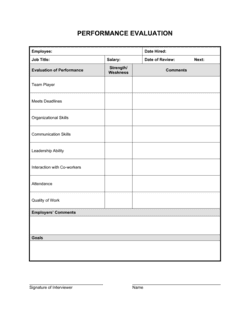
Complete the identification and period fields before the meeting
Fill in the employee's name, title, department, your name and title, and the exact review period dates before you sit down together. These fields should never be left for the meeting itself.
💡 Use the employee's official job title from their employment contract, not an informal working title — discrepancies create confusion in HR records.
2
Review evidence before scoring each competency
Go through your notes, emails, project records, or any documented incidents from the full review period before assigning ratings. Score each competency independently rather than letting one area color the others.
💡 Set a calendar reminder each month during the review period to jot down one or two notable observations per direct report — this eliminates recency bias when scoring time comes.
3
Write at least one specific example per competency
In the supporting observations field beneath each rating, record a concrete, date-referenced example. 'In March, [NAME] resolved a billing dispute with [CLIENT] within 24 hours, retaining a $15K account' is more useful than 'good with clients.'
💡 Specific examples are your primary defense if a rating is challenged — vague notes provide almost no protection.
4
Draft the overall summary and strengths
Write the summary and strengths sections after completing all competency rows, not before. Summarize the pattern across scores rather than leading with a conclusion you then try to justify.
💡 Read the summary and strengths back against the competency scores — if the narrative says 'exceeded expectations' but three competencies are rated 2, revise one or the other.
5
Set specific development actions with deadlines
For each development area, write a named action (a training course, a stretch assignment, a coaching conversation), identify who provides support, and set a target date within the next review cycle.
💡 Cap development areas at three. More than three signals the employee has no clear priority and dilutes the motivational effect of the review.
6
Share the draft with the employee before the meeting
Send the completed checklist to the employee at least 24–48 hours before the review meeting so they can prepare their comments and questions.
💡 Employees who receive feedback cold in a meeting are more defensive — advance sharing consistently produces more constructive conversations.
7
Collect signatures and file the completed form
After the meeting, have both parties sign the acknowledgment section. Store the signed PDF in the employee's personnel file and provide the employee with a copy.
💡 If an employee refuses to sign, note the refusal in writing on the form itself — 'Employee declined to sign on [DATE]' — and have a witness initial the note.