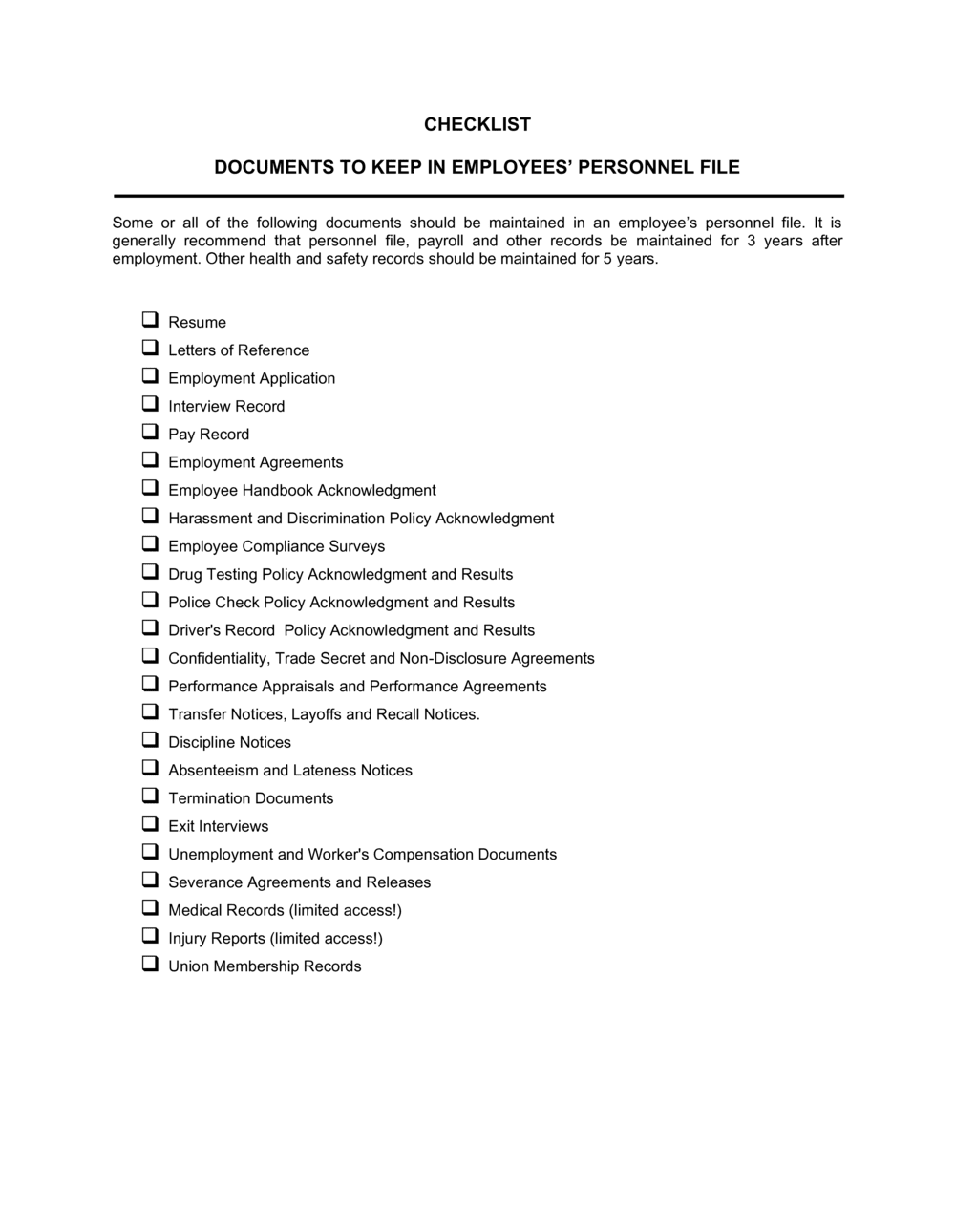
Checklist Personnel File

Free download β€’ Use as a template β€’ Print or share

1 pageβ€’15–25 min to useβ€’Difficulty: Standard
Learn more ↓
FreeChecklist Personnel File Template

At a glance

What it is
A Personnel File Checklist is an HR document that itemizes every record required in a complete employee file β€” from the signed employment contract and government-issued ID copies to tax forms, benefits enrollment, training logs, and performance evaluations. This free Word download gives HR teams a structured, editable checklist they can use when onboarding new hires or auditing existing files for compliance and record-retention requirements.
When you need it
Use it when setting up a file for a new employee, conducting an annual HR audit, preparing for an external audit or inspection, or offboarding a departing employee and archiving their records.
What's inside
Pre-employment documents, employment agreement, tax and payroll forms, government ID verification, benefits enrollment records, training and certification logs, performance evaluations, disciplinary records, and separation or termination documents.

What is a Personnel File Checklist?

A Personnel File Checklist is an HR document that itemizes every record an employer must collect, maintain, and retain for each employee β€” covering everything from the signed employment contract and government ID verification to tax withholding forms, benefits enrollment, training completions, and performance evaluations. It functions as both an onboarding tool and an ongoing audit instrument, giving HR teams a consistent, repeatable standard for confirming that every employee file is complete, properly organized, and compliant with applicable record-retention requirements.

Why You Need This Document

Without a standardized checklist, personnel files accumulate gaps quietly β€” a missing I-9, an unsigned performance review, or a benefits waiver that was never collected. Those gaps become expensive when a termination is disputed, a labor authority conducts an inspection, or an acquisition triggers HR due diligence. Disorganized or incomplete files have resulted in employers losing wrongful termination claims simply because they could not produce the documentation that supported their decisions. A completed checklist for every employee file eliminates that risk, ensures mandatory documents are never overlooked at hire, and gives HR teams a reliable audit trail from day one through separation. This template provides a ready-to-use starting point that takes under 20 minutes per file and scales across your entire workforce.

Which variant fits your situation?

If your situation is…Use this template
Assembling a file for a brand-new full-time employeePersonnel File Checklist (New Hire)
Auditing all existing employee files for completenessHR Audit Checklist
Offboarding a departing employee and archiving recordsEmployee Offboarding Checklist
Tracking certifications and mandatory training complianceEmployee Training Record
Recording and filing a formal disciplinary actionEmployee Written Warning
Documenting a formal performance review cycleEmployee Performance Review

Common mistakes to avoid

❌ Storing I-9 forms inside the general personnel file

Why it matters: Federal inspectors expect I-9s in a dedicated binder. Mixed files slow inspections and make it easy to miss a re-verification deadline buried among unrelated documents.

Fix: Keep all I-9s in a single, separate binder or secure digital folder organized by active and terminated employees, distinct from individual personnel files.

❌ Filing documents without a date received

Why it matters: An undated checklist cannot prove that a signed contract or background check was collected before the employee's start date β€” creating compliance and enforcement gaps.

Fix: Add a 'Date Filed' column to every checklist line item and require the HR coordinator to enter the date when each document is received and stored.

❌ Keeping medical information in the main personnel file

Why it matters: The ADA and FMLA require medical records and accommodation requests to be maintained in a confidential file separate from general employment records. Commingling them is a federal violation.

Fix: Create a physically and digitally separate confidential medical file for each employee and move any existing medical documents out of the general personnel file immediately.

❌ Never updating the checklist after the initial hire

Why it matters: A personnel file that reflects only the hire date is useless for a performance dispute, an audit, or a termination β€” missing years of evaluations, training records, and agreement updates.

Fix: Schedule an annual personnel file review for every active employee and use the checklist to identify and fill gaps before they become compliance problems.

The 9 key fields, explained

Employee Identification

Pre-Employment Documents

Employment Agreement and Policy Acknowledgments

Government ID and Work Authorization

Tax and Payroll Forms

Benefits Enrollment Records

Training and Certification Records

Performance Evaluations and Disciplinary Records

Separation and Termination Documents

How to fill it out

  1. 1

    Enter the employee's identifying information

    Complete the header section with the employee's full legal name, employee ID, job title, department, hire date, and employment type. This ties every subsequent document in the file to the correct record.

    πŸ’‘ Cross-reference the name against the signed government ID before entering it β€” a single character difference between the personnel file and payroll system can trigger tax reporting errors.

  2. 2

    Check off pre-employment documents

    Verify that the signed offer letter, completed application, background check results, and reference notes are present. Mark each item with the date filed, not just a checkmark.

    πŸ’‘ Date-stamping each item makes it easy to prove a document was collected before the start date if the hire is ever audited.

  3. 3

    Confirm all signed agreements are on file

    Locate the signed employment contract, handbook acknowledgment, NDA, and any non-compete. Confirm each was signed before or on the first day of employment and note the execution date.

    πŸ’‘ Agreements signed after the start date may require separate consideration to be enforceable β€” flag any gaps for legal review.

  4. 4

    Verify government ID and work authorization

    Confirm Form I-9 is complete, the correct document types were reviewed, and copies are retained in a separate I-9 file rather than the general personnel folder.

    πŸ’‘ Set a calendar reminder for re-verification expiry dates on temporary work authorizations β€” missing a re-verification deadline is a federal compliance violation.

  5. 5

    Check tax, payroll, and benefits forms

    Confirm W-4, state withholding form, direct deposit authorization, and all benefits election or waiver forms are signed, dated, and on file. Note whether an annual benefits update is due.

    πŸ’‘ Ask employees to review and resubmit their W-4 any time they report a major life change β€” marriage, divorce, or a new dependent β€” rather than waiting for year-end.

  6. 6

    Log training completions and certifications

    Record each completed training module with the date, attach or reference the completion certificate, and note expiration dates for any time-limited certifications or licenses.

    πŸ’‘ Build a separate tab or tracker for licenses with expiry dates so HR receives an automated reminder 60 days before renewal is due.

  7. 7

    File performance and disciplinary records chronologically

    Confirm that all performance reviews and any disciplinary notices are filed in date order, that each document carries the employee's signature, and that the file reflects the current status of any active PIP.

    πŸ’‘ Always retain the employee's written response to a disciplinary notice alongside the notice itself β€” incomplete files are the most common reason employment disputes are lost.

  8. 8

    Complete the separation section upon departure

    When an employee leaves, fill in the separation type, final pay date, COBRA notice date, and property return confirmation. Archive the completed checklist with the closed personnel file.

    πŸ’‘ Retain terminated employee files for at least 7 years β€” or longer if required by your jurisdiction β€” before destruction per your record-retention policy.

Frequently asked questions

What is a personnel file checklist?

A personnel file checklist is an HR document that lists every record an employer must collect and retain for each employee β€” from the signed employment contract and government ID verification to tax forms, benefits enrollment, training completions, and performance evaluations. It serves as both an onboarding tool and an audit instrument, ensuring nothing is missing when a file is reviewed by an auditor, a regulator, or legal counsel.

What documents should be in an employee personnel file?

A complete personnel file typically includes the signed offer letter, employment application, employment contract, Form I-9, W-4 and state withholding forms, direct deposit authorization, benefits enrollment or waiver forms, training and certification records, annual performance reviews, any disciplinary notices, and separation documents upon departure. Medical records and accommodation requests must be kept in a separate confidential file.

How long should employee personnel files be retained?

Most US federal guidelines require retaining personnel files for at least 3 years after termination; EEOC regulations require employment records for 1 year, and ERISA requires benefits records for 6 years. Many employment attorneys recommend a 7-year minimum to cover the statute of limitations for most employment claims. Check your state's specific requirements, as some exceed federal minimums.

Should I-9 forms be stored in the personnel file?

No. Form I-9 should be stored in a separate, dedicated binder or secure digital folder for all employees β€” not inside individual personnel files. This makes a federal I-9 inspection straightforward and ensures re-verification deadlines for temporary work authorizations are easy to monitor and track across your workforce.

Can employees access their own personnel files?

In many US states, employees have a legal right to inspect and copy their own personnel files upon request. States including California, Illinois, Michigan, and Massachusetts have specific statutes governing access timelines and copying rights. Best practice is to have a written policy stating how requests are handled and to provide access within 30 days of a written request.

What should not be in a personnel file?

Medical records, FMLA paperwork, disability accommodation requests, workers' compensation documents, and EEO self-identification forms should all be kept out of the general personnel file and stored in separate confidential folders. Immigration documents beyond I-9 records, credit check results, and certain background check details may also be subject to separate storage requirements under applicable law.

How often should personnel files be audited?

Conducting a full personnel file audit at least once per year is standard practice for most HR departments. Additional spot audits are advisable before any regulatory inspection, during a merger or acquisition due diligence review, or when an employee files a complaint. Using a standardized checklist for each audit ensures consistent results across your entire workforce.

Do personnel files need to be kept in physical paper form?

Most jurisdictions permit electronic storage of personnel records, provided the system maintains document integrity, access controls, and audit trails. Electronic files must be as complete and accessible as paper files and should be backed up regularly. Some original documents β€” such as wet-ink signed agreements β€” may still be advisable to retain in physical form depending on your jurisdiction and internal policy.

How this compares to alternatives

vs Employee Onboarding Checklist

An employee onboarding checklist tracks the process of integrating a new hire β€” IT setup, introductions, first-week tasks, and system access. A personnel file checklist tracks the documents that must be collected and filed for HR compliance. Both are used at hire, but they serve different purposes: one is a task list, the other is a records audit.

vs Employee Offboarding Checklist

An offboarding checklist covers the departure process β€” system deprovisioning, exit interview, property return, and final pay. A personnel file checklist covers the records that must be complete and archived once that process is finished. The offboarding checklist drives the workflow; the personnel file checklist confirms the documentation is correct before the file is closed.

vs HR Audit Checklist

An HR audit checklist reviews the entire HR function β€” policies, compensation practices, benefits compliance, and workforce planning. A personnel file checklist is narrower, focused specifically on whether each individual employee's records are complete and properly filed. The personnel file checklist is one component of a broader HR audit.

vs Employee Performance Review

A performance review template is used to conduct and document a structured evaluation conversation. A personnel file checklist confirms that completed and signed performance reviews are present in the employee's file. The review creates the document; the checklist verifies it was collected and retained.

Industry-specific considerations

Healthcare

Clinical staff files require licensing and credentialing documents, mandatory HIPAA training completion records, and vaccination status β€” all with strict expiry-date tracking.

Construction and Trades

Personnel files must include trade certifications, OSHA safety training completions, equipment operator licenses, and site-specific induction records with renewal dates.

Retail / Hospitality

High turnover and large hourly workforces make standardized checklists essential for confirming I-9 compliance, tip-reporting acknowledgments, and food handler certifications at scale.

Professional Services

Files for licensed professionals (lawyers, accountants, engineers) must track active professional licenses, continuing education completions, and conflict-of-interest disclosure forms.

Template vs pro β€” what fits your needs?

PathBest forCostTime
Use the templateHR managers, small business owners, and operations teams building or auditing personnel files in-houseFree10–20 minutes per employee file
Template + professional reviewCompanies preparing for a regulatory audit, merger due diligence, or operating in states with strict personnel record laws$200–$500 for an HR consultant review1–2 days
Custom draftedLarge employers, unionized workforces, or multi-state operations requiring jurisdiction-specific document requirements baked into the checklist$500–$2,000 for a custom HR compliance build-out1–2 weeks

Glossary

Personnel File
The official employer-maintained folder containing all employment-related documents for a single employee, from hire through termination.
Form I-9
A US federal form used to verify an employee's identity and legal authorization to work; employers must retain it for 3 years after hire or 1 year after separation, whichever is later.
Form W-4
A US IRS withholding form employees complete to instruct their employer how much federal income tax to deduct from each paycheck.
Record Retention Policy
An employer's written rules specifying how long each type of employment document must be kept before it may be lawfully destroyed.
Benefits Enrollment Form
A signed document recording an employee's elections for health, dental, vision, retirement, and other employer-sponsored benefit plans.
At-Will Acknowledgment
A signed statement confirming the employee understands employment may be terminated by either party at any time for any lawful reason β€” required in most US at-will states.
Direct Deposit Authorization
A form authorizing the employer to deposit payroll funds directly into the employee's designated bank account.
Performance Improvement Plan (PIP)
A formal document outlining specific performance deficiencies, measurable improvement targets, and a defined timeframe for corrective action.
Separation Agreement
A document signed at termination that records final pay, benefit continuation, return of company property, and any mutual release of claims.
Confidential Medical File
A physically and digitally separate file β€” required under the ADA and FMLA β€” that holds medical information and accommodation requests apart from the general personnel file.

Part of your Business Operating System

This document is one of 3,000+ business & legal templates included in Business in a Box.

  • Fill-in-the-blanks β€” ready in minutes
  • 100% customizable Word document
  • Compatible with all office suites
  • Export to PDF and share electronically

Create your document in 3 simple steps.

From template to signed document β€” all inside one Business Operating System.
1
Download or open template

Access over 3,000+ business and legal templates for any business task, project or initiative.

2
Edit and fill in the blanks with AI

Customize your ready-made business document template and save it in the cloud.

3
Save, Share, Send, Sign

Share your files and folders with your team. Create a space of seamless collaboration.

Save time, save money, and create top-quality documents.

β˜…β˜…β˜…β˜…β˜…

"Fantastic value! I'm not sure how I'd do without it. It's worth its weight in gold and paid back for itself many times."

Managing Director Β· Mall Farm
Robert Whalley
Managing Director, Mall Farm Proprietary Limited
β˜…β˜…β˜…β˜…β˜…

"I have been using Business in a Box for years. It has been the most useful source of templates I have encountered. I recommend it to anyone."

Business Owner Β· 4+ years
Dr Michael John Freestone
Business Owner
β˜…β˜…β˜…β˜…β˜…

"It has been a life saver so many times I have lost count. Business in a Box has saved me so much time and as you know, time is money."

Owner Β· Upstate Web
David G. Moore Jr.
Owner, Upstate Web

Run your business with a system β€” not scattered tools

Stop downloading documents. Start operating with clarity. Business in a Box gives you the Business Operating System used by over 250,000 companies worldwide to structure, run, and grow their business.

Start freeΒ Β·Β No credit card required