Checklist Contract Terms and Provisions

Free download β€’ Use as a template β€’ Print or share

7 pagesβ€’25–30 min to useβ€’Difficulty: Complex
Learn more ↓
FreeChecklist Contract Terms and Provisions Template

At a glance

What it is
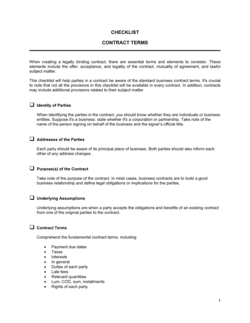
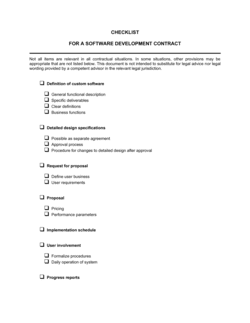
A Checklist Contract Terms and Provisions is a structured review form used to verify that all critical clauses and legal provisions are present, complete, and acceptable before a contract is signed. This free Word download gives you a ready-to-use checklist you can edit online, mark up during review, and export as PDF to share with counterparties or counsel.
When you need it
Use it whenever you are reviewing a contract presented by another party, auditing an existing agreement for completeness, or preparing your own contract for internal sign-off before execution.
What's inside
Itemized rows covering party identification, scope of work, payment terms, IP ownership, confidentiality, liability limits, termination rights, dispute resolution, and governing law β€” each with a status field to mark reviewed, missing, or flagged for negotiation.

What is a Checklist Contract Terms and Provisions?

A Checklist Contract Terms and Provisions is a structured review form that itemizes the key clauses every commercial agreement should contain and provides a systematic way to verify whether each provision is present, complete, and acceptable before a contract is signed. It works across contract types β€” service agreements, vendor contracts, NDAs, consulting arrangements, and employment agreements β€” and gives anyone reviewing a contract a consistent process to follow, regardless of their legal background.

Why You Need This Document

Contracts that are signed without a structured review frequently contain missing liability caps, absent termination rights, or vague scope language that creates disputes months later β€” often at significant cost. A checklist forces a complete read of every critical provision and creates a written record of what was reviewed and what was flagged before execution. Without it, gaps are discovered only when something goes wrong: an auto-renewal locks you in for another year, an IP clause never existed so a contractor keeps the deliverable, or a missing late-fee provision leaves you with no financial lever on a slow-paying client. This template closes those gaps in under 20 minutes per contract β€” and the completed checklist serves as documented evidence of due diligence if a dispute ever reaches negotiation or court.

Which variant fits your situation?

If your situation is…Use this template
Reviewing a vendor or supplier agreementVendor Agreement Checklist
Auditing an employment contract for completenessEmployment Contract
Checking a client services agreement before signingService Agreement
Reviewing an NDA for missing confidentiality provisionsNon-Disclosure Agreement (NDA)
Auditing a lease or office rental contractCommercial Lease Agreement
Preparing a contract for internal sign-off before sending to counterpartyContract Approval Checklist

Common mistakes to avoid

❌ Skipping the checklist for 'standard' or short contracts

Why it matters: Even a two-page agreement can be missing an IP assignment or liability cap that creates significant exposure. Brief contracts are not inherently low-risk.

Fix: Run every contract β€” regardless of length β€” through the checklist before signing. The process takes under 15 minutes for short agreements.

❌ Marking provisions as present without reading them

Why it matters: A clause can exist in a contract but be so narrowly worded that it provides no real protection β€” for example, a confidentiality clause that expires after 12 months.

Fix: Read each clause before marking it present, and note whether it meets your minimum acceptable standard, not just whether it appears somewhere in the document.

❌ Leaving the 'notes' column blank on flagged items

Why it matters: A flag without context loses its meaning when the checklist is reviewed a week later or handed to a colleague or lawyer.

Fix: Write a one-sentence note for every flagged item explaining the specific concern β€” 'liability cap is one-sided, only limits our recovery' is actionable; 'check this' is not.

❌ Filing the checklist separately from the executed contract

Why it matters: If a dispute arises 18 months later, a review checklist stored in a different folder from the contract may never be found or used as evidence of due diligence.

Fix: Save the completed checklist in the same folder or record as the signed contract, named with the same contract reference number.

The 10 key fields, explained

Parties and Signatories

Scope of Work or Subject Matter

Payment Terms

Term and Renewal

Intellectual Property Ownership

Confidentiality

Limitation of Liability

Termination Rights

Dispute Resolution

Governing Law and Jurisdiction

How to fill it out

  1. 1

    Identify the contract being reviewed

    Enter the contract name, counterparty name, contract date, and internal reference number at the top of the checklist. This ties the checklist to a specific agreement and makes it retrievable later.

    πŸ’‘ Use the same reference number as your contract management system or file folder so the checklist and the executed contract stay linked.

  2. 2

    Work through each provision row in order

    For each checklist item, mark whether the provision is present, absent, or present but flagged for review. Add a notes field for any clause you want to negotiate or escalate.

    πŸ’‘ Do not skip rows β€” marking a provision 'N/A' is a deliberate decision that should be documented, not a blank left by oversight.

  3. 3

    Flag missing or one-sided clauses

    Highlight any provision that is absent entirely or drafted in a way that gives one party significantly more protection. Mark these as 'Needs Revision' with a brief note on what is missing.

    πŸ’‘ Pay extra attention to limitation of liability and termination clauses β€” these are the most commonly omitted or one-sided provisions in vendor-drafted contracts.

  4. 4

    Cross-reference against your standard contract terms

    Compare what the counterparty's contract says against your company's standard position on each provision. Note any deviations that require negotiation before signing.

    πŸ’‘ If your company has a contract playbook or negotiation guidelines, keep them open in a second window while completing this checklist.

  5. 5

    Assign each flagged item an action and owner

    For every item marked 'Needs Revision' or 'Missing,' note what action is needed (redline, add clause, escalate to legal) and who is responsible for completing it.

    πŸ’‘ Set a deadline next to each action β€” open items without deadlines rarely get resolved before the signing pressure mounts.

  6. 6

    Obtain sign-off and archive the completed checklist

    Once all items are resolved, mark the checklist complete, get sign-off from the reviewer, and save it alongside the executed contract in your document management system.

    πŸ’‘ A completed checklist serves as evidence of due diligence if a dispute arises later β€” treat it as a permanent record, not a throwaway worksheet.

Frequently asked questions

What is a contract terms and provisions checklist?

A contract terms and provisions checklist is a structured review form that lists the key clauses every business contract should contain and helps reviewers verify whether each clause is present, acceptable, or missing before the contract is signed. It standardizes the review process so nothing critical gets overlooked, regardless of who is doing the review.

When should I use a contract checklist?

Use it whenever you receive a contract from another party to review and sign, when you are preparing your own contract for internal approval, or when auditing an existing portfolio of agreements for completeness. It is especially useful when your team reviews contracts without dedicated legal support and needs a consistent process to follow.

What are the most important provisions to check in any contract?

The six provisions that most often create disputes or exposure when missing or poorly drafted are: scope of work, payment terms with a late fee, IP ownership, limitation of liability, termination rights (including for convenience), and governing law. A checklist ensures all six are present and readable before you sign.

Can I use this checklist for any type of contract?

Yes β€” the core provisions covered apply to most commercial agreements, including service contracts, vendor agreements, NDAs, consulting agreements, and employment contracts. For highly specialized contracts such as construction, real estate leases, or financial instruments, you may need to add industry-specific provisions to the checklist.

How do I handle a contract that is missing several key provisions?

Mark each missing item in the checklist's status column and note what needs to be added. Then either request a revised draft from the other party, prepare a redline adding the missing clauses, or negotiate a side letter addressing the gaps. Never sign a contract expecting to resolve gaps informally after execution.

How should I store completed contract checklists?

Save each completed checklist in the same folder or document management record as the executed contract, using the same reference number in the file name. This ensures the checklist can be located instantly if a dispute arises and serves as documented evidence that a formal review was completed before signing.

What is the difference between a contract checklist and a contract template?

A contract template is a pre-drafted document with placeholder text that you fill in to create an agreement. A contract checklist is a review tool you use to evaluate an existing draft β€” whether your own template or a counterparty's document β€” to confirm it contains all required provisions before it is signed.

How this compares to alternatives

vs Non-Disclosure Agreement (NDA)

An NDA is a binding agreement that creates confidentiality obligations between parties. A contract checklist is a review tool used to verify that an NDA β€” or any other contract β€” contains the provisions it should. Use the NDA when you need a confidentiality agreement; use the checklist when you need to review one before signing.

vs Service Agreement

A service agreement is the binding contract governing a service engagement. A contract checklist is used to audit that service agreement β€” or any draft presented by a client or vendor β€” to confirm all standard provisions are present and acceptable before execution.

vs Contract Amendment

A contract amendment modifies an already-executed agreement. A contract checklist is used before execution to catch the gaps that would otherwise require an amendment later. Running a thorough checklist review reduces the number of amendments needed post-signing.

vs Letter of Intent (LOI)

A letter of intent outlines the preliminary terms of a proposed deal before a full contract is drafted. A contract checklist is used at the end of that process β€” once a full draft exists β€” to verify the final document reflects what was agreed in the LOI and contains all required provisions.

Industry-specific considerations

Professional Services

Scope creep is the primary risk β€” the checklist focuses on detailed scope-of-work and change-order provisions to protect both billing and delivery expectations.

Technology / SaaS

IP assignment, data ownership, and limitation of liability clauses require extra scrutiny given the value of software deliverables and the cost of data incidents.

Construction

Payment milestones, lien waiver references, force majeure, and insurance requirements are provisions the checklist should verify on every subcontract and owner agreement.

Retail and E-commerce

Vendor supply agreements need careful review of delivery terms, warranty provisions, returns and liability allocation, and exclusivity or minimum purchase obligations.

Template vs pro β€” what fits your needs?

PathBest forCostTime
Use the templateSmall businesses, freelancers, and operations teams reviewing standard commercial contractsFree10–20 minutes per contract
Template + professional reviewContracts above $50K in value, or agreements with complex IP, liability, or exclusivity terms$150–$400 for a one-hour lawyer review of flagged items1–2 days
Custom draftedEnterprise procurement programs requiring a custom playbook tied to company-specific standard positions$500–$2,000 for a contract playbook built by outside counsel1–3 weeks

Glossary

Provision
A specific clause or section within a contract that addresses a distinct legal obligation, right, or condition.
Indemnification
A clause requiring one party to compensate the other for specified losses, damages, or legal costs arising from defined events.
Limitation of Liability
A clause capping the maximum amount one party can recover from the other for contract-related claims, typically expressed as a multiple of fees paid.
Force Majeure
A provision excusing a party from performance when an extraordinary event outside their control β€” such as a natural disaster or government action β€” makes performance impossible.
Governing Law
The jurisdiction whose laws apply to interpreting and enforcing the contract, regardless of where the parties are located.
Entire Agreement Clause
A clause stating that the written contract supersedes all prior negotiations, representations, and understandings between the parties.
Assignment
A clause addressing whether a party may transfer their rights or obligations under the contract to a third party, and under what conditions.
Severability
A clause providing that if one provision is found unenforceable, the remainder of the contract continues in full force.
Representations and Warranties
Statements of fact made by each party at signing that the other party relies upon β€” if untrue, the misrepresenting party may be liable for breach.
Counterparts
A clause allowing each party to sign a separate copy of the contract, with all copies together forming one binding agreement.

Part of your Business Operating System

This document is one of 3,000+ business & legal templates included in Business in a Box.

  • Fill-in-the-blanks β€” ready in minutes
  • 100% customizable Word document
  • Compatible with all office suites
  • Export to PDF and share electronically

Create your document in 3 simple steps.

From template to signed document β€” all inside one Business Operating System.
1
Download or open template

Access over 3,000+ business and legal templates for any business task, project or initiative.

2
Edit and fill in the blanks with AI

Customize your ready-made business document template and save it in the cloud.

3
Save, Share, Send, Sign

Share your files and folders with your team. Create a space of seamless collaboration.

Save time, save money, and create top-quality documents.

β˜…β˜…β˜…β˜…β˜…

"Fantastic value! I'm not sure how I'd do without it. It's worth its weight in gold and paid back for itself many times."

Managing Director Β· Mall Farm
Robert Whalley
Managing Director, Mall Farm Proprietary Limited
β˜…β˜…β˜…β˜…β˜…

"I have been using Business in a Box for years. It has been the most useful source of templates I have encountered. I recommend it to anyone."

Business Owner Β· 4+ years
Dr Michael John Freestone
Business Owner
β˜…β˜…β˜…β˜…β˜…

"It has been a life saver so many times I have lost count. Business in a Box has saved me so much time and as you know, time is money."

Owner Β· Upstate Web
David G. Moore Jr.
Owner, Upstate Web

Run your business with a system β€” not scattered tools

Stop downloading documents. Start operating with clarity. Business in a Box gives you the Business Operating System used by over 250,000 companies worldwide to structure, run, and grow their business.

Free Forever PlanΒ Β·Β No credit card required