Direct Deposit Enrollment Form Template

Free Word download β€’ Edit online β€’ Save & share with Drive β€’ Export to PDF

1 pageβ€’15–25 min to fillβ€’Difficulty: Standard
Learn more ↓
FreeDirect Deposit Enrollment Form Template

At a glance

What it is
A Direct Deposit Enrollment Form is a structured payroll document an employee completes to authorize their employer to deposit wages, salaries, or reimbursements directly into a designated bank account. This free Word download captures all required banking details and authorization language in a single page you can edit online and distribute to new hires or existing staff.
When you need it
Use it during onboarding to set up payroll for new employees, when an existing employee changes banks or wants to update their account information, or when rolling out direct deposit for the first time across your organization.
What's inside
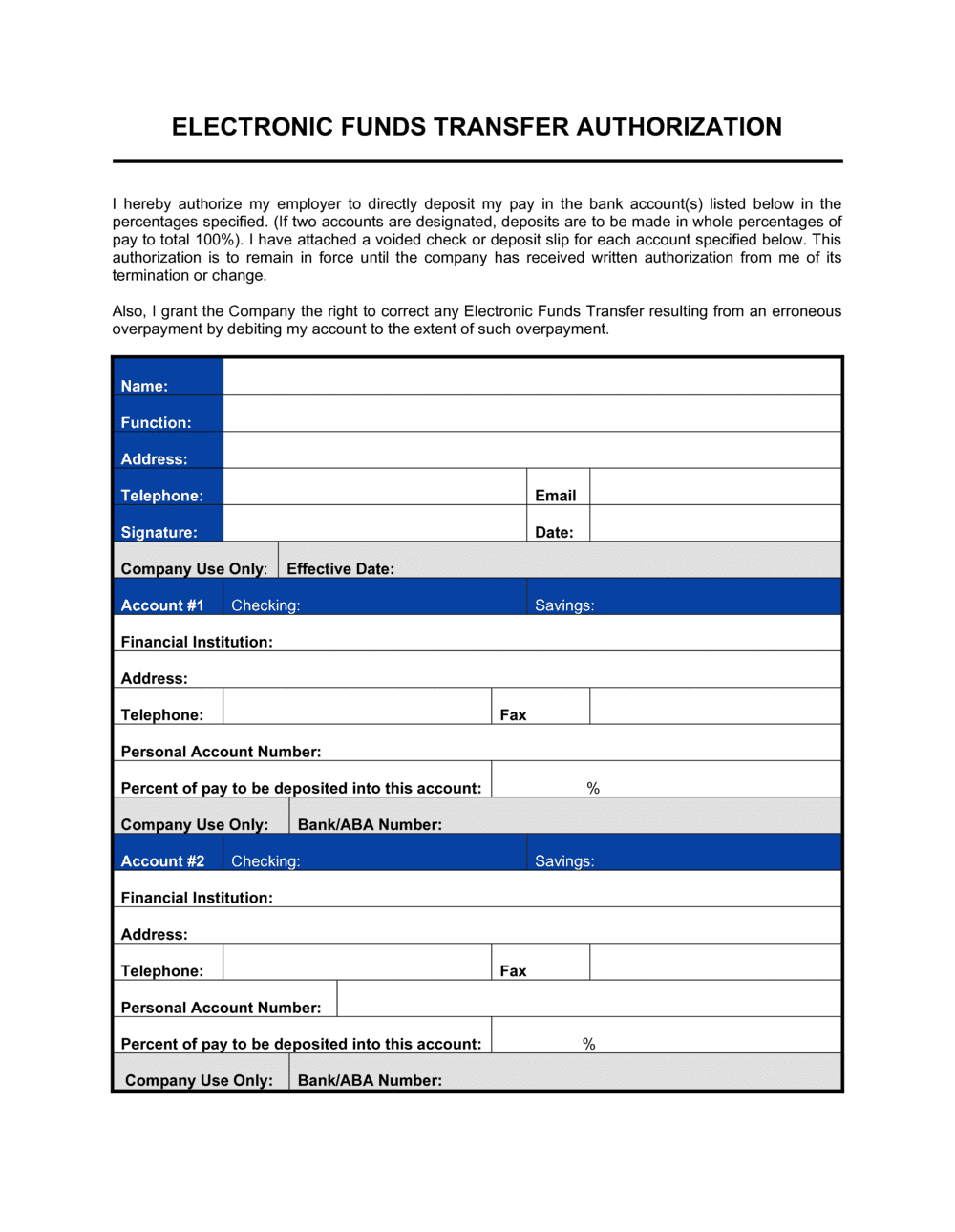
Employee identification fields, financial institution details, routing and account numbers, account type selection, deposit allocation instructions, and an authorization statement with signature and date fields.

What is a Direct Deposit Enrollment Form?

A Direct Deposit Enrollment Form is a structured payroll document an employee completes to authorize their employer to deposit wages electronically into a designated bank account via the ACH network. It captures the employee's full banking details β€” financial institution name, ABA routing number, account number, and account type β€” along with a signed authorization statement that satisfies NACHA operating rules. Employers use the completed form to configure ACH credits in their payroll system, replacing paper checks with direct transfers that post on each scheduled pay date.

Why You Need This Document

Processing payroll without a signed enrollment form exposes the employer to NACHA compliance risk and creates no written record of the employee's consent to electronic deposits. If a deposit posts to the wrong account β€” due to a transcription error or an unverified routing number β€” and no authorization form is on file, the employer has no documented evidence that the employee provided the banking details. The resulting ACH reversal process can take 3–5 business days, meaning the employee misses a pay date entirely. A completed, verified enrollment form prevents this chain of events, provides the audit trail required under federal ACH rules, and gives payroll teams a reliable reference point for resolving any future discrepancies quickly.

Which variant fits your situation?

If your situation is…Use this template
Employee splitting pay between two accountsDirect Deposit Split Allocation Form
Contractor receiving project-based payments electronicallyVendor ACH Payment Authorization Form
Employee updating an existing bank account on fileDirect Deposit Change Form
Employee canceling direct deposit and reverting to paper checkDirect Deposit Cancellation Form
Employer setting up payroll for the first timeNew Employee Onboarding Checklist
Processing reimbursements separate from payrollExpense Reimbursement Form

Common mistakes to avoid

❌ Using the wire routing number instead of the ACH routing number

Why it matters: Many banks assign separate routing numbers for ACH and wire transfers. Entering the wire number causes the deposit to fail or be returned, delaying pay by at least one cycle.

Fix: Instruct employees to confirm the ACH routing number directly with their bank or look it up on the bank's official website β€” not from memory.

❌ No confirmation field for the account number

Why it matters: A single transposed digit in a 10–12 digit account number sends the deposit to a random account or triggers a return β€” the employee doesn't get paid on time.

Fix: Add a 'Confirm Account Number' field to your form and require both entries to match before the form is accepted by payroll.

❌ Accepting undated or unsigned forms

Why it matters: Without a signature and date, the employer has no documented authorization for the ACH debit or credit, which violates NACHA operating rules and creates liability in a dispute.

Fix: Return incomplete forms immediately and require a new signed, dated copy before entering any banking information into the payroll system.

❌ Filing the form without a processing confirmation number

Why it matters: If the deposit fails on the first pay date, an unverified form provides no audit trail to determine whether the data was entered correctly or at all.

Fix: Require the payroll processor to log the system confirmation number on the form before it is filed, creating a complete chain of custody from submission to processing.

The 9 key fields, explained

Employee Information

Financial Institution Name and Address

ABA Routing Number

Account Number

Account Type

Deposit Allocation

Authorization Statement

Employee Signature and Date

Employer or Payroll Representative Verification

How to fill it out

  1. 1

    Enter employee identification details

    Fill in the employee's full legal name exactly as it appears on their government ID and payroll record. Add their employee ID, department, and hire date.

    πŸ’‘ Cross-reference the name against the I-9 form to catch discrepancies before the form reaches payroll.

  2. 2

    Gather bank details from a voided check or bank statement

    Ask the employee to attach a voided check or a printed bank statement header showing their routing and account numbers. Do not rely on memory or mobile banking app screenshots alone.

    πŸ’‘ A voided check is the most reliable source β€” the routing and account numbers are printed by the bank's MICR encoding system and are less prone to transcription errors than numbers typed into an app.

  3. 3

    Enter the nine-digit ABA routing number

    Copy the routing number from the bottom-left of the voided check. Confirm it is the ACH routing number, not the wire transfer routing number, by checking the bank's website or calling the branch.

    πŸ’‘ Large banks like Bank of America and Wells Fargo have different routing numbers by state β€” verify the number corresponds to the state where the account was opened.

  4. 4

    Enter and confirm the account number

    Enter the account number in both the primary and confirmation fields. The account number appears after the routing number on the bottom of a check, before the check number.

    πŸ’‘ Have the employee verify both entries before signing β€” a single transposed digit will cause the first deposit to reject and delay pay by one full cycle.

  5. 5

    Select account type and deposit allocation

    Check either 'Checking' or 'Savings.' Then choose whether the full net pay or a fixed dollar amount should go to this account. For employees splitting pay, complete a separate line or form for each account.

    πŸ’‘ For employees designating multiple accounts, process all allocation lines in the same payroll system session to avoid partial setups that trigger an overpayment.

  6. 6

    Review the authorization statement with the employee

    Walk the employee through the authorization language so they understand the employer will initiate ACH credits to the listed account and that cancellation requires advance written notice.

    πŸ’‘ Retain the completed, signed form in the employee's personnel file for a minimum of three years β€” this is the evidence of consent required under NACHA rules.

  7. 7

    Process, verify, and confirm in payroll

    Enter the banking details into your payroll system, note the confirmation number on the form, and initial the employer verification field. File the signed paper copy securely.

    πŸ’‘ Run a prenote (zero-dollar test transaction) at least one full pay cycle before the first live deposit β€” this catches invalid accounts before a real paycheck is at stake.

Frequently asked questions

What is a direct deposit enrollment form?

A direct deposit enrollment form is a payroll document an employee completes to authorize their employer to deposit wages electronically into a designated bank account. It captures the employee's banking details β€” routing number, account number, and account type β€” along with a signed authorization statement. The employer uses the form to set up ACH credits through their payroll system.

Is a direct deposit enrollment form legally required?

No federal law mandates direct deposit, and no single form is universally required by statute. However, NACHA β€” the organization governing the ACH network β€” requires employers to obtain written or electronic authorization from employees before initiating direct deposits. A signed enrollment form is the standard way to satisfy that requirement and protect the employer in the event of a dispute.

What information does an employee need to complete the form?

Employees need their bank's nine-digit ABA routing number, their account number, and confirmation of whether the account is checking or savings. The most reliable source for all three is a voided check. Employees who don't have checks can typically obtain the information from a printed bank statement or their bank's online portal.

Can an employee split their paycheck between two accounts?

Yes. Most payroll systems support split allocations. The employee fills out a separate enrollment form for each account and specifies either a fixed dollar amount or a percentage for each. One account is typically designated to receive any remaining balance after fixed allocations are applied. Both forms must be submitted and processed together to avoid an overpayment or shortfall.

How long does direct deposit take to activate after the form is submitted?

In most cases, direct deposit takes one to two full pay cycles to activate after the form is processed. Many payroll administrators run a prenote β€” a zero-dollar test transaction β€” one cycle before the first live deposit to verify the account details. Employees should expect to receive a paper check for their next one or two pay periods after enrolling unless the payroll cutoff allows same-cycle processing.

What happens if an employee enters the wrong account number?

If the account number is invalid, the ACH network returns the deposit and the employer must reissue payment β€” typically by paper check β€” which delays pay by several business days. If the account number belongs to someone else's account, the funds may post to the wrong account and require an ACH reversal, which can take 3–5 business days and is not always successful if the recipient has already withdrawn the funds.

Do I need to attach a voided check to the enrollment form?

Attaching a voided check is strongly recommended but not universally required. It provides a bank-encoded verification of the routing and account numbers, reducing transcription errors. Employees without checks can substitute a bank-issued direct deposit letter or a printed statement showing the account and routing numbers. Mobile screenshots are generally not accepted because they can be edited.

How should completed direct deposit enrollment forms be stored?

Completed forms contain sensitive banking information and should be stored in a secure, access-controlled location β€” either a locked physical file or an encrypted digital HR system. Retain forms for a minimum of three years after the employee's last pay period under the enrollment, as NACHA and most state record-retention guidelines require. Shred paper copies securely when the retention period expires.

Can a contractor or vendor use this form?

A standard employee direct deposit enrollment form is designed for payroll ACH credits. Vendors and contractors receiving payments through accounts payable typically use a separate vendor ACH authorization form, which may include additional fields for a W-9 taxpayer identification number. Using the payroll form for vendor payments can create confusion in accounting records and should be avoided.

How this compares to alternatives

vs Voided Check

A voided check is a supporting document that verifies banking details β€” it is not a form. An enrollment form is the actual authorization document the employer retains to comply with NACHA rules. Employees submit a voided check alongside the form to reduce transcription errors, but the check alone is not sufficient to authorize direct deposit.

vs Payroll Change Form

A payroll change form handles a broad range of employee record updates β€” name changes, tax withholding adjustments, benefit elections, and address corrections. A direct deposit enrollment form is narrowly focused on bank account details and ACH authorization. Use the enrollment form for initial setup or account changes; use the payroll change form for everything else.

vs Expense Reimbursement Form

An expense reimbursement form documents business costs an employee paid out of pocket and requests repayment. It does not authorize standing electronic deposits to a bank account. If reimbursements are paid through a separate ACH process outside payroll, a vendor ACH authorization form is more appropriate than a payroll direct deposit enrollment form.

vs New Employee Onboarding Checklist

An onboarding checklist is a tracking document that confirms all required paperwork and tasks are completed for a new hire. The direct deposit enrollment form is one item on that checklist. The checklist organizes the process; the enrollment form captures the banking authorization. Both are needed but serve distinct purposes.

Industry-specific considerations

Healthcare

Large clinical and administrative workforces across multiple pay grades make standardized enrollment forms critical to on-time payroll processing and audit compliance.

Retail and Hospitality

High turnover and hourly pay cycles mean enrollment forms are processed frequently; a clear, one-page format reduces errors during rapid onboarding.

Professional Services

Firms with remote employees across multiple states benefit from a consistent enrollment form that works with national payroll processors regardless of the employee's bank location.

Manufacturing

Shift-based pay and union payrolls require accurate, verified account details to ensure net pay calculations and deduction allocations deposit correctly on fixed pay dates.

Template vs pro β€” what fits your needs?

PathBest forCostTime
Use the templateAny employer or HR team collecting direct deposit information from employeesFree5 minutes per employee
Template + professional reviewEmployers adding custom split-allocation rules or integrating the form with a specific payroll platform$0–$100 (payroll specialist review)1–2 hours
Custom draftedEnterprise organizations with complex multi-account payroll structures, union agreements, or HRIS integration requirements$200–$800 (HR consultant or payroll vendor setup)1–5 days

Glossary

ACH Transfer
Automated Clearing House transfer β€” the electronic network used to move funds directly between bank accounts in the United States.
Routing Number
A nine-digit number that identifies a specific financial institution within the ACH network, printed at the bottom-left of a check.
Account Number
A unique number assigned to an individual bank account, used with the routing number to direct funds to the correct destination.
Prenote
A zero-dollar test transaction sent through the ACH network before the first live deposit to verify that the routing and account numbers are valid.
Voided Check
A check with 'VOID' written across it, submitted alongside an enrollment form to confirm routing and account numbers without allowing funds to be drawn.
Deposit Allocation
Instructions specifying what portion of a paycheck goes to each account when an employee designates multiple bank accounts.
Net Pay
The amount deposited after all taxes, deductions, and withholdings have been subtracted from gross wages.
Preauthorized Debit
Written permission allowing a company to withdraw funds from an employee's or customer's account, required for ACH compliance.
RDFI (Receiving Depository Financial Institution)
The employee's bank or credit union that receives the direct deposit funds through the ACH network.
EFT (Electronic Funds Transfer)
The broad category of digital money movement that includes direct deposit, wire transfers, and ACH transactions.

Part of your Business Operating System

This document is one of 3,000+ business & legal templates included in Business in a Box.

  • Fill-in-the-blanks β€” ready in minutes
  • 100% customizable Word document
  • Compatible with all office suites
  • Export to PDF and share electronically

Create your document in 3 simple steps.

From template to signed document β€” all inside one Business Operating System.
1
Download or open template

Access over 3,000+ business and legal templates for any business task, project or initiative.

2
Edit and fill in the blanks with AI

Customize your ready-made business document template and save it in the cloud.

3
Save, Share, Send, Sign

Share your files and folders with your team. Create a space of seamless collaboration.

Save time, save money, and create top-quality documents.

β˜…β˜…β˜…β˜…β˜…

"Fantastic value! I'm not sure how I'd do without it. It's worth its weight in gold and paid back for itself many times."

Managing Director Β· Mall Farm
Robert Whalley
Managing Director, Mall Farm Proprietary Limited
β˜…β˜…β˜…β˜…β˜…

"I have been using Business in a Box for years. It has been the most useful source of templates I have encountered. I recommend it to anyone."

Business Owner Β· 4+ years
Dr Michael John Freestone
Business Owner
β˜…β˜…β˜…β˜…β˜…

"It has been a life saver so many times I have lost count. Business in a Box has saved me so much time and as you know, time is money."

Owner Β· Upstate Web
David G. Moore Jr.
Owner, Upstate Web

Run your business with a system β€” not scattered tools

Stop downloading documents. Start operating with clarity. Business in a Box gives you the Business Operating System used by over 250,000 companies worldwide to structure, run, and grow their business.

Start freeΒ Β·Β No credit card required