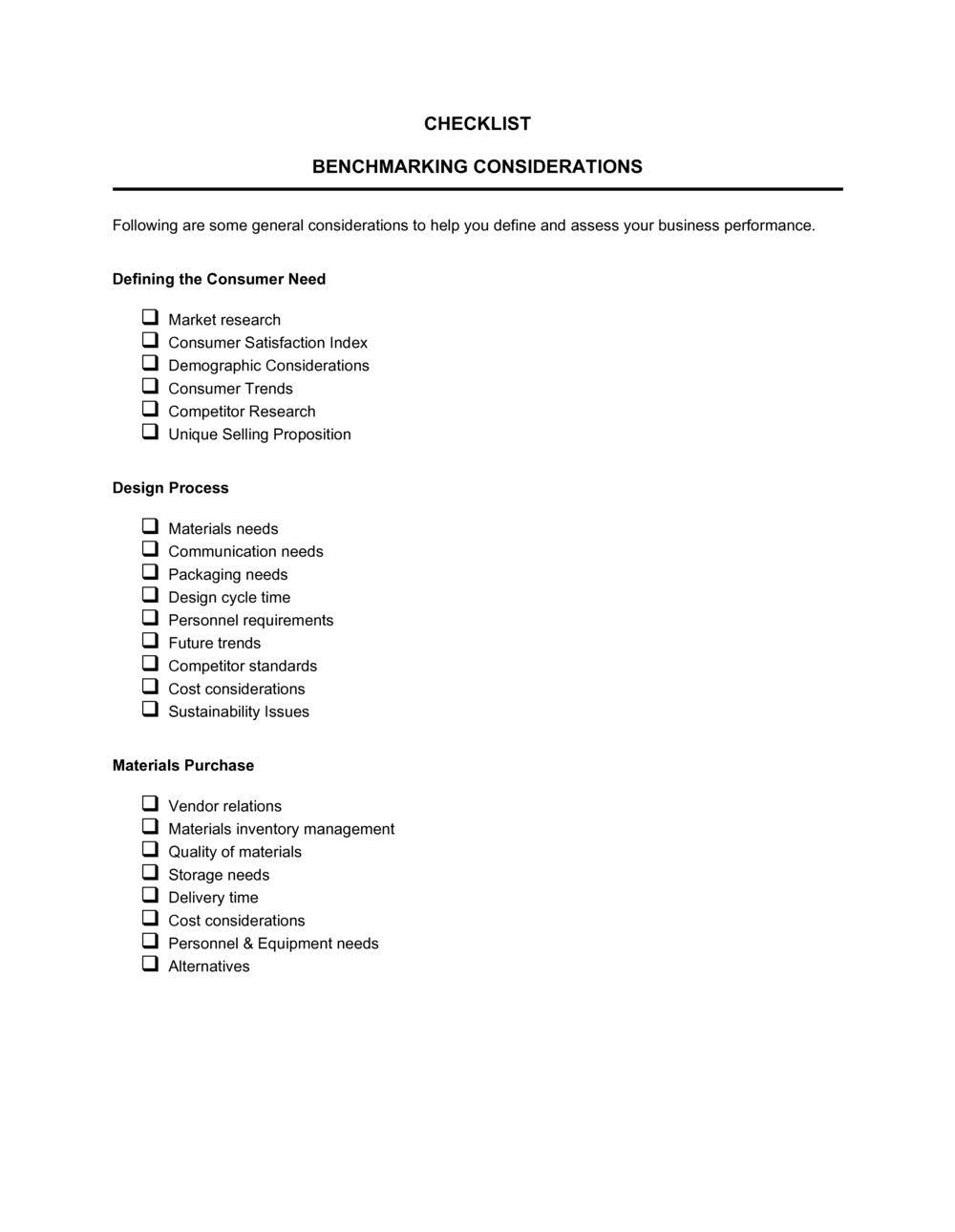
Checklist Benchmarking Considerations

Free download β€’ Use as a template β€’ Print or share

4 pagesβ€’20–25 min to useβ€’Difficulty: Standard
Learn more ↓
FreeChecklist Benchmarking Considerations Template

At a glance

What it is
A Checklist Benchmarking Considerations template is a structured form used to systematically capture, compare, and evaluate an organization's processes, metrics, and performance levels against internal targets or external industry standards. This free Word download gives teams a ready-made framework they can edit online and export as PDF in minutes.
When you need it
Use it when initiating a formal benchmarking project, preparing for an operational review, or identifying performance gaps before a strategic planning cycle. It is also useful when onboarding a new team member who will be responsible for ongoing performance tracking.
What's inside
The checklist covers scope definition, data source identification, key performance indicators, current-state baselines, benchmark targets, gap analysis fields, action priority ratings, and owner assignments β€” everything needed to run a structured benchmarking exercise from start to finish.

What is a Checklist Benchmarking Considerations?

A Checklist Benchmarking Considerations is a structured operational form that guides teams through a systematic comparison of their current performance metrics against a defined reference point β€” whether that is an internal historical baseline, an industry median, or a best-in-class peer. It captures every element of the benchmarking exercise in a single document: the scope and type of comparison, the data sources used, each KPI with its measured baseline and benchmark target, the calculated gap, improvement priorities, specific actions, and named owners responsible for closing each gap. By standardizing how benchmarking data is collected and recorded, the form makes the exercise repeatable across departments and audit cycles.

Why You Need This Document

Without a structured benchmarking checklist, performance comparisons tend to be informal, inconsistent, and impossible to act on. Teams pull metrics from different systems using different calculation methods, compare them against unverified or undated sources, and produce findings that no one can reconcile at the next review. The result is a conversation about whether the data is right rather than what to do about the gaps. A completed benchmarking checklist eliminates that problem by anchoring every comparison to a documented source, a verified baseline, and a named action owner with a due date. It also creates the audit trail needed when presenting performance findings to leadership, a board, or an accreditation body β€” turning a one-off analysis into a repeatable operational discipline.

Which variant fits your situation?

If your situation is…Use this template
Benchmarking financial KPIs against industry peersFinancial Performance Dashboard
Evaluating employee performance against role expectationsEmployee Performance Review
Assessing a specific process for improvement opportunitiesProcess Improvement Plan
Conducting a full operational audit across departmentsOperations Audit Checklist
Tracking project delivery against milestones and targetsProject Status Report
Comparing supplier performance on cost, quality, and lead timeVendor Evaluation Form
Reviewing IT systems against security and compliance standardsIT Audit Checklist

Common mistakes to avoid

❌ Scope defined too broadly

Why it matters: Benchmarking 'all operations' or 'the whole company' at once produces data that is too aggregated to act on and too time-consuming to collect consistently.

Fix: Narrow the scope to one function or process per checklist. Run separate exercises for each area you want to evaluate.


❌ Baseline pulled from memory rather than a system

Why it matters: Estimated baselines introduce errors that make the calculated gap unreliable β€” improvement initiatives then target the wrong starting point.

Fix: Extract all baseline values directly from a named data system and document the extraction date alongside the value.

❌ All items rated high priority

Why it matters: When every gap is marked urgent, teams cannot sequence their work β€” everything gets started, nothing gets finished, and the checklist drives no real change.

Fix: Force-rank items by business impact and limit high-priority designations to no more than two or three items per checklist cycle.

❌ Action ownership assigned to a team rather than a person

Why it matters: Shared ownership means no single person is accountable β€” actions stall at the first competing priority and rarely reach the review date in any meaningful state.

Fix: Name one specific individual as the owner for every action item, even if a team is involved in execution.

The 10 key fields, explained

Benchmarking scope

Benchmark type

Data source

Key performance indicator (KPI)

Current baseline

Benchmark target

Gap and gap direction

Priority rating

Recommended action

Action owner and review date

How to fill it out

  1. 1

    Define the benchmarking scope

    Enter the specific process, function, or metric you are evaluating. Set the time period and the department or team responsible. A narrow, well-defined scope produces more actionable results than a broad one.

    πŸ’‘ Limit each checklist to a single function or process. If you need to benchmark multiple areas, complete a separate checklist for each.

  2. 2

    Select and document your benchmark type and data source

    Choose whether you are benchmarking internally or externally, then record the exact source of your benchmark data β€” report name, publisher, and date. This ensures the checklist can be updated in future cycles.

    πŸ’‘ Prefer dated, third-party industry reports (e.g., Gartner, APQC, trade associations) over informal peer comparisons for external benchmarks.

  3. 3

    List each KPI with its unit and measurement frequency

    Enter every metric you plan to compare. Define the unit of measurement and how often it is tracked. Consistent definitions prevent evaluators from calculating the same KPI differently.

    πŸ’‘ Limit the checklist to 5–10 KPIs per exercise. More than 10 typically signals unclear scope rather than thorough analysis.

  4. 4

    Record the current baseline from a verified data source

    Pull each baseline value directly from your CRM, ERP, or reporting system β€” not from memory or estimates. Note the system and the date the data was extracted.

    πŸ’‘ Screenshot or export the source data and attach it to the completed checklist so the baseline can be verified later.

  5. 5

    Enter benchmark targets and calculate gaps

    Record the benchmark value from your chosen source, then calculate the absolute and percentage gap for each KPI. Note whether you are above or below target.

    πŸ’‘ Use the gap percentage column to make KPIs with different units comparable when assigning priority ratings in the next step.

  6. 6

    Assign priority ratings and identify actions

    Rate each gap as high, medium, or low based on its strategic importance and feasibility to close. For each high-priority gap, write a specific, actionable improvement step with a target completion date and resource estimate.

    πŸ’‘ No more than 20% of items should be rated high priority β€” if everything is urgent, re-evaluate the ratings as a team.

  7. 7

    Assign owners and set review dates

    Name a single individual as the action owner for each item β€” not a team. Set a specific review date, not a rolling or indefinite one, and confirm the date with the owner before finalizing the checklist.

    πŸ’‘ Send each owner a calendar invite for their review date at the same time you distribute the completed checklist.

Frequently asked questions

What is a benchmarking checklist?

A benchmarking checklist is a structured form that guides an organization through the process of comparing its current performance on specific metrics against a reference point β€” such as an industry average, a competitor, or an internal historical baseline. It captures scope, data sources, KPIs, baselines, targets, gaps, and improvement actions in a single document, making the benchmarking exercise repeatable and auditable.

What types of benchmarking does this checklist support?

The template supports both internal benchmarking (comparing teams, departments, or time periods within your own organization) and external benchmarking (comparing against industry averages, best-in-class peers, or published data sets). A field for benchmark type lets you label each KPI clearly so mixed comparisons do not skew your gap analysis.

How many KPIs should I include in one benchmarking checklist?

Five to ten KPIs per checklist is the practical range for most exercises. Fewer than five often signals an incomplete scope; more than ten typically means the scope is too broad and should be split into separate checklists by function or process. Keeping the list focused makes it easier to assign owners and follow through on improvement actions.

Where do I find reliable benchmark data?

Reliable external benchmark data comes from industry associations, research firms such as Gartner or APQC, government statistical agencies, and trade publications that publish annual performance surveys. Internal benchmarks come from your own ERP, CRM, or reporting systems. Always record the source name, publisher, and publication date directly on the checklist so data can be verified and updated in future cycles.

How often should a benchmarking checklist be completed?

For most operational processes, an annual benchmarking cycle aligned to strategic planning is standard. High-velocity functions β€” such as sales pipeline conversion or customer support resolution times β€” may warrant quarterly reviews. The key is consistency: running the same checklist on the same cadence produces trend data that is more valuable than any single snapshot.

What is the difference between a benchmarking checklist and a KPI dashboard?

A KPI dashboard tracks live performance metrics over time and is primarily a monitoring tool. A benchmarking checklist is a periodic analytical exercise that compares a snapshot of performance against an external or internal reference point, identifies gaps, and drives specific improvement actions. Dashboards tell you where you are; a benchmarking checklist tells you how far you are from where you should be and what to do about it.

Can I use this checklist for benchmarking HR metrics?

Yes. HR is one of the most common applications. Typical HR benchmarks include time-to-hire (industry median: 23–45 days depending on role level), voluntary turnover rate, cost-per-hire, and employee engagement scores. The checklist fields β€” KPI, baseline, benchmark target, gap, and action owner β€” apply directly to HR metrics without modification.

Does the checklist need to be signed or approved?

No signature is required for the checklist to function as an operational tool. However, having the responsible manager or department head review and date the completed checklist before it is distributed creates a clear record of who approved the baselines, targets, and action assignments β€” which is useful for follow-up accountability and audit purposes.

How this compares to alternatives

vs Performance Review Form

A performance review form evaluates an individual employee's output against role-specific expectations. A benchmarking checklist compares organizational or process-level metrics against an external or internal reference point. Performance reviews are people-focused; benchmarking checklists are process-focused. Both can inform improvement actions but at different levels of the organization.

vs Process Improvement Plan

A process improvement plan documents the full remediation roadmap for a known gap β€” problem statement, root cause, solution design, and implementation timeline. A benchmarking checklist is the diagnostic step that identifies which gaps exist and how large they are. The benchmarking checklist typically feeds into and justifies the process improvement plan.

vs SWOT Analysis

A SWOT analysis maps qualitative strengths, weaknesses, opportunities, and threats at a strategic level. A benchmarking checklist is a quantitative, metric-level comparison against a specific reference point. SWOTs are broader and directional; benchmarking checklists are narrower, data-driven, and tied to specific actionable gaps.

vs Audit Checklist

An audit checklist verifies compliance with a defined standard β€” confirming whether required steps were followed or controls are in place. A benchmarking checklist measures how well a process performs relative to a peer or target, not simply whether it meets a minimum requirement. Audits answer 'did we do it?'; benchmarking answers 'how well did we do it compared to others?'

Industry-specific considerations

Manufacturing

Production throughput, defect rates, downtime percentage, and cost per unit benchmarked against lean manufacturing or Six Sigma standards.

Professional Services

Billable utilization rate, revenue per employee, and client satisfaction scores compared to practice-area peer groups.

Retail / E-commerce

Inventory turnover, cart abandonment rate, and fulfillment accuracy benchmarked against category-specific e-commerce medians.

Healthcare

Patient wait times, readmission rates, and staff-to-patient ratios compared to accreditation body standards and regional averages.

Template vs pro β€” what fits your needs?

PathBest forCostTime
Use the templateOperations managers, analysts, and small business owners running internal or standard external benchmarking exercisesFree1–3 hours per benchmarking cycle
Template + professional reviewTeams benchmarking against regulated industry standards or preparing data for board or investor review$200–$800 (management consultant or analyst review)1–2 days
Custom draftedLarge organizations running enterprise-wide benchmarking programs with custom KPI frameworks and data integrations$2,000–$8,000+ (consulting engagement)2–6 weeks

Glossary

Benchmarking
The practice of comparing an organization's processes or performance metrics to a reference point β€” typically an industry average, best-in-class competitor, or internal historical baseline.
Key Performance Indicator (KPI)
A quantifiable measure used to evaluate how effectively an organization is achieving a specific objective.
Baseline
The current measured value of a metric before any improvement initiative is applied β€” used as the starting reference for gap analysis.
Gap Analysis
A structured comparison between current-state performance and a desired or benchmark target, used to identify improvement priorities.
Best-in-Class
The highest performance level observed in a given metric across a relevant peer group, used as an aspirational benchmark target.
Internal Benchmarking
Comparing performance across different departments, teams, or time periods within the same organization.
External Benchmarking
Comparing performance against organizations outside your own β€” competitors, industry associations, or published data sets.
Action Owner
The named individual responsible for executing a specific improvement action identified through the benchmarking exercise.
Priority Rating
A relative score or ranking assigned to each gap or action item based on its impact and feasibility, used to sequence improvement efforts.
Data Source
The specific origin of the benchmark data used for comparison β€” such as an industry report, trade association database, or internal system.

Part of your Business Operating System

This document is one of 3,000+ business & legal templates included in Business in a Box.

  • Fill-in-the-blanks β€” ready in minutes
  • 100% customizable Word document
  • Compatible with all office suites
  • Export to PDF and share electronically

Create your document in 3 simple steps.

From template to signed document β€” all inside one Business Operating System.
1
Download or open template

Access over 3,000+ business and legal templates for any business task, project or initiative.

2
Edit and fill in the blanks with AI

Customize your ready-made business document template and save it in the cloud.

3
Save, Share, Send, Sign

Share your files and folders with your team. Create a space of seamless collaboration.

Save time, save money, and create top-quality documents.

β˜…β˜…β˜…β˜…β˜…

"Fantastic value! I'm not sure how I'd do without it. It's worth its weight in gold and paid back for itself many times."

Managing Director Β· Mall Farm
Robert Whalley
Managing Director, Mall Farm Proprietary Limited
β˜…β˜…β˜…β˜…β˜…

"I have been using Business in a Box for years. It has been the most useful source of templates I have encountered. I recommend it to anyone."

Business Owner Β· 4+ years
Dr Michael John Freestone
Business Owner
β˜…β˜…β˜…β˜…β˜…

"It has been a life saver so many times I have lost count. Business in a Box has saved me so much time and as you know, time is money."

Owner Β· Upstate Web
David G. Moore Jr.
Owner, Upstate Web

Run your business with a system β€” not scattered tools

Stop downloading documents. Start operating with clarity. Business in a Box gives you the Business Operating System used by over 250,000 companies worldwide to structure, run, and grow their business.

Start freeΒ Β·Β No credit card required