How To Build A Professional Website

Free to read β€’ Save or share with one click

FreeHow To Build A Professional Website Template

At a glance

What it is
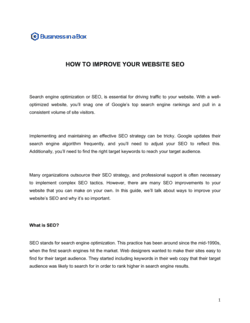
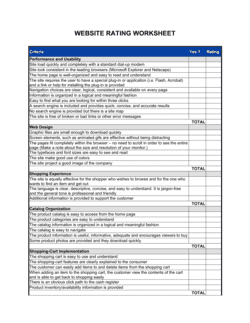
How To Build A Professional Website is a structured operational guide that walks a business owner or team through every stage of planning, building, and launching a professional online presence. This free Word download covers goal-setting, domain and hosting selection, site architecture, design decisions, content creation, SEO fundamentals, and go-live verification in a single editable document you can export as PDF and share with your team or a web developer.
When you need it
Use it when launching a new business website from scratch, rebuilding an outdated site, or onboarding a freelance developer or agency and needing a documented brief to align on scope and deliverables. It is also useful when an internal team is taking over web management for the first time and needs a clear operational reference.
What's inside
Goal definition and audience profiling, domain and hosting selection criteria, site architecture and page planning, design and branding guidelines, content and copywriting requirements, SEO and technical setup, security and performance standards, and a pre-launch checklist with post-launch review steps.

What is How To Build A Professional Website?

How To Build A Professional Website is a structured operational guide that takes a business owner, founder, or marketing team through every stage of planning and executing a professional online presence β€” from defining measurable goals and registering a domain to configuring SEO, passing a pre-launch checklist, and scheduling ongoing maintenance. Unlike a generic tutorial, this document functions as a working project brief: it captures the decisions, standards, and responsibilities specific to your business so that everyone involved β€” internal team members, freelancers, or agencies β€” works from a single, documented source of truth. The template is a free Word download you can edit online and export as PDF to share with any stakeholder in the build process.

Why You Need This Document

Launching a website without a documented plan is the most common reason business websites go live broken, off-brand, or invisible to search engines. Freelancers build to whatever brief they receive β€” a vague email thread produces a vague website. Contact forms go untested and silently fail for weeks. Domains get registered in the wrong name and become hostage to a vendor relationship. SEO is treated as a post-launch project, adding months to the time it takes Google to rank the site. This guide forces every critical decision β€” hosting ownership, page architecture, copy deadlines, SEO configuration, and pre-launch verification β€” to be made explicitly before work begins. The result is a site that launches on time, works correctly from day one, and can be handed off to any team member or vendor without starting over from scratch.

Which variant fits your situation?

If your situation is…Use this template
Launching a simple informational site for a service businessHow To Build A Professional Website
Planning a full e-commerce store with product pages and checkoutE-Commerce Website Launch Plan
Briefing an external agency or developer on project scopeWebsite Development Proposal
Documenting ongoing website maintenance and content update proceduresWebsite Maintenance SOP
Auditing and improving an existing site's SEO performanceSEO Audit Checklist
Mapping user journeys and conversion funnels before design beginsDigital Marketing Plan

Common mistakes to avoid

❌ Registering the domain under the developer's account

Why it matters: If the developer relationship ends, recovering domain access can take days to weeks and may require legal escalation, during which the site may go offline.

Fix: Always register the domain directly in the business owner's name with a personal login, then grant the developer temporary access.

❌ Launching without a completed pre-launch checklist

Why it matters: Broken contact forms, missing SSL, and unrendered mobile layouts go unnoticed for days or weeks, silently killing inbound leads and damaging search rankings.

Fix: Treat the pre-launch checklist as a non-negotiable gate β€” no page goes live until every item is checked and verified by a second person.

❌ Writing copy after design is finalized

Why it matters: Copy written to fit a design produces truncated headlines and padded body text that weakens the message and forces expensive redesign cycles.

Fix: Finalize homepage and services copy before the design phase begins; use real copy in wireframes from day one.

❌ Leaving SEO configuration until after launch

Why it matters: A site launched with default CMS title tags, no sitemap, and no Search Console setup can take three to six months longer to rank because Google has no clean signal to index.

Fix: Build SEO configuration β€” title tags, meta descriptions, sitemap, canonical URLs, and Analytics β€” into the pre-launch checklist, not a separate post-launch project.

❌ Ignoring mobile rendering during the build

Why it matters: More than 60% of website traffic arrives on mobile devices; a site that breaks on phones loses the majority of its audience and ranks lower in Google's mobile-first index.

Fix: Test every page on at least two real mobile devices β€” not just a browser emulator β€” before approving any page design.

❌ Setting no measurable goal for the website

Why it matters: Without a goal (leads per month, e-commerce conversion rate, average session duration), there is no basis to evaluate whether the site is working or what to improve.

Fix: Define one primary metric before the project starts and set up the corresponding conversion event in Google Analytics 4 on launch day.

The 9 key sections, explained

Goals and audience definition

Domain name and hosting selection

Site architecture and page plan

Design and branding guidelines

Content and copywriting plan

SEO and technical setup

Security, performance, and accessibility

Pre-launch checklist

Post-launch review and maintenance schedule

How to fill it out

  1. 1

    Define your website goals and visitor personas

    Write one primary measurable goal for the site (e.g., 50 contact form submissions per month) and describe the top two visitor types with their pain points and intent. Keep this section to one page.

    πŸ’‘ Interview two to three current clients about how they found you and what they were looking for β€” their language should drive your homepage headline.

  2. 2

    Register your domain and choose a hosting plan

    Register the domain in the business owner's name using a reputable registrar. Select a hosting plan based on expected traffic and whether you need managed WordPress, shared, VPS, or an all-in-one site builder.

    πŸ’‘ Enable auto-renewal on the domain the day you register it β€” expired domains are snapped up by squatters within hours in many TLDs.

  3. 3

    Map your site architecture before opening the CMS

    List every page you need, group them into navigation categories, and assign a primary purpose and one CTA to each page. Validate the structure against your goal before touching any design tools.

    πŸ’‘ Limit top-level navigation to five items β€” more than five forces visitors to make too many decisions and increases exit rates.

  4. 4

    Document brand and design standards

    Record your hex color codes, font names and weights, logo file formats, and image style guidelines in the design section of this template before briefing a designer or choosing a theme.

    πŸ’‘ Export a one-page brand reference sheet from this section to share with every vendor β€” it eliminates the most common source of visual inconsistency across pages.

  5. 5

    Write or commission your copy before design begins

    Supply final or near-final copy for each page before the designer starts. Design built around real copy renders far better than design that forces copy into fixed containers after the fact.

    πŸ’‘ Write the homepage headline in ten words or fewer before anything else β€” if you cannot do that, the value proposition is not clear enough to build a site around.

  6. 6

    Configure SEO, analytics, and tracking on every page

    Set title tags and meta descriptions for every page, install Google Analytics 4 and Google Search Console, submit your sitemap, and verify no pages are accidentally set to noindex.

    πŸ’‘ Use a browser extension like Detailed SEO or SEO Minion to audit title tags and meta descriptions across the live site in under ten minutes.

  7. 7

    Run the pre-launch checklist before publishing

    Test every form, click every link, view every page on mobile and desktop, and confirm SSL is active. Do not skip this step under deadline pressure β€” broken forms are silent lead killers.

    πŸ’‘ Use a free tool like Screaming Frog (up to 500 URLs) to crawl the staging site and catch broken links, missing alt text, and duplicate title tags before launch.

  8. 8

    Schedule your 30-day review and ongoing maintenance

    Set a calendar reminder for a 30-day performance review comparing traffic, bounce rate, and conversion against your stated goals. Document a monthly maintenance routine for backups, updates, and uptime checks.

    πŸ’‘ Set up automated weekly backups before launch β€” restoring from a backup is ten times faster than rebuilding a hacked or corrupted site from scratch.

Frequently asked questions

What does a professional business website need to include?

A professional business website needs at minimum a homepage that states your value proposition clearly, a services or products page, an about page with team or company background, a contact page with a working form, and an SSL certificate. Most businesses also benefit from a blog or resources section for SEO and a case studies or testimonials page to build trust. Each page should have a single, clear call to action.

How long does it take to build a professional website?

A simple informational site built on a CMS like WordPress or Squarespace takes two to six weeks from domain registration to launch if copy and brand assets are ready. A site requiring custom design, e-commerce functionality, or CRM integration typically takes eight to sixteen weeks. The most common delay is waiting for approved copy β€” having all text ready before design begins cuts timelines by 30 to 40 percent.

How much does it cost to build a professional business website?

A DIY site built on Squarespace, Wix, or WordPress.com costs $15 to $50 per month. A professionally designed WordPress site with a freelancer typically runs $2,000 to $8,000. A custom-designed site built by an agency ranges from $10,000 to $50,000 or more depending on functionality. Annual ongoing costs include domain renewal ($10 to $20), hosting ($10 to $100 per month), and any premium plugins or themes.

What is the best platform to build a professional website?

The right platform depends on your needs. WordPress powers 43% of all websites and offers maximum flexibility for SEO and customization but requires more maintenance. Squarespace and Wix are faster to launch and easier to manage but offer less SEO control. Webflow suits design-led teams who want code-free custom layouts. Shopify is the standard for e-commerce. Choose based on who will manage the site long-term, not just which is easiest to build initially.

Do I need a developer to build a professional website?

Not necessarily. Modern CMS platforms allow non-technical users to build professional sites using pre-built templates and drag-and-drop editors. A developer becomes valuable when you need custom functionality, CRM or payment integrations, performance optimization, or a fully custom design that departs from available templates. For most small businesses, a well-chosen template plus strong copy and photography outperforms a mediocre custom build.

How important is SEO when building a website?

SEO should be configured during the build, not after. Title tags, meta descriptions, header hierarchy (H1, H2, H3), image alt text, site speed, mobile responsiveness, and sitemap submission all affect how quickly Google indexes and ranks a new site. A site launched without basic on-page SEO can take three to six months longer to appear in search results compared to one configured correctly from day one.

What hosting plan does a small business website need?

Most small business informational sites run well on shared hosting plans costing $5 to $20 per month from providers like SiteGround, Kinsta, or WP Engine. Sites expecting more than 10,000 monthly visitors or running e-commerce should consider managed WordPress or VPS hosting. All-in-one platforms like Squarespace bundle hosting in the monthly subscription. Always verify your hosting plan includes daily automated backups and a one-click SSL certificate.

How do I make sure my website is secure?

Install an SSL certificate on launch day β€” most hosts provide one free via Let's Encrypt. Keep your CMS, themes, and plugins updated monthly, as outdated plugins are the leading cause of WordPress site breaches. Use a strong, unique admin password and enable two-factor authentication. Install a web application firewall (Cloudflare's free tier works for most small sites) and set up automated daily backups stored off-server.

What should I check before launching my website?

Before going live, verify that all contact forms deliver to the correct email, every page loads correctly on mobile and desktop, SSL is active and no pages load over HTTP, all internal links return a 200 status with no broken links, images are compressed and include alt text, Google Analytics and Search Console are installed and verified, and your sitemap has been submitted. A structured pre-launch checklist prevents the most common post-launch fixes.

How this compares to alternatives

vs Digital marketing plan

A digital marketing plan covers the full spectrum of online channels β€” paid ads, social media, email, and SEO β€” used to drive traffic and revenue. A website build guide focuses specifically on creating the destination those channels point to. The website comes first; the marketing plan activates it.

vs Website development proposal

A website development proposal is a client-facing document a developer or agency submits to win a project, covering scope, timeline, and cost. This guide is an operational planning document the business owner uses internally to define requirements before engaging a vendor. Both are useful but serve opposite sides of the table.

vs Brand guidelines template

Brand guidelines document logo usage, colors, typography, and tone of voice as a standalone reference. This website guide incorporates brand standards as one section within a broader build plan that also covers hosting, architecture, SEO, and launch. Businesses with mature brand standards can reference their existing guidelines document from within this template.

vs Marketing plan

A marketing plan defines annual campaign objectives, budgets, channels, and target audiences across the entire marketing function. A website build guide is a project-scoped operational document for a single deliverable. Once the site is live, it becomes one asset within the broader marketing plan's channel strategy.

Industry-specific considerations

Professional services

Lead-generation focus with a prominent contact form, case studies, and credentials page to establish authority and convert search traffic to consultations.

Retail and e-commerce

Product catalog architecture, payment gateway integration, shipping and returns pages, and mobile checkout optimization are the critical build priorities.

Healthcare and wellness

HIPAA-compliant contact forms, online booking integrations, and clear service and practitioner credential pages that meet patient trust and regulatory requirements.

Creative and marketing agencies

Portfolio and case study sections with visual-first design, fast image loading, and a clear client intake or briefing CTA to drive new project inquiries.

Template vs pro β€” what fits your needs?

PathBest forCostTime
Use the templateSmall business owners and founders building or rebuilding a site with an all-in-one platform like Squarespace, Wix, or WordPressFree (plus $15–$50/month platform costs)2–4 weeks
Template + professional reviewBusinesses briefing a freelance developer or small agency and needing a documented scope to prevent scope creep$500–$2,000 for a freelance developer review or web strategist session4–8 weeks
Custom draftedEnterprises, e-commerce sites with complex integrations, or regulated industries requiring custom architecture and compliance review$10,000–$50,000+ for a full agency build8–20 weeks

Glossary

Domain Name
The unique web address (e.g., yourbusiness.com) that visitors type to reach your site, registered through a domain registrar for an annual fee.
Web Hosting
A service that stores your website's files on a server and makes them accessible on the internet 24/7.
CMS (Content Management System)
Software β€” such as WordPress, Squarespace, or Webflow β€” that lets you create, edit, and publish website content without writing code.
SSL Certificate
A security protocol that encrypts data transmitted between a visitor's browser and your server, displayed as the padlock icon and HTTPS in the address bar.
Site Architecture
The planned hierarchy of pages and navigation menus that determines how visitors move through your website.
Above the Fold
The portion of a web page visible without scrolling β€” the most valuable real estate for communicating your core value proposition.
CTA (Call to Action)
A button, link, or prompt that directs a visitor to take a specific next step, such as 'Book a Call', 'Buy Now', or 'Download Free Guide'.
Responsive Design
A design approach that automatically adapts a website's layout to display correctly on desktops, tablets, and mobile phones.
Core Web Vitals
Google's set of page experience metrics β€” Largest Contentful Paint, Interaction to Next Paint, and Cumulative Layout Shift β€” that affect search ranking.
Bounce Rate
The percentage of visitors who leave a website after viewing only one page, used as an indicator of content relevance or page load problems.
Meta Description
A 150–160 character summary of a web page's content that appears in search engine results and influences click-through rates.

Part of your Business Operating System

This document is one of 3,000+ business & legal templates included in Business in a Box.

  • Fill-in-the-blanks β€” ready in minutes
  • Compatible with all office suites
  • Export to PDF and share electronically

Create your document in 3 simple steps.

From template to signed document β€” all inside one Business Operating System.
1
Download or open template

Access over 3,000+ business and legal templates for any business task, project or initiative.

2
Edit and fill in the blanks with AI

Customize your ready-made business document template and save it in the cloud.

3
Save, Share, Send, Sign

Share your files and folders with your team. Create a space of seamless collaboration.

Save time, save money, and create top-quality documents.

β˜…β˜…β˜…β˜…β˜…

"Fantastic value! I'm not sure how I'd do without it. It's worth its weight in gold and paid back for itself many times."

Managing Director Β· Mall Farm
Robert Whalley
Managing Director, Mall Farm Proprietary Limited
β˜…β˜…β˜…β˜…β˜…

"I have been using Business in a Box for years. It has been the most useful source of templates I have encountered. I recommend it to anyone."

Business Owner Β· 4+ years
Dr Michael John Freestone
Business Owner
β˜…β˜…β˜…β˜…β˜…

"It has been a life saver so many times I have lost count. Business in a Box has saved me so much time and as you know, time is money."

Owner Β· Upstate Web
David G. Moore Jr.
Owner, Upstate Web

Run your business with a system β€” not scattered tools

Stop downloading documents. Start operating with clarity. Business in a Box gives you the Business Operating System used by over 250,000 companies worldwide to structure, run, and grow their business.

Free Forever PlanΒ Β·Β No credit card required